October 15, 2026
Hreflang Setup: 3 Tags for English and Spanish, Then Test

Implement reciprocal hreflang entries for every English and Spanish version of a page, self-canonicalize each localized URL, and pick one placement method, HTML head, sitemap, or HTTP header, and use it consistently. Skip any of these three and search engines will keep serving the wrong language to the wrong reader, no matter how good the translation is.
TL;DR:
- Use en and es first; add regional codes only for distinct national pricing, laws, or services, and group Latin American readers under one Spanish variant.
- HTML head tags suit CMS managed sites, XML sitemaps fit large catalogs, and HTTP headers work for PDFs; inconsistent methods can create incomplete clusters.
- Canonicalize each localized page to itself; pointing a Spanish page to its English counterpart can undermine its eligibility to appear in search results.
- A fallback page catches visitors whose language matches no listed version; use a language selector or your primary market homepage for that role.
- Check live page source and Search Console after deployment; indexing reports may take a few weeks to reflect changes by language.
Table of Contents
- One-sentence verdict and what to fix first
- How hreflang works for English and Spanish pages
- Correct hreflang syntax with practical examples for es and en
- Placement options: head, sitemaps, or HTTP headers
- Canonicalization and hreflang: follow Google’s guidance
- Choosing language and regional codes for your pages
- Common hreflang mistakes and a troubleshooting checklist
- Validation and testing: confirming your hreflang cluster works
- What working on bilingual sites actually teaches you
- A managed path if you’d rather not maintain this yourself
- FAQ
- Sources
One-sentence verdict and what to fix first
Add a reciprocal hreflang tag for each language version of a page, including a tag that points back to itself, and give each page a same-language canonical. Choose HTML link rel tags, XML sitemap entries, or HTTP headers as your placement method, then stay with it across the whole site. Add x-default for a fallback page, and test the setup before calling it done.
How hreflang works for English and Spanish pages
Hreflang is an annotation that tells search engines which URL to serve to a visitor based on their language and, optionally, their region. For a bilingual site, that usually means pairing an English page with its Spanish counterpart and telling search engines, through a set of linked tags, that the two are translations of each other rather than duplicate content competing for the same ranking.
The annotation can be language-only, like es for any Spanish-speaking visitor, or language-plus-region, like es-MX for Spanish speakers in Mexico specifically. When a visitor’s language and region do not exactly match an available tag, search engines fall back to the closest match: a general es tag if no es-MX variant exists, or the page marked x-default if nothing else fits. This fallback behavior is why many bilingual sites get away with just two codes, es and en, instead of maintaining a tag for every Spanish-speaking country.
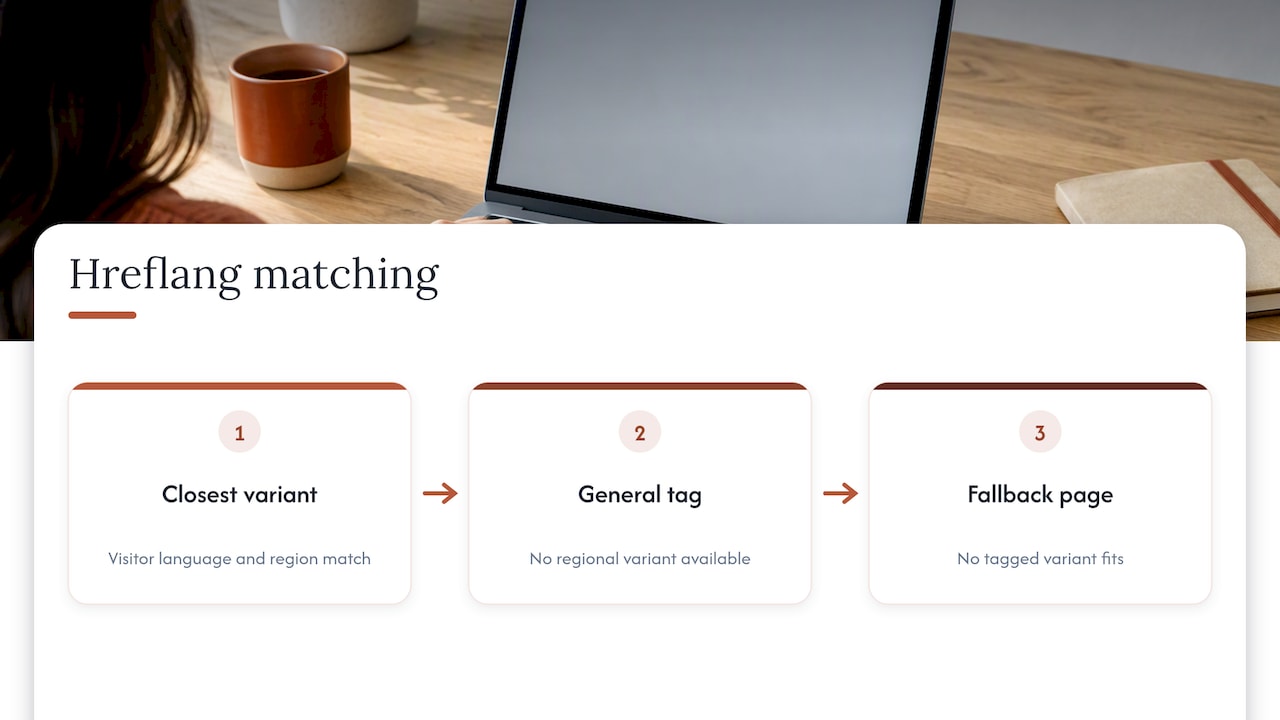
It is worth remembering that hreflang is a signal, not a command. Search engines use it heavily to pick which URL to show, but the quality of the localized content, the page’s own ranking signals, and technical issues like broken canonicals still shape the outcome. Correct hreflang gets the right page in front of the right algorithm; it does not override weak content on that page.
Correct hreflang syntax with practical examples for es and en
The safest pattern is to list every language variant on every page in the cluster, including a self-referencing entry. For a site with an English version at /en/services and a Spanish version at /es/servicios, the head of both pages should contain the same set of tags:
<link rel="alternate" hreflang="en" href="https://example.com/en/services" /><link rel="alternate" hreflang="es" href="https://example.com/es/servicios" /><link rel="alternate" hreflang="x-default" href="https://example.com/en/services" />
That block, unchanged, belongs on both the English and the Spanish page. The self-reference, the English tag appearing on the English page itself, is what trips up the most implementations when it gets dropped.
For region-specific targeting, swap the language-only codes for combined ones, such as hreflang="es-419" for Latin American Spanish or hreflang="en-us" for US English. According to the authoritative hreflang code reference, hreflang supports two-letter ISO 639-1 language codes paired with optional ISO 3166-1 alpha-2 region codes, and mixing up the order or casing of these codes is a common source of silent failures.
Use x-default to point at whichever page should load for a visitor whose language does not match any variant you have tagged, typically a language-selector page or your primary market’s homepage.
Placement options: head, sitemaps, or HTTP headers
You can declare hreflang in three places, and each fits a different kind of site.
- HTML head tags work best for small to mid-sized sites managed through a CMS, since each page carries its own block and templates can inject it automatically.
- XML sitemap entries using
xhtml:linkscale better for large catalogs, because you update one sitemap file instead of editing thousands of page templates. - HTTP headers are the only practical option for non-HTML resources like PDFs, where you cannot embed a
linktag in the document itself.
Pick one method as your primary approach and stay with it. Mixing head tags on some pages with sitemap entries on others, inconsistently, is a frequent cause of partial or conflicting clusters that confuse crawlers rather than helping them.
Canonicalization and hreflang: follow Google’s guidance
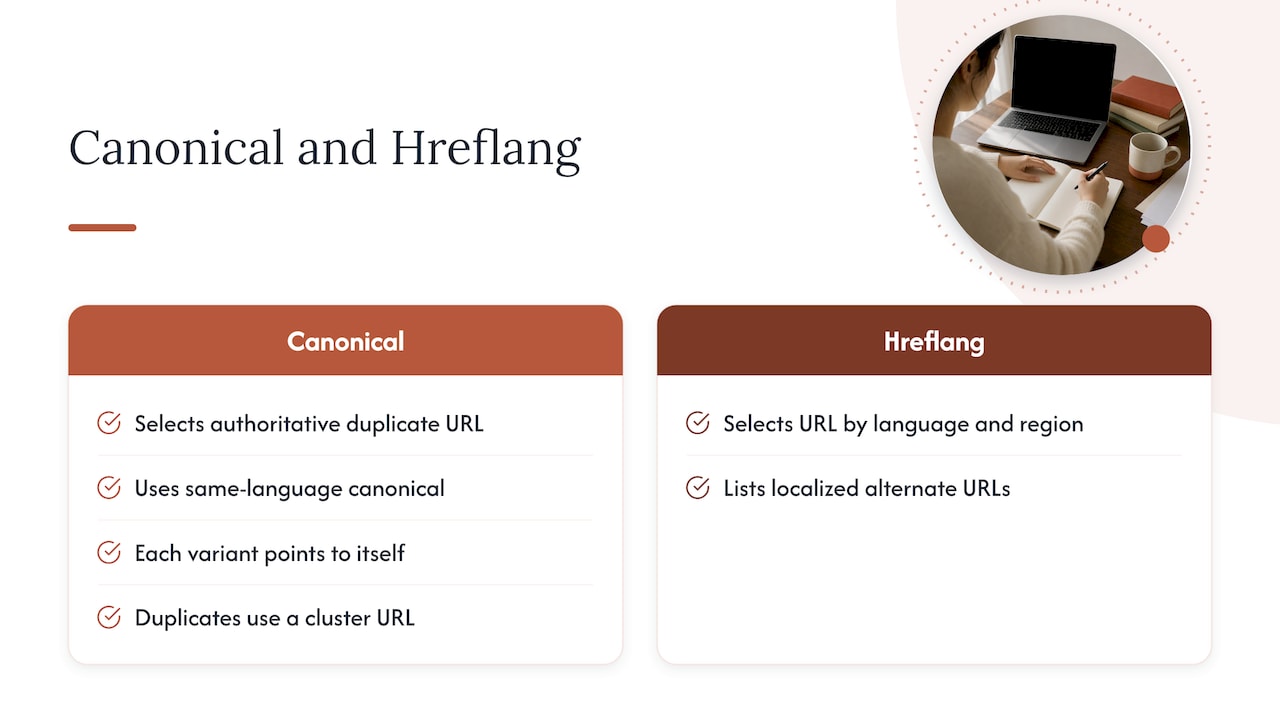
Canonical tags and hreflang tags solve different problems, and conflating them breaks both. Canonicalization tells search engines which URL is the authoritative version when duplicate or near-duplicate content exists; hreflang tells them which localized URL to show for a given language and region. Google’s own guidance on consolidating duplicate URLs states that when using hreflang, each page should specify a canonical in the same language, or the best available same-language substitute if no exact one exists.
Canonicalizing a Spanish page to its English counterpart is one of the more damaging mistakes we see, because it can undercut the Spanish page’s eligibility to appear in search results at all, even though the hreflang tags correctly list it as an alternate. The fix is simple: every language variant should canonicalize to itself. When duplicates exist within the same language, for example two near-identical Spanish URLs, canonicalize to the version that is part of the hreflang cluster rather than an orphan page outside it.
Choosing language and regional codes for your pages
Start with language-only codes, es and en, unless you have a specific reason to split further. Region codes earn their complexity when content genuinely differs by country, pricing in local currency, legal disclaimers, or region-specific services. If you serve Spanish speakers across many Latin American countries but cannot maintain a page per country, es-419 is built for exactly that: a broad Latin American Spanish target without naming individual nations.
Always pull codes from an authoritative list rather than guessing. The hreflang code list lays out the valid ISO 639-1 language codes and ISO 3166-1 region codes, and nonstandard casing or invented combinations will simply get ignored by search engines.
- A US-facing bilingual practice site typically needs just
esanden. - A site serving distinct pricing or regulations by country might add
es-mxoren-gbalongside the base codes. - A broad Latin American audience without country-specific content fits well under
es-419.
Common hreflang mistakes and a troubleshooting checklist
Hreflang failures often trace back to repeat offenders: missing self-references, one-way links where page A points to page B but B never points back, inconsistent code casing, canonicals that point across languages, incomplete clusters that list some but not all variants, and duplicate tags pointing to the same URL from two different pages.
- Open view-source on each page and confirm every language variant appears, including the page’s own self-reference.
- Check that each linked URL in the cluster lists the same full set of alternates back, with no page left out.
- Confirm every
hreflangvalue matches the standard code format exactly, lowercase language, matching region casing. - Verify the canonical tag on each page points to itself, not to a different language version.
- For sitemap-based implementations, open the sitemap XML and confirm
xhtml:linkentries mirror the same reciprocal structure.
Pro Tip: If hreflang tags are generated by a build pipeline, check the template after every deploy. A single CI/CD regeneration bug can silently strip self-references across an entire site.
Validation and testing: confirming your hreflang cluster works
Treat validation as a short, repeatable routine rather than a one-time check.
- View source on a sample of English and Spanish pages to confirm the full set of reciprocal tags is present.
- Use Google Search Console’s coverage and performance reports, filtered by country or language, to see which variant is actually being indexed and served.
- Open the XML sitemap directly and confirm
xhtml:linkentries match what the HTML carries, if you use both. - For PDFs or other binary files, use an HTTP header inspector to confirm the hreflang header is returned.
- Give Search Console a few weeks to reflect changes, then recheck indexing by language before declaring the fix complete.
What working on bilingual sites actually teaches you
The surprises are rarely about the hreflang tags themselves. They show up in indexing reports where a Spanish page quietly stops appearing because a canonical pointed it at an English duplicate months earlier, unnoticed. Fix reciprocity and canonicals first. Code precision and regional targeting matter, but they are refinements, not the foundation.
Correct hreflang paired with real self-canonicals and genuinely localized content, not a direct translation, is what actually gets the right page in front of Spanish-speaking visitors. For readers who want a deeper walkthrough, our hreflang audit and our guide to duplicate content on bilingual sites cover the same ground in more depth.
— Francisco
A managed path if you’d rather not maintain this yourself
We built our bilingual front desk platform to support practice owners who want to handle this groundwork without touching code.
- Support for correct site structure and reciprocal hreflang across Spanish and English pages.
If keeping this consistent in-house sounds like more plumbing than your team wants to own, our Diazluna plans pair a bilingual website with a bilingual AI receptionist and WhatsApp integration, or visit our bilingual front desk page to see the full feature set.
FAQ
What is hreflang and how is it used in SEO?
Hreflang is an HTML, sitemap, or HTTP header annotation that tells search engines which language and regional version of a page to serve a given visitor. It is used by linking each localized URL to every other variant, including itself, so search engines can match the right page to the right language.
What is es 419?
es-419 is a hreflang code for Spanish targeted broadly at Latin America rather than one specific country, combining the ISO 639-1 Spanish language code with the UN-assigned regional code 419. It is useful when a site serves many Latin American countries but cannot maintain a separate page for each one, as described in the hreflang code reference.
What are the best practices for implementing hreflang tags?
Best practices include adding a self-referencing tag on every page, making sure all language variants reciprocate links to one another, using valid ISO language and region codes, and self-canonicalizing each localized URL rather than pointing it to a different language version. Confirming the setup in Google Search Console after deployment catches most remaining errors.
What is a website link called in Spanish?
A website link is most commonly called an “enlace” in Spanish, with “vínculo” also used in some regions and contexts. Either term refers to the same clickable reference between pages that English speakers call a “link.”
Sources
- How to Specify a Canonical with rel=“canonical” and Other Methods | Google Search Central | Documentation | Google for Developers
- Hreflang