October 3, 2026
Audit First: 3 Fixes to Stop Duplicate Content on Bilingual

Fixing duplicate content on bilingual sites means three things working together: hreflang to mark language relationships, canonical tags or redirects to resolve identical URLs, and real localization instead of literal translation. Accidental duplicates rarely trigger manual penalties, but they dilute ranking signals and waste crawl budget. The rest of this guide covers the technical rules, a prioritized audit checklist, and ways to test your fixes before you call the job done.
TL;DR:
- Proper hreflang tags must be reciprocal and accurately match content region or language codes to prevent indexing issues and improve ranking signals.
- Canonical tags should only be used for same-language duplicates, while hreflang manages cross-language relationships; incorrect use can cause canonical loops and indexing errors.
- Genuine localization requires rewriting examples, adjusting dates and currency, and tailoring content to the cultural context of each audience, not just translating words.
- URL structures influence management complexity, with subdirectories offering easier maintenance and better hreflang implementation than subdomains or country-specific domains.
- Prioritize fixing high-traffic duplicate pairs with redirects or canonicals first, then repairing hreflang reciprocity, followed by content rewriting for the most effective results.
Table of Contents
- Why duplicate content matters for bilingual and multilingual sites
- Technical signals: when to use hreflang, canonical, redirects, and noindex
- Content and localization best practices to prevent near-duplicate translations
- URL structure and site architecture for bilingual sites
- Audit and fix checklist: step-by-step remediation for duplicate bilingual pages
- Common mistakes and testing procedures for multilingual implementations
- Author note and client case highlights
- Handling user-generated content duplicates across languages
- Managing duplicate content in dynamic or faceted navigation scenarios
- Impact of duplicate content on SEO rankings for bilingual and multilingual sites
- Using language and regional targeting tags beyond hreflang
- Strategies for content differentiation to minimize duplication
- What to fix first when resources are limited
- A managed path for practices that would rather outsource this
- Sources
- FAQ
Why duplicate content matters for bilingual and multilingual sites
When Google finds multiple URLs on your site with essentially the same content, it picks one as the canonical version and largely ignores the rest for ranking purposes. That sounds harmless until you realize what it costs. The same source notes that duplicates usually do not draw a manual penalty, but they split link equity across versions that should have been consolidated into one, and they burn crawl budget that could have gone toward indexing your newest pages. Estimates suggest that a quarter to a third of all web content is duplicate in some form, so the problem is common rather than rare.
Bilingual sites have their own version of this problem. A Spanish page that is really just an English page run through a translation plugin, with the same structure, same examples, and same internal links, reads to Google as a near-clone rather than a distinct resource for a distinct audience. The search engine has to guess which version to rank, and it often guesses wrong.
For content-heavy bilingual sites, the downstream effects show up in predictable places:
- Pages that should rank for Spanish queries get outranked by thinner, better-signaled competitors.
- New content takes longer to get crawled because bots spend time revisiting near-identical URLs.
- Backlinks earned by one language version never strengthen the other, because the two pages compete instead of complementing each other.
None of this requires bad intent. It happens by default when a bilingual site is built without a plan for signaling language relationships clearly.
Technical signals: when to use hreflang, canonical, redirects, and noindex
Each of these four tools solves a different problem, and using the wrong one is the most common reason bilingual sites underperform.
Hreflang tells Google which page serves which language or region, and it only works when the relationship is reciprocal: if your English page points to your Spanish page, the Spanish page must point back. Google’s guidance on multi-regional sites is explicit about this. Common codes include en for English, es-419 for Latin American Spanish, and es-ES for Spanish as used in Spain, among others; you do not need an exhaustive list, just the codes that match your actual audiences.
Canonical tags solve a different problem: same-language duplicates. If you have two English URLs with nearly the same content (a seasonal landing page and its evergreen twin, for example), Google’s canonicalization documentation recommends picking one as preferred and pointing the other at it with rel=“canonical”, used alongside hreflang rather than instead of it.
Here is the decision order:
- Same content, same language, different URL: use rel=“canonical” to point to the preferred version.
- Same content, different language: use reciprocal hreflang, no canonical needed between them.
- Old URL permanently replaced: use a 301 redirect, not a canonical tag.
- Thin or low-value duplicate with no SEO reason to exist: noindex it instead of trying to consolidate signals.
Misconfigurations are common: hreflang tags that point one way but not back, language codes that do not match the actual content, canonical tags that point to a page that itself canonicalizes elsewhere (a canonical loop), and hreflang clusters that were never updated after a URL changed.
Pro Tip: Run a single page through a hreflang testing tool and check that every listed alternate URL returns a 200 status and points back to the page you started on.
Content and localization best practices to prevent near-duplicate translations
The technical signals only work if the content underneath them is genuinely different. If you translate the words but keep the same examples, the same date formats, and the same calls to action, Google can still treat the pages as duplicates once the main content fails to show meaningful variation, a point Google’s canonicalization guidance makes directly: translating the UI while leaving the body unchanged still reads as duplicate content.
Transcreation goes further than translation. A Spanish-language page aimed at Hispanic readers should use its own examples, its own idioms, and its own cultural references rather than a word-for-word mirror of the English version. Dates, units of measurement, and currency references should match what the reader actually expects, not what was convenient to copy over. Industry guidance on multilingual sites recommends this kind of localization specifically to avoid near-duplicate pages and to improve the experience for the person reading them.
Title tags, meta descriptions, and headings need the same treatment. It is common to see a bilingual site with a perfectly translated body page sitting under a title tag that was auto-translated by a plugin and never reviewed, which undercuts click-through rate in search results.
A short checklist for localization teams:
- Rewrite examples and case references for the target audience, not just the sentences around them.
- Localize title tags, meta descriptions, and headings separately from the body text.
- Adjust dates, units, and currency to match reader expectations.
- Have a native speaker review for tone, not just grammar.
Pro Tip: Ask your translator to flag any sentence they copied with only word substitutions. Those are the sentences most likely to read as duplicate content.
URL structure and site architecture for bilingual sites
Your URL structure decides how much manual signaling work you will be doing for years. Subdirectories (example.com/es/) are the easiest to manage, inherit the authority of the main domain, and work cleanly with hreflang because every language version lives under one root. Subdomains (es.example.com) separate language versions more cleanly for large organizations but require their own crawl budget and link-building momentum, since Google can treat them as semi-independent properties. Country-code top-level domains (example.es) offer the strongest geographic signal but mean starting from zero on domain authority for each one, and they are rarely worth it unless you are running fully separate country operations.
- Subdirectories: simplest to maintain, easiest hreflang setup, shares authority across languages.
- Subdomains: cleaner separation for large teams, but splits crawl budget and backlink equity.
- ccTLDs: the strongest geotargeting signal, but each domain starts with no inherited authority.
Architecture also decides how much canonical work you need. A subdirectory structure with consistent URL patterns (/en/services/ and /es/services/) makes reciprocal hreflang almost mechanical to maintain. Scattered architecture, where some content lives on subdomains and some on the main domain, multiplies the number of hreflang clusters you have to track and the number of places a reciprocal link can quietly break.
For most professional services sites, subdirectories are the practical choice. The exception is a business running genuinely separate operations per country, with different teams, different content calendars, and different legal entities, where a ccTLD or subdomain split may reflect how the business actually runs.
Audit and fix checklist: step-by-step remediation for duplicate bilingual pages
Start detection with tools you probably already have open. Search Console’s coverage and indexing reports will show pages marked as duplicate or as alternates with a proper canonical tag. A simple site:yourdomain.com search in Google surfaces how many URLs are indexed per language, which often reveals a lopsided split. Crawler tools that run similarity reports (comparing page content and flagging matches at or above an 85% similarity threshold) give you a prioritized list without manual page-by-page review.
Once you have a list, fix in this order:
- Canonicalize or redirect the highest-traffic duplicate pairs first, since these cost you the most in wasted ranking signal.
- Repair hreflang reciprocity across every cluster the audit flags, not just the ones you noticed manually.
- Noindex low-value duplicates that have no real reason to be indexed at all.
- Move to content-level fixes: rewrite thin or near-identical pages once the technical signals are stable.
A practical audit flow, condensed:
- Pull the Search Console coverage report and filter for duplicate or alternate-page issues.
- Run a site-wide crawl and flag pages above the similarity threshold your tool allows.
- Cross-check hreflang reciprocity cluster by cluster.
- Prioritize fixes by traffic and ranking value, not by how easy they are to fix.
After changes go live, confirm them with Search Console’s URL Inspection tool, a live HTTP header check to confirm redirects return the expected status, and a hreflang testing tool to confirm reciprocal links resolve correctly. A short walkthrough of this exact process is covered in this hreflang audit guide, built specifically for bilingual professional sites running a tight audit on limited time.
Common mistakes and testing procedures for multilingual implementations
Most bilingual SEO problems trace back to a handful of repeat offenders. Non-reciprocal hreflang, where page A points to page B but page B never points back, is the single most common issue and the easiest to miss without a dedicated check. Incorrect language or region codes (using es when the content is specifically es-419) confuse targeting even when the reciprocity is otherwise correct. Canonical loops, where a page canonicalizes to a page that canonicalizes back to the first, leave Google without a clear signal to follow. Mobile and desktop mismatches, where separate URLs exist for each but the hreflang or canonical tags were only updated on one, create indexation gaps that are easy to miss in a quick check, a risk Google’s mobile-first indexing documentation flags directly.
Testing after a fix should be routine, not optional:
- Use the URL Inspection tool in Search Console to confirm which URL Google treats as canonical.
- Run a live hreflang tester on a sample of pages across every language cluster.
- Check parameterized URLs (filters, tracking parameters) separately, since they generate duplicate content at scale if left unmanaged.
Pro Tip: Check syndicated or republished content last. It is often correctly canonicalized by the original publisher, so chasing it first wastes time better spent on your own duplicate clusters.
Author note and client case highlights
I am Francisco, and this guide reflects patterns seen repeatedly across bilingual professional services sites: dental, legal, and medical practices where a Spanish-language presence is not optional but is often implemented as an afterthought. Diazluna, a bilingual front desk platform for practices serving Hispanic clients, builds bilingual websites, AI call handling, and WhatsApp integration as one connected system rather than three disconnected tools. Diazluna’s own operational claims include fast indexing after launch and a reduction in client loss tied to language barriers, both of which depend on the exact technical hygiene covered above: clean hreflang, resolved canonicals, and content that reads as genuinely localized rather than translated. An applied example of prioritized page fixes for a professional practice site is covered in this dental SEO case, which mirrors the audit order recommended in this guide.
Handling user-generated content duplicates across languages
Reviews, comments, and forum posts create a different kind of duplicate problem. When a client leaves a review in Spanish and your system auto-translates it into English for the English version of the page, you now have two pages with substantially the same testimonial content, just in different languages, sitting on otherwise distinct pages. That is not the same risk as a cloned landing page, but it adds up across dozens of reviews.
The practical fix is to keep user-generated content in its original language on the page where it was submitted, and avoid machine-translating it into a duplicate block on the counterpart page. If you want both language versions to show the same review, link to it or excerpt a short, clearly marked translation rather than republishing the full text as if it were original content on that page. For high-value testimonials worth featuring on both language versions, write a short human-reviewed localization rather than relying on the site’s default translation layer.
Forum-style platforms that support multiple languages run into this constantly. Discussion threads around cloning content across languages describe the same pattern repeatedly: automated cloning tools duplicate structure and metadata along with the text, which multiplies the duplicate-content footprint rather than solving it. Treat any auto-translate or auto-clone feature in your CMS as a starting draft, not a publishing decision.
Managing duplicate content in dynamic or faceted navigation scenarios
Faceted navigation (filters for price, category, location, or service type) multiplies URLs fast, and doing it across two languages multiplies the problem again. A filtered product listing in English and the same filter combination in Spanish can each generate dozens of parameterized URL variants, most of which have no unique ranking value and no reason to be indexed separately.
The fix starts with deciding which filtered views deserve to be indexed at all. Most do not. For the ones that stay indexable, make sure the canonical tag points to the clean, unfiltered version of the page in that same language, and keep hreflang relationships pointing between the equivalent clean URLs in each language, not between filtered variants. Google’s guidance on consolidating duplicate URLs notes that Google favors canonicalizing pages that sit inside a consistent, reciprocal hreflang network, which only works if your filtered URLs are not accidentally part of that network.
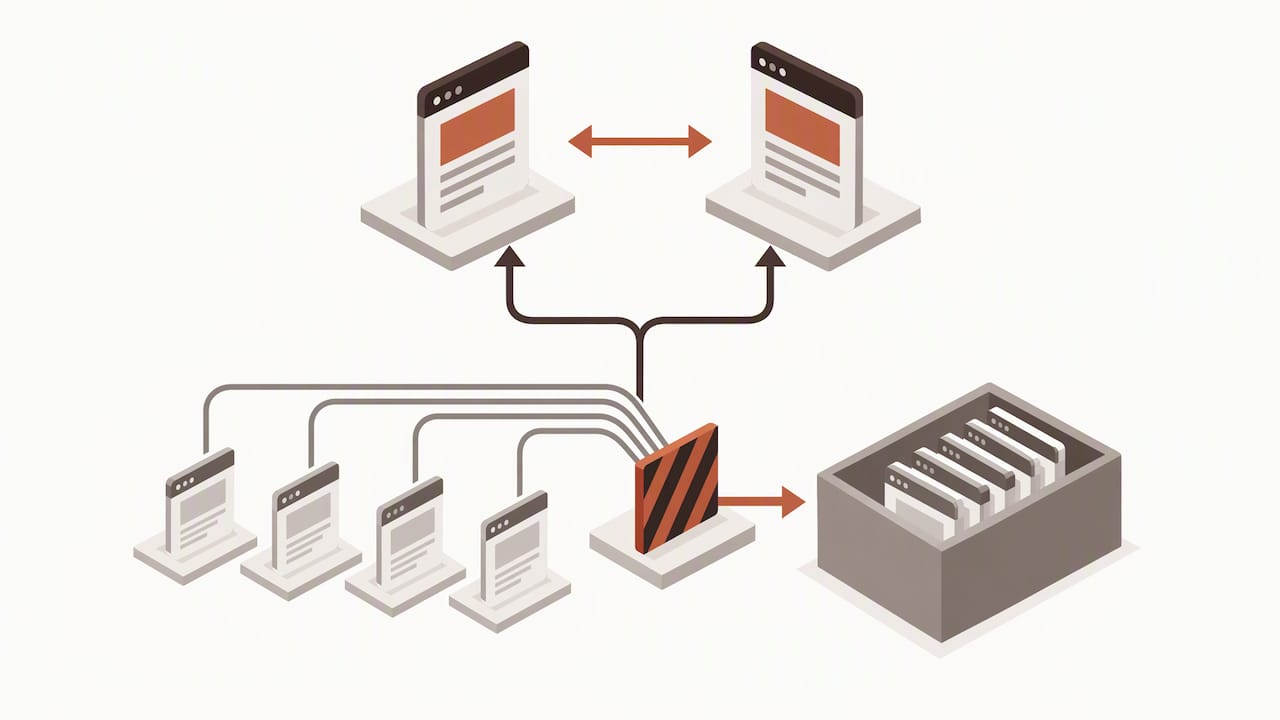
Parameter handling at the server or CMS level, blocking low-value parameter combinations from being crawled at all, solves this more reliably than trying to canonicalize your way out of thousands of URL variants after the fact. Set the rule once at the architecture level rather than patching individual filtered URLs as they get discovered.
Impact of duplicate content on SEO rankings for bilingual and multilingual sites
The ranking impact of duplicate content on bilingual sites is rarely a sudden drop. It is a slow underperformance that is easy to miss because nothing looks obviously broken. Pages rank, just not as well as they should, and the site owner often assumes the content itself is weak rather than recognizing a signal-splitting problem.
The real mechanism, as Google’s own SEO guidance frames it, is technical inefficiency rather than punishment: crawl budget gets spent revisiting near-identical URLs instead of discovering new content, and ranking signals like links and engagement get divided across pages that should have been consolidated into one strong version. For a bilingual site, that often means the English version ranks reasonably well while the Spanish version, treated as a secondary duplicate rather than a distinct resource, never gets a fair shot.
The fix compounds over time rather than producing instant results. Clean hreflang and resolved canonicals do not guarantee a ranking jump by themselves, but they stop the signal loss that was holding the weaker language version back, and they free up crawl budget for Google to find and index new content faster.
Using language and regional targeting tags beyond hreflang
Hreflang does most of the heavy lifting for language and regional targeting, but it is worth being clear about what it does not do. Google’s documentation on localized versions states plainly that hreflang does not perform canonicalization. It tells Google which version to serve to which audience, but it does not tell Google which version to treat as the primary one for ranking purposes. Sites that rely on hreflang alone to resolve same-language duplicates are solving the wrong problem with the wrong tool.
Beyond hreflang, the lang attribute on the HTML tag helps browsers and assistive technology identify the page’s language correctly, which is a usability and accessibility signal rather than a ranking one. Content-language HTTP headers can reinforce language targeting at the server level, though they carry less weight than hreflang in practice. None of these replace rel=“canonical” when the goal is picking one preferred URL among same-language variants, a distinction worth keeping in mind so you are not layering targeting signals on top of an unresolved duplicate problem.
Strategies for content differentiation to minimize duplication
The most durable fix for bilingual duplicate content is not a tag at all. It is building each language version around content that would still make sense to write even if the other version did not exist. That means different examples suited to each audience, different internal links to resources relevant to that audience, and, where it fits naturally, different supporting data or case references.
Practical strategies that work:
- Write the Spanish version from a fresh outline rather than translating the English draft sentence by sentence.
- Localize supporting examples: a legal practice page should reference scenarios relevant to the Hispanic client base, not a direct translation of the English case study.
- Vary internal linking so each language version points to resources genuinely useful to that audience rather than a mirrored link structure.
- Localize FAQ sections independently, since the questions a Spanish-speaking client asks are not always the same ones an English-speaking client asks.
Bilingual healthcare and legal sites benefit especially from this approach, since trust signals (tone, examples, even the phrasing of reassurance) differ meaningfully between audiences. A broader look at how this plays out for healthcare-specific audiences is covered in this piece on bilingual healthcare sites.
What to fix first when resources are limited
If you can only do three things, do them in this order: fix redirects and canonicals on your highest-traffic duplicate pairs first, since that is where signal loss costs the most. Then repair hreflang reciprocity across every language cluster, not just the ones you noticed by accident. Only then move to rewriting thin or near-identical content, since that work pays off once the technical signals underneath it are stable. After deploying fixes, watch indexed page counts per language and organic traffic to the Spanish version specifically, since that is usually the side absorbing the most signal loss.
— Francisco
A managed path for practices that would rather outsource this
If this feels like more ongoing maintenance than your team has time for, this platform was built to close that gap, bundling bilingual websites, AI reception, and WhatsApp integration into one managed solution for professional practices serving Hispanic clients.
Plans range from the Solo Sitio website-only tier at $99 per month up to the full-service Sitio + María Pro package at $349 per month, with a one-time $399 activation fee and annual billing available on every tier. If you want the technical hygiene covered in this guide handled for you, including localized content that reads as genuinely bilingual rather than translated, check plan availability on the Diazluna site.
Sources
Core references: duplicate URL handling, multi-regional site guidance, canonicalization docs, and a practical duplicate content audit guide. For hands-on auditing support, BabyLoveGrowth’s whitelabel SEO services and this duplicate content fix guide offer additional practical angles.
- Duplicate URL - Search Console Help
- Managing multi-regional and multilingual sites | Google Search Central
- Duplicate content: Why it happens and how to fix it (Semrush)
FAQ
What is a website that is available in multiple languages?
A website available in multiple languages serves the same content (or localized equivalents) to readers in different languages, typically through separate URLs for each version. These are organized by subdirectory, subdomain, or sometimes separate country domains, each requiring its own hreflang and canonical setup.
What is content duplication?
Content duplication happens when multiple URLs on a site contain essentially the same content, forcing search engines to pick one canonical version and largely ignore the rest. It usually does not trigger a manual penalty, but it wastes crawl budget and splits ranking signals across pages that should have been consolidated.
Why is a website showing up in another language?
This usually happens when hreflang tags are missing, non-reciprocal, or misconfigured, causing a search engine to serve the wrong language version to a user. It can also happen when browser or location settings override the intended page, which proper hreflang implementation is designed to prevent.
How to check duplicate content in a website?
Start with Search Console’s coverage report to see pages flagged as duplicate or alternate with a canonical, then run a site-wide crawl using a tool that flags pages above a set similarity threshold, such as 85% or higher. A simple site: search also reveals how many pages per language are actually indexed, which often exposes an imbalance worth investigating.