November 20, 2026
WhatsApp and Attorney-Client Privilege
WhatsApp messages between a lawyer and a client can be privileged. The app does not decide that, though. Privilege depends on what the message says, who can see it and what happens to it afterward. For a firm whose clients live on WhatsApp, the practical answer is to give the channel a structure: a defined purpose, written client consent, prompt filing of messages and a clear line between scheduling and legal advice. That structure is what keeps a convenient channel from becoming a waiver problem.
TL;DR
- Privilege protects confidential communications made to get or give legal advice. Cornell’s Legal Information Institute says this covers emails and text messages, and the privilege belongs to the client.
- WhatsApp’s end-to-end encryption protects messages in transit. It is not a privilege shield: forwarding, screenshots, shared devices and non-essential group members can still waive privilege.
- Under ABA Model Rule 1.6(c), you must make reasonable efforts to prevent unauthorized disclosure. Your engagement letter, a written messaging policy and prompt logging of messages are how you show those efforts.
- For Spanish-speaking clients, language is part of the ethics question: without clear communication there is no informed consent.
- Use WhatsApp for scheduling and first contact. Keep substantive advice in the channels your firm has documented and the client has approved.
Table of Contents
- What privilege actually protects
- Why the channel does not decide the question
- Four ways WhatsApp conversations lose privilege
- What your ethics duties require
- A reasonable-efforts checklist for WhatsApp
- WhatsApp intake: where the first message goes
- The language layer: informed consent in Spanish
- Perspective: the first channel should be built, not improvised
- What a bilingual front desk adds to the picture
- Diazluna plans and pricing
- FAQ
- Sources
What privilege actually protects
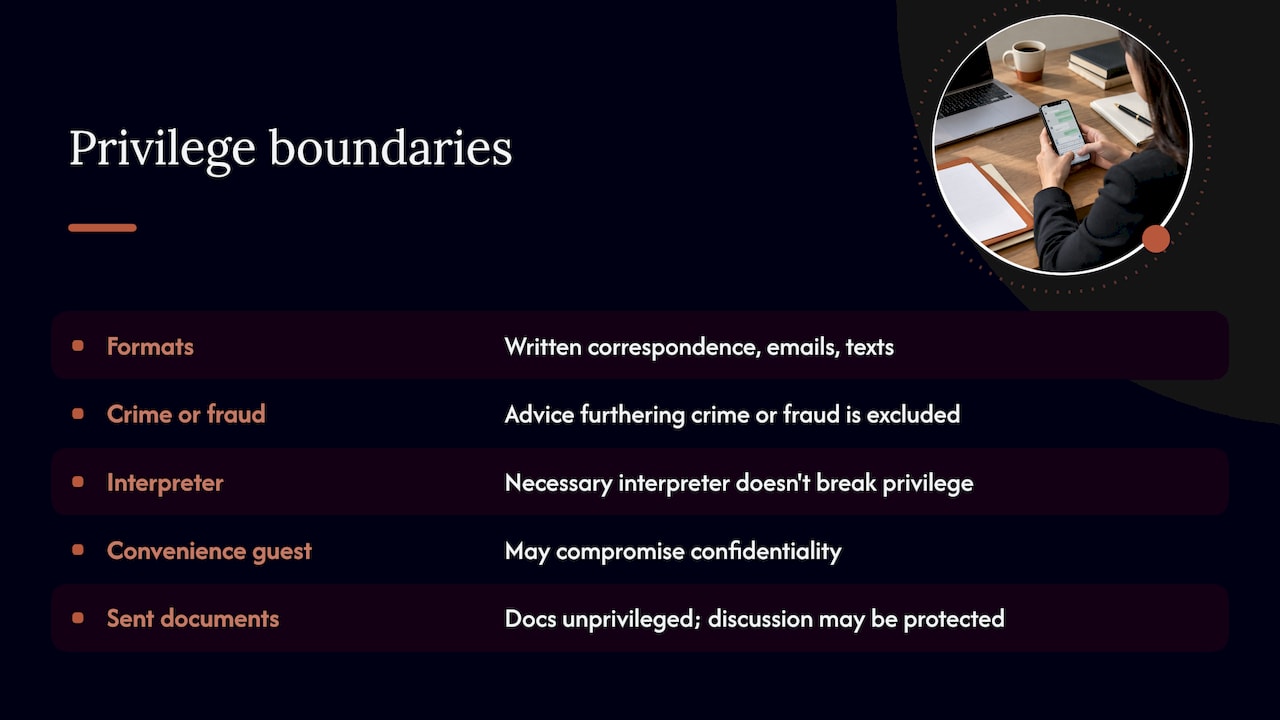
Attorney-client privilege covers confidential communications between a lawyer and a client made for the purpose of seeking or giving legal advice. Cornell’s Wex entry notes that the protection reaches written correspondence, emails and text messages, that it does not apply to advice sought to further a crime or fraud, and that a third party’s presence can compromise it unless that person is essential, such as an interpreter.
That last point matters for firms serving Spanish-speaking clients. An interpreter who is necessary to the conversation does not automatically break confidentiality. A cousin, a neighbor or a friend who “helps with English” and joins the chat for convenience is a different matter.
The ABA’s family-law guidance for clients adds a point many clients miss. Privilege protects communications, not underlying facts: photographs, business records and other preexisting documents do not become privileged because a client sends them to a lawyer. The discussion about them may be. A client who thinks that sending a document to the firm shelters it needs to hear otherwise at the start.
Why the channel does not decide the question
Courts generally treat modern messaging much like letters and email. According to an overview from attorneys.media, the question is whether the content is a confidential legal communication and whether anything has undone that confidentiality.
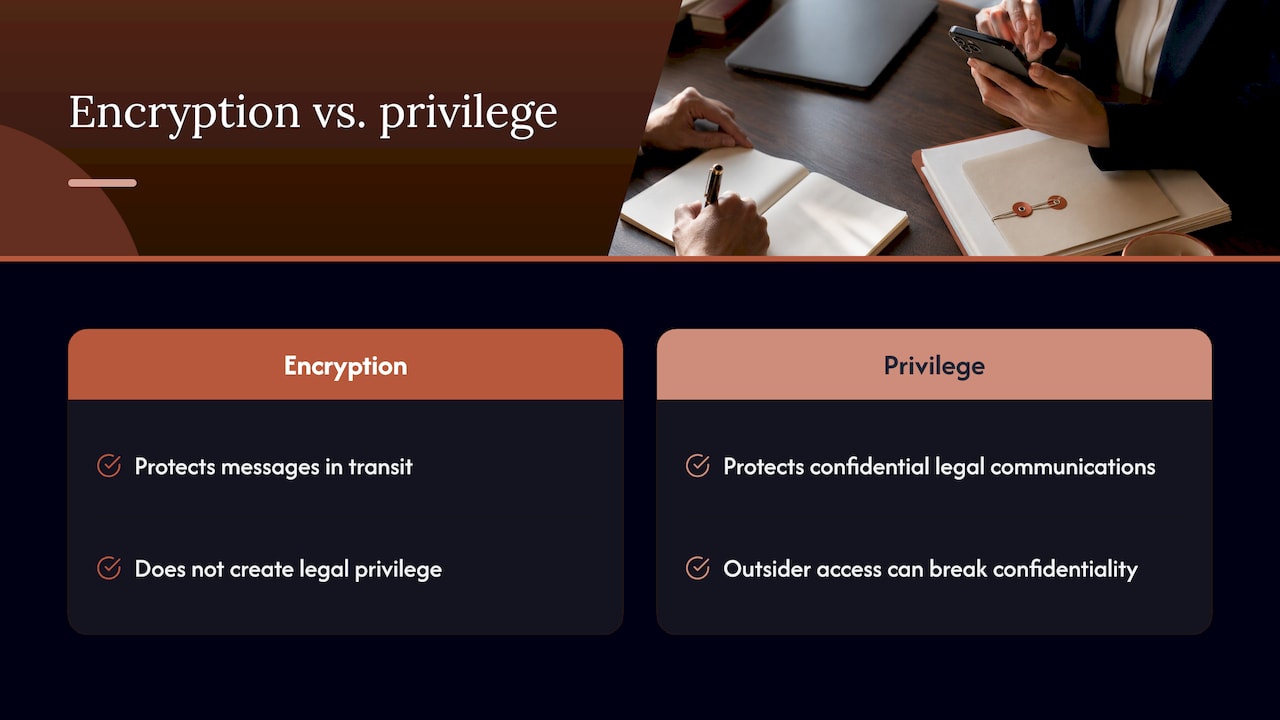
It is easy to over-credit encryption. WhatsApp uses true end-to-end encryption, and a New York State Bar Association article calls it probably among the most secure tools for sharing confidential information. But another attorneys.media piece states plainly that encryption is not a legal privilege shield. Encryption protects a message in transit. Privilege is lost when a person with no business seeing the message sees it anyway.
The same NYSBA article flags a second problem: WhatsApp’s delete feature can remove a message from the recipient’s device after it has been read. For a firm, that means a gap in the file and a potential discovery headache.
Four ways WhatsApp conversations lose privilege
The attorneys.media overview names four recurring traps. Each is something you can address with your client at the outset.
- Forwarding or screenshots. A client who shares your advice with a friend, relative or business contact may waive privilege. The ABA’s How to Lose Attorney-Client Privilege lists voluntary and inadvertent disclosure, “reply all” and forwarding among the common triggers.
- Employer-managed phones. A client who messages you from a work device under a monitoring policy may expose the thread to the employer.
- Shared devices and synced accounts. A family Apple ID, a shared tablet or WhatsApp Web left open on a shared computer puts the conversation in front of people who are not part of it. In households where several people share one phone, this risk is real.
- Group chats with non-essential participants. The overview gives the example of a founder, a CFO and a marketing consultant in one thread. The consultant’s presence can destroy privilege for the whole thread.
The ABA also notes that waiver can arise when a client sues a lawyer for malpractice or relies on an advice-of-counsel defense. In Beware of the Risk of Waiver, it describes acting inconsistently with confidentiality, such as adding a third party to an otherwise privileged conversation, as a trigger too. Those are less about WhatsApp and more about how clients behave once messages are in their pocket.
What your ethics duties require
Model Rule 1.6(c) says a lawyer must make reasonable efforts to prevent inadvertent or unauthorized disclosure of, or access to, information relating to the representation. According to the PCE chart of ABA Model Rules, Comment 19 adds that special security measures are not required when the method of communication affords a reasonable expectation of privacy, though special circumstances can call for extra precautions.
So WhatsApp is not forbidden. The question is whether your use of it is reasonable. State bars give you a framework for answering it:
- California requires an attorney, before using a technology to transmit or store confidential information, to weigh six factors. They include the technology’s security, the legal consequences if a third party intercepts the data, the sensitivity of the information, the effect of inadvertent disclosure on the client, urgency, and the client’s instructions and circumstances, including whether others can reach the client’s devices.
- Wisconsin’s Formal Ethics Opinion EF-15-01 lists twelve factors for judging reasonable efforts. The state bar’s guidance for solo and small firms also calls for a firm text-messaging policy that says how messages are downloaded and stored for the file.
Rules differ by state, so check your own bar’s opinions. The pattern across them is consistent: assess the tool, match the precautions to the sensitivity of the information, and write down what you decided.
A reasonable-efforts checklist for WhatsApp
The ABA’s Law Practice Today article on communication tools and the ABA Litigation Section’s guidance on texting clients point to the same set of practices.
- Read the terms of service. Check data ownership, privacy and encryption, and look again when the terms change.
- Get client opt-in in the engagement letter. The letter should describe your communication policies and the risks, name the channel the client chooses, and identify the secure client portal as the most protected option. For third-party apps, it should confirm the client has reviewed the platform’s terms and will not delete or edit messages after sending. Our guide to WhatsApp consent messages covers how that opt-in can read in practice.
- Log messages promptly. Because WhatsApp offers no retention guarantee, export or archive threads and log them in your practice management system.
- Lock down devices. Use screen locks and passwords, remove device synchronization, and watch default settings such as message previews. The ABA notes that shared family devices and auto-sync can cause inadvertent disclosure. Our piece on WhatsApp Business privacy settings walks through the settings that matter.
- Mark the purpose of each message. The ABA’s checklist suggests clearly marking when you are seeking or giving legal advice, and documenting business advice separately.
- Counsel the client, early and again later. Explain what privilege covers, what waives it and why forwarding or screenshots are risky.
- Apply the media test. The ABA’s author recommends asking whether you would be comfortable seeing the message published. Hasty, emotional replies cause much of the waiver risk.
One official voice pushes the other way. The U.S. Court of International Trade’s professional counsel piece observes that most lawyer-client texts are mundane scheduling messages, so unencrypted text is acceptable for typical use. That supports the split most firms land on: logistics in the fast channel, substance in a documented one.
WhatsApp intake: where the first message goes
Intake is where privilege and ethics questions arrive together. A prospective client’s first message often contains facts, a name and a description of trouble, sometimes before any engagement letter exists, any conflict check has run or any consent to the channel has been given.
A sound intake flow does four things:
- It opens with a short notice about what the channel is for and what not to send, so the client is not narrating a case into a chat window.
- It collects the minimum needed to schedule and run a conflict check: name, language, contact details, practice area and urgency.
- It routes anything urgent to a person promptly.
- It moves substantive discussion to a documented channel once the client has opted in through the engagement letter.
A firm that lets intake drift into a long casual WhatsApp thread has the problems the checklist above is meant to prevent: no logged record, no consent and sometimes a third party joining the conversation. Our WhatsApp for law firms guide goes deeper on a safe setup.
Channel choice is also a website question. A firm’s site is the first place a client reads about how to reach you, and law firm website chat software is one way firms capture and qualify leads around the clock. Whatever you use, the notice and consent language has to be in front of the client before they type.
The language layer: informed consent in Spanish
Privilege advice is useless if the client does not understand it. The Washington State Bar’s Language Access Advisory Opinion 202601 holds that a lawyer who cannot communicate clearly with a client cannot obtain informed consent or represent them competently. It adds that a lawyer using machine interpretation or translation must determine its reliability and confidentiality, decide whether human review is needed, disclose its use, bear the risk of errors and obtain the client’s informed consent before using AI or machine technology to translate documents.
For a firm serving Hispanic clients, the practical consequences are concrete:
- Your WhatsApp notice and engagement-letter opt-in should exist in real Spanish, not a word-for-word conversion of English legal phrasing. A client who cannot follow “do not forward our messages” cannot be said to have consented to that policy.
- Explain waiver in plain terms. “Do not share our chat with family, friends or your boss, and do not let others use your phone to read it” works better than a clause about third-party disclosure.
- Ask who else uses the device, and ask in the client’s language. Shared phones are common in many households, and the question is one the California factors expressly cover.
- If a third party must interpret, make sure that person is truly essential to the communication, in line with the interpreter point in the Wex entry.
Perspective: the first channel should be built, not improvised
We build front-desk systems for professionals who serve Hispanic clients, and the pattern we see in the question of WhatsApp and privilege is that the risk is rarely the app. It is the absence of a plan around it.
A client finds your site, sees a WhatsApp number and writes at 9 p.m. in Spanish. If nothing greets that message in Spanish, tells them what the channel is for and keeps the first exchange on scheduling and basics, the conversation will fill with facts the firm never meant to collect that way.
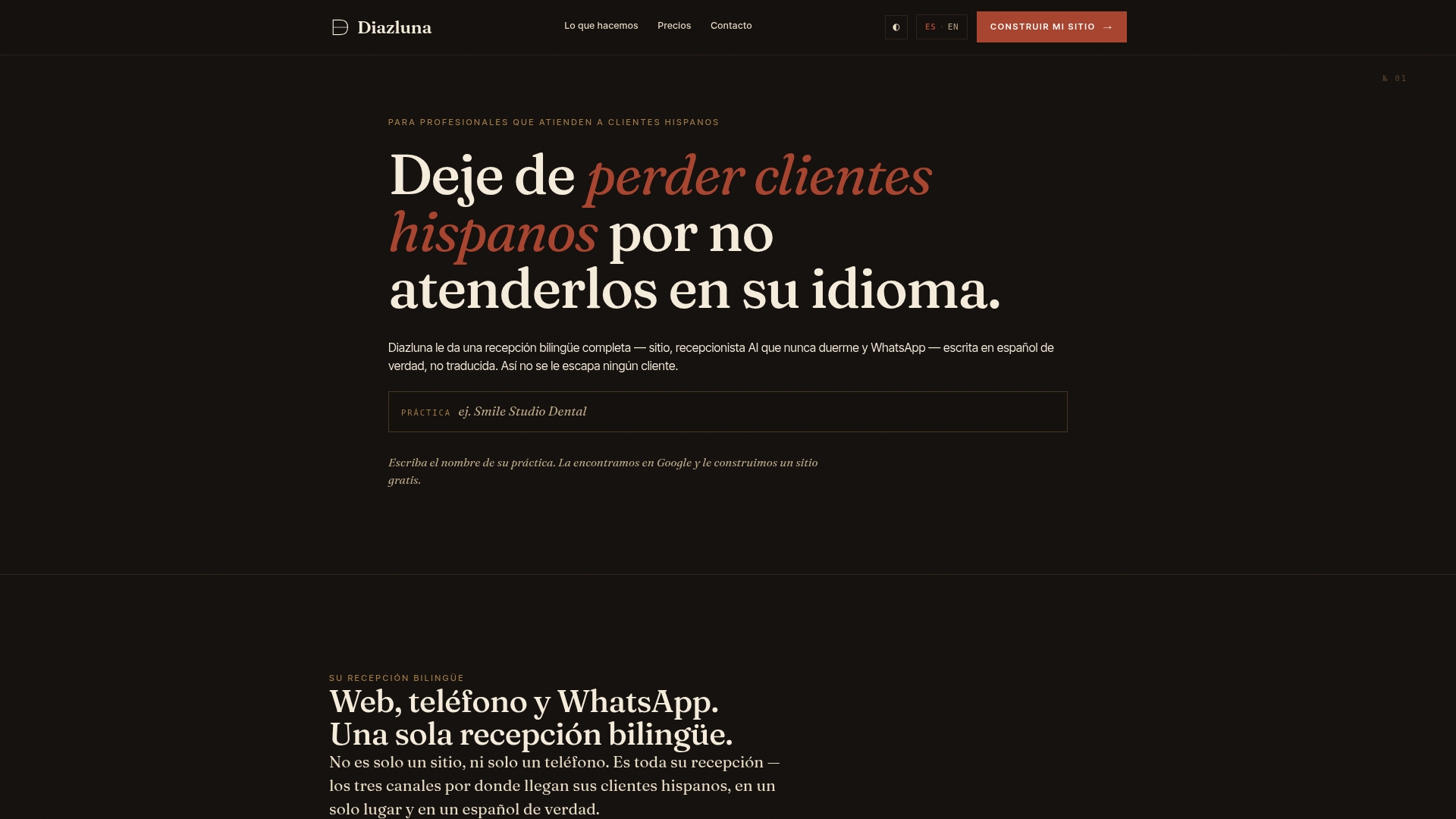
That is why we put three things together: a bilingual website with Spanish content that is human-reviewed rather than translated, a 24/7 AI receptionist that handles calls, messages and appointment scheduling in Spanish and English, and WhatsApp integration. The receptionist gives your team real-time summaries and transfers urgent cases, so a person picks up what needs a person.
Whether your firm’s WhatsApp use satisfies your state’s rules is a judgment for you and your bar’s guidance. What we can do is make sure the clients who reach you in Spanish meet a clear, consistent first step instead of an unmonitored chat.
Francisco
What a bilingual front desk adds to the picture
The checklist above is mostly policy, and policy only works if clients meet it at the right moment. Three parts of a bilingual front desk line up with it:
- A bilingual site puts your communication approach in front of Spanish-speaking clients in their own language before they write.
- A 24/7 receptionist means a late-night message from a worried client gets a response in Spanish instead of sitting unread.
- Summaries and urgent transfer mean your staff sees what came in and who needs attention first, which is the first step toward a clean, logged record.
Our dentist-focused page shows how this bilingual setup works for another profession serving the same community, and the same structure applies to law offices.
Diazluna plans and pricing
Diazluna is a monthly subscription with three tiers, plus a one-time activation fee of $399:
| Plan | Monthly | Annual |
|---|---|---|
| Solo Sitio (bilingual website) | $99 per month | $990 per year |
| Sitio + María (website plus AI receptionist) | $199 per month | $1990 per year |
| Sitio + María Pro (full-service managed package with site updates and expanded call capacity) | $349 per month | $3490 per year |
The site is fully bilingual and editable by the owner without technical skills. If you want Spanish-speaking clients to reach your firm through a clear, bilingual first step, see the plans at Diazluna.
FAQ
Are WhatsApp messages with my lawyer privileged?
They can be, if they are confidential and made to seek or give legal advice. The channel does not change that test. Sharing the messages with others, or letting others read them on a shared device, can waive the protection.
Can lawyers use WhatsApp with clients?
Yes. The ABA’s guidance says lawyers should use secure methods for confidential discussions, review the app’s terms, log messages promptly and update engagement letters to describe the policies and risks. Your state bar’s opinions set the exact standard for your practice.
Does end-to-end encryption protect privilege?
It protects messages in transit, which supports a reasonable expectation of privacy. It does not stop waiver through forwarding, screenshots, exported chats, backups or group members who should not be there.
What should a client avoid doing in a WhatsApp chat with a lawyer?
Avoid adding others to the chat, forwarding or screenshotting advice, and using a work phone or a device that family members can open. Keep a strong passcode and log out of WhatsApp Web on shared computers. Ask your lawyer how to share anything that must be shared.
Sources
- Cornell LII: attorney-client privilege (Wex)
- attorneys.media: privilege and text messages on WhatsApp or iMessage
- attorneys.media: protecting privilege on Slack, Teams or WhatsApp
- ABA: The Attorney-Client Privilege: What Every Client Should Know
- ABA: How to Lose Attorney-Client Privilege
- ABA: Beware of the Risk of Waiver
- NYSBA: Protecting Attorney-Client Privilege With Today’s Communication Tools
- PCE: Chart of ABA Model Rules on Cybersecurity
- State Bar of California: Formal Opinion 2010-179
- State Bar of Wisconsin: Cybersecurity for Solo and Small Firms
- ABA Law Practice Today: Navigating Modern Communication Tools as a Lawyer
- ABA Litigation Section: Considerations for Communicating with Clients via Text Message
- U.S. Court of International Trade: Professional Counsel
- Washington State Bar: Language Access Advisory Opinion 202601