August 27, 2026
Can You Automate Appointment Reminders on WhatsApp?
Yes. You can reliably automate appointment reminders on WhatsApp, and the right setup depends on your volume, not your ambition. Solo practitioners with a small number of daily bookings can lean on a free WhatsApp Web scheduler. Busier practices need the WhatsApp Business API or a managed bilingual front desk that handles two-way rescheduling without extra staff hours.
Two questions decide your path: how many reminders you send and whether clients need to reply in Spanish or English to confirm or reschedule. WhatsApp’s open rates run around 98%, which is why this channel outperforms email for time-sensitive messages.
- Fewer than 20 reminders a week, one language: a browser scheduler works fine.
- Higher volume, two-way replies, or bilingual clients: go with the API or a managed service.
Key Takeaways
Automated WhatsApp reminders cut no-shows because the channel’s near universal open rate gets confirmations in front of clients before a scheduler or email ever would.
| Point | Details |
|---|---|
| Pick your path by volume | Use a free scheduler under about 20 reminders a week; move to the API or managed service above that. |
| Templates must stay transactional | Utility templates get rejected or repriced if they read as promotional content. |
| Bilingual timing wins trust | Send reminders in the language captured at booking, not a default language. |
| Test before you scale | Run a two-week pilot tracking confirmation and no-show rates before full rollout. |
| Diazluna handles the bilingual layer | Diazluna’s managed front desk runs WhatsApp opt-ins, confirmations, and reschedules in Spanish and English without DIY template management. |
Setup and Reference Links
For the technical details behind template approval, pricing, and integration mechanics, start with the WhatsApp Business API cost and setup breakdown, the WhatsApp Web scheduler comparison, Zoho Bookings’ native WhatsApp integration, and the Zapier community thread on reminder automation. Treat these as starting points for setup and current pricing, since Meta’s fee structure shifts periodically.
Table of Contents
- How WhatsApp Appointment Reminders Actually Get Delivered
- Why WhatsApp Reminders Cut No-Shows
- What Should a WhatsApp Reminder Template Say?
- How Do You Set Up Automated WhatsApp Reminders?
- Which Integration Fits Your Booking System?
- Compliance Rules You Can’t Skip
- What Should You Track After Launch?
- Why Bilingual Automation Matters for Hispanic-Serving Practices
- Get Bilingual WhatsApp Reminders Running Without the DIY Setup
- Sources
How WhatsApp Appointment Reminders Actually Get Delivered
There are two real technical paths, and they work very differently under the hood.
WhatsApp Web schedulers run through a browser extension that queues messages from your personal or business WhatsApp account. There’s no per-message fee, which makes this route attractive for solo shops. The catch: it needs an active desktop session and a phone that stays logged in. Accessibility-based auto-senders like Tasker have known reliability gaps on Android and don’t work at all for unattended sends on iPhone, so anything mission-critical shouldn’t depend on them.
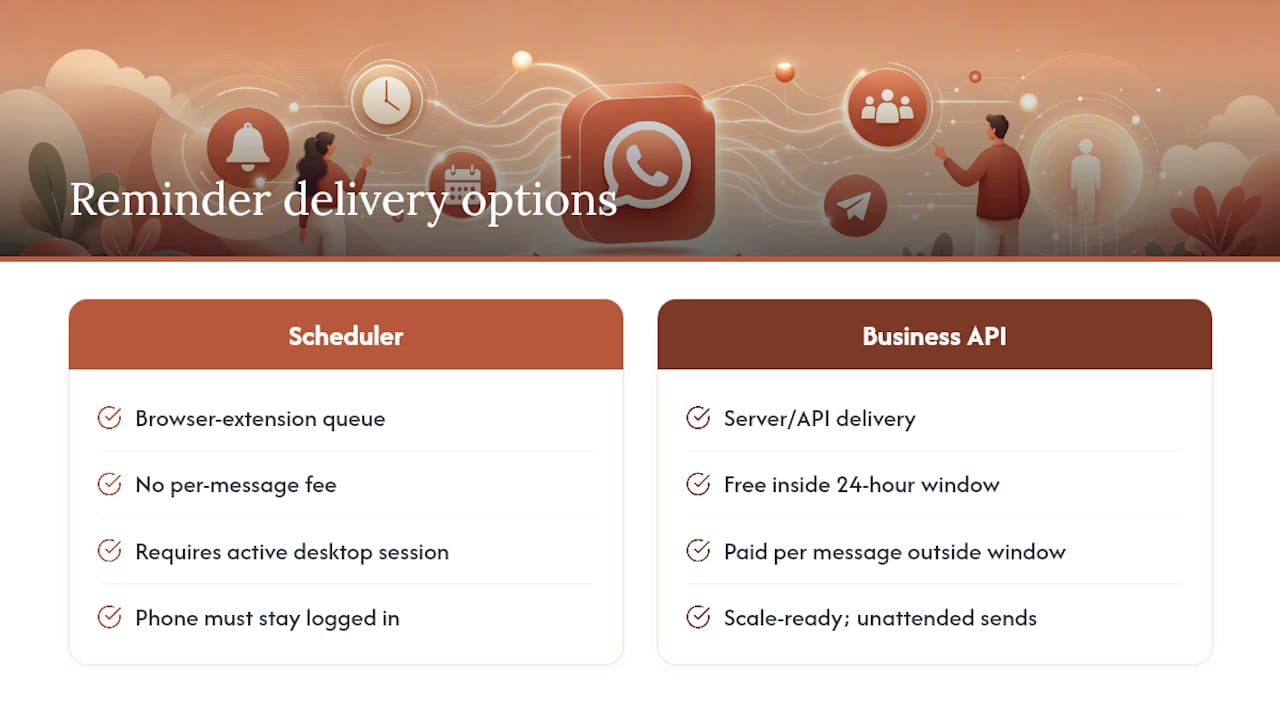
The WhatsApp Business API is built for scale. Every reminder has to use a Meta-approved Utility template, a transactional message format that keeps you compliant with WhatsApp’s rules around promotional content. Messages inside the 24-hour service window (started by a client reply) are free; anything outside it carries a per-message cost. Newer Flows features, including a built-in Date Picker, let a client reschedule right inside the chat thread without opening another app.
Pro Tip: If you’re testing the waters, start with a scheduler for two weeks. If you outgrow it, that’s your signal to move to the API or a managed service, not a sign you did something wrong.
Why WhatsApp Reminders Cut No-Shows
The math is simple: a message nobody sees can’t get a reply. WhatsApp’s roughly 98% open rate compares to email’s 20 to 30%, and that gap alone explains most of the confirmation lift practices report after switching channels.
No-show reductions vary widely by practice type and baseline rate. Vendor case studies cite ranges from 40% to 85%, though results depend heavily on cadence, wording, and how easy rescheduling is, so treat any single number as illustrative rather than a promise.
Here’s a rough way to size the payoff:
- Recovered revenue = (avoided no-shows per month) x (average appointment value).
- A dental practice avoiding 10 no-shows a month at $150 per visit recovers $1,500 monthly. That’s before counting staff time saved on manual phone confirmations.
What Should a WhatsApp Reminder Template Say?
Keep every reminder short, personal, and built around one clear action. Utility templates reward brevity. Here’s a sequence that covers the full appointment lifecycle:
- Booking confirmation: “Hi [Name], your appointment with [Business] is confirmed for [Date] at [Time]. Reply YES to confirm or RESCHEDULE to pick a new time.”
- 24 hour reminder: “Reminder: you have an appointment tomorrow at [Time] with [Business]. Reply YES to confirm.”
- 2 to 3 hour reminder: “See you soon! Your appointment is at [Time] today. Reply RESCHEDULE if something came up.”
- Missed appointment follow up: “We missed you today. Reply BOOK to pick a new time, or call us at [Phone].”
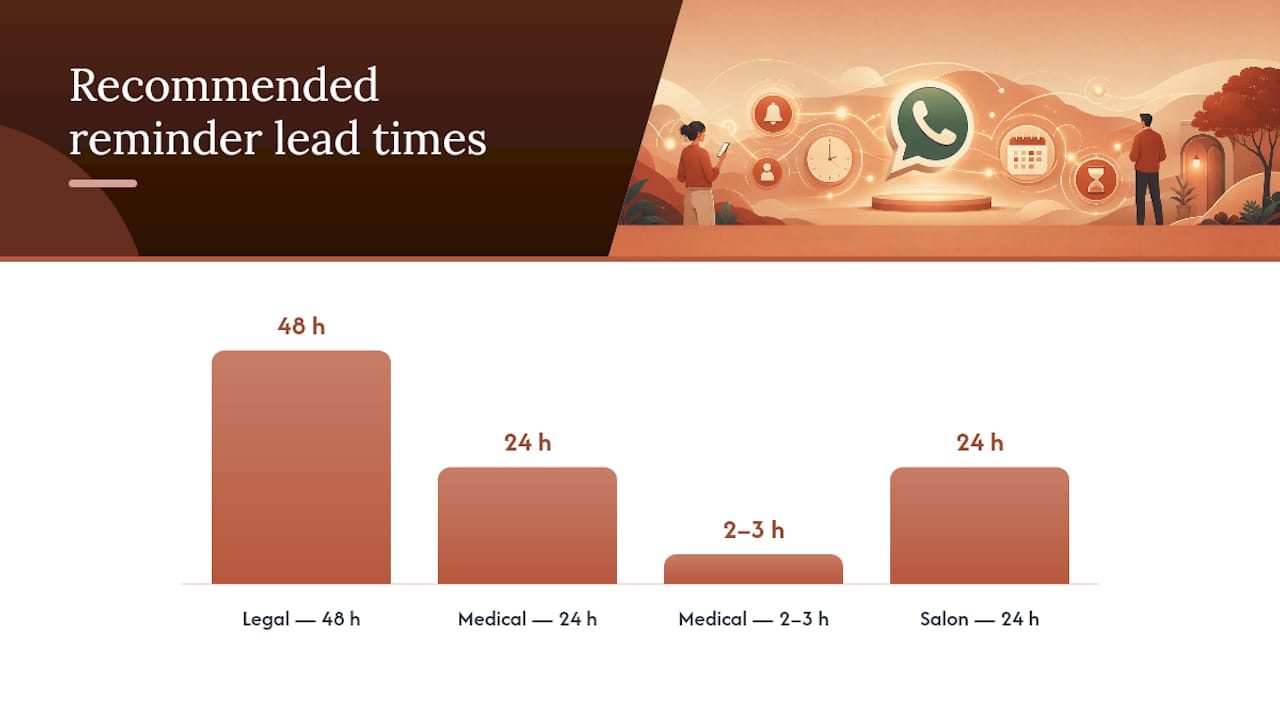
Timing depends on the stakes involved. Medical and dental offices tend to send both a 24 hour and a 2 hour reminder, since a missed slot often means an empty chair nobody can fill. Salons usually get away with one reminder at 24 hours. Legal consultations often warrant a 48 hour notice given how far in advance clients book.
If you serve bilingual clients, send the reminder in the language the client used at booking, not whatever the front desk defaults to. A Spanish-speaking client who gets an English-only reminder is far less likely to reply at all.
How Do You Set Up Automated WhatsApp Reminders?
Getting this right the first time saves you weeks of chasing template rejections and mismatched time zones. Work through it in this order:
- Verify your business in Meta Business Manager and register your phone number if you’re going the API route.
- Capture opt-in at booking. Record the method and timestamp, and give every message a way to opt out.
- Design and submit Utility templates. Keep the wording strictly transactional. Anything that reads like a promotion gets rejected or reclassified at a higher price.
- Connect your calendar or booking system. Google Calendar, Calendly, and Cal.com all support triggers that fire reminders automatically when an appointment is created or changed.
- Test edge cases before launch. Double bookings, daylight saving shifts, and clients in a different time zone are where most setups break first.
- Run a two-week pilot. Track confirmation and no-show rates against your baseline before switching every appointment over.
Pro Tip: Send yourself a test reminder using a fake booking 48 hours out, then again at the 2 hour mark. If the timing math looks wrong on your own phone, it’ll look wrong on your client’s phone too.
Which Integration Fits Your Booking System?
Three integration patterns cover almost every practice, and picking the wrong one costs you either money or maintenance time.
- Native integrations are the lowest effort when your booking platform supports them. Zoho Bookings, for example, connects through Meta Business Suite and can send up to three scheduled reminders per appointment using approved templates, no custom development needed.
- No-code middleware like Zapier or Pabbly Connect fills the gap when your booking tool has no native WhatsApp option. The pattern is straightforward: new booking triggers a lookup of the client’s phone number, which then fires a WhatsApp message through a connector. Community threads document real reliability trade-offs with this approach, including delays and failed sends that need manual monitoring. Reviewing proven CRM workflow automation patterns before you build your first Zap will save you a few false starts.
- Developer builds or managed services make sense once you need custom Flows, a Date Picker, bilingual routing, or volume that middleware can’t handle reliably.
Compliance Rules You Can’t Skip
Meta blocks numbers that misuse templates, so treat opt-in and template hygiene as non-negotiable, not optional polish.
- Record how and when each client opted in, and put a clear opt-out instruction in every message.
- Keep every reminder template strictly transactional. A “book now and save” line in a Utility template gets flagged fast.
- Test every template variable and date format before it goes live, and log every approval and test conversation for reference later.
With open rates near 98%, a rejected or blocked template costs you more than a missed reminder. It costs you the entire channel until Meta reinstates the number.
What Should You Track After Launch?
Set up measurement before you scale, not after. Track confirmation rate, no-show rate, reschedule rate, reply rate, and recovered revenue per time slot, broken out by day of week if your volume supports it.
Run these tests in sequence rather than all at once, so you know what actually moved the number:
- 24 hour reminder versus 48 hour reminder timing.
- A question (“Can you still make it?”) versus a statement (“Your appointment is confirmed”).
- One reminder versus two versus three per appointment.
Move from a scheduler to the API or a managed service once you’re sending more than roughly 50 reminders a week, or once clients start expecting two-way replies your team can’t monitor manually.
Why Bilingual Automation Matters for Hispanic-Serving Practices
Diazluna combines a bilingual website, a 24/7 AI receptionist, and WhatsApp integration to capture opt-ins and confirm or reschedule appointments in Spanish and English, without a client ever hitting a language wall. Practical walkthroughs on setting up WhatsApp QR code appointments show exactly how opt-in capture works in the field.
- A managed bilingual front desk saves the DIY trial-and-error of template rejections and mismatched language sends.
- It matters most where a single missed language cue turns a confirmed slot into a no-show.
A quick reality check on rollout timelines
The biggest win in the first week isn’t the automation itself. It’s the phone finally going quiet during lunch because clients are confirming by text instead of calling. Expect a few rough edges early: a mistimed reminder, a client who replies in the wrong thread. Practices serving Hispanic clients see the fastest trust jump once replies start landing in the client’s own language, often faster than any other single change to the front desk.
— Francisco
Get Bilingual WhatsApp Reminders Running Without the DIY Setup
If you’ve read this far, you already know the DIY route works, but it also means you’re the one debugging templates, chasing Meta approvals, and manually toggling between English and Spanish threads. Diazluna is the alternative to building this yourself: one bilingual front desk that handles WhatsApp opt-ins, appointment confirmations, and reschedules in both languages, backed by a 24/7 AI receptionist that syncs directly with your calendar.
Practices serving Hispanic clients lose bookings not because clients don’t want to show up, but because a reminder never reached them in the language they trust. Diazluna’s bilingual front-desk platform closes that gap without you managing template approvals or middleware yourself. Dental practices can see how this plays out on the bilingual dentist page, and law firms have a similar setup on the bilingual attorney page. Book a demo to see your calendar connected and your first bilingual reminder sequence running within days.
Sources
- WhatsApp Appointment Reminders 2026: Setup, Costs, Templates | Chatarmin
- How to Send a Reminder Message on WhatsApp (Appointment, Payment & Follow-Up Templates) — Blueticks Blog
- Schedule appointments and send notifications via WhatsApp — Zoho Bookings
- How do I set up a Zap for appointment reminders and promotional updates via WhatsApp? — Zapier Community