October 12, 2026
Spanish Voicemail Transcription for Clinics

The quickest reliable path is to use built-in phone transcription when it’s available, such as on-device visual voicemail, and fall back to exporting the audio into a Spanish-language ASR tool when it isn’t. Either way, add a short human review pass to catch names, dates, and phone numbers before you act on the message. For clinical or legal voicemails, that review step is not optional: automated drafts need a second set of eyes on anything numeric.
TL;DR:
- Use on device voicemail transcription for sensitive messages; when unavailable, export audio to a Spanish speech recognition tool, then review the draft.
- Check names, appointment dates, phone numbers, dollar amounts, and medical dosages against the audio, especially before taking clinical or legal action.
- Clean noisy recordings, select a Spanish regional model when available, and use speaker labels or timestamps to locate claims that need checking.
- For routine calls, machine translation plus a manual check may suffice; send legal disputes, contracts, consent forms, and patient care messages to a professional translator.
- Clinics should ask callers for only a name, birth date, and callback number, then move sensitive details to a live or secure channel.
Table of Contents
- Quick ways to get a Spanish voicemail into text
- Step-by-step: transcribing a voicemail from your phone or an audio file
- How to improve transcription accuracy for Spanish voicemails
- Translating and summarizing Spanish transcripts
- Practical advice for clinics handling Spanish voicemails
- Why a fast, accurate Spanish voicemail workflow matters
- Diazluna: a bilingual front desk that handles the calls before they become voicemails
- FAQ
- Sources
Quick ways to get a Spanish voicemail into text
Your fastest option depends on your phone, your carrier, and how sensitive the message is. A few paths cover almost every situation.
- On-device transcription: Live Voicemail on supported iPhones transcribes calls as they happen and keeps the audio and text on the device, which Apple’s own documentation on Live Voicemail confirms stays local rather than routing through cloud servers.
- Platform or cloud voicemail: Business phone systems like Microsoft Teams offer built-in voicemail transcription and translation, but an administrator has to turn these on through Teams voicemail policies before they work.
- Standalone transcription apps: General-purpose ASR tools accept an uploaded audio file and return a Spanish transcript, often with an option to translate it, though accuracy varies by tool and accent.
- Manual transcription: Typing out a short, clear voicemail by hand is still sometimes the fastest and most accurate route, especially for a 20-second message with no complex content.
- Hybrid workflow: Running an automated draft first and then editing it yourself usually beats either extreme on its own.
Live Voicemail and carrier-based visual voicemail win on speed and privacy because nothing leaves your device. Cloud voicemail transcription through platforms like Teams works well for business lines where translation into English is also useful, since the feature set includes both. Standalone apps are the most flexible when you have an already-exported audio file and no visual voicemail option, but you give up some privacy since the file travels to a third-party server. Manual transcription has no accuracy risk but doesn’t scale if you handle more than a handful of messages a day.
The decision rule is straightforward: pick on-device tools first for sensitive content, pick cloud or app-based ASR for speed and volume, and always pair automation with a quick manual check when the message involves an appointment, a prescription, or a legal matter.
Step-by-step: transcribing a voicemail from your phone or an audio file
Once you’ve picked a method, the process itself takes just a few minutes per message.
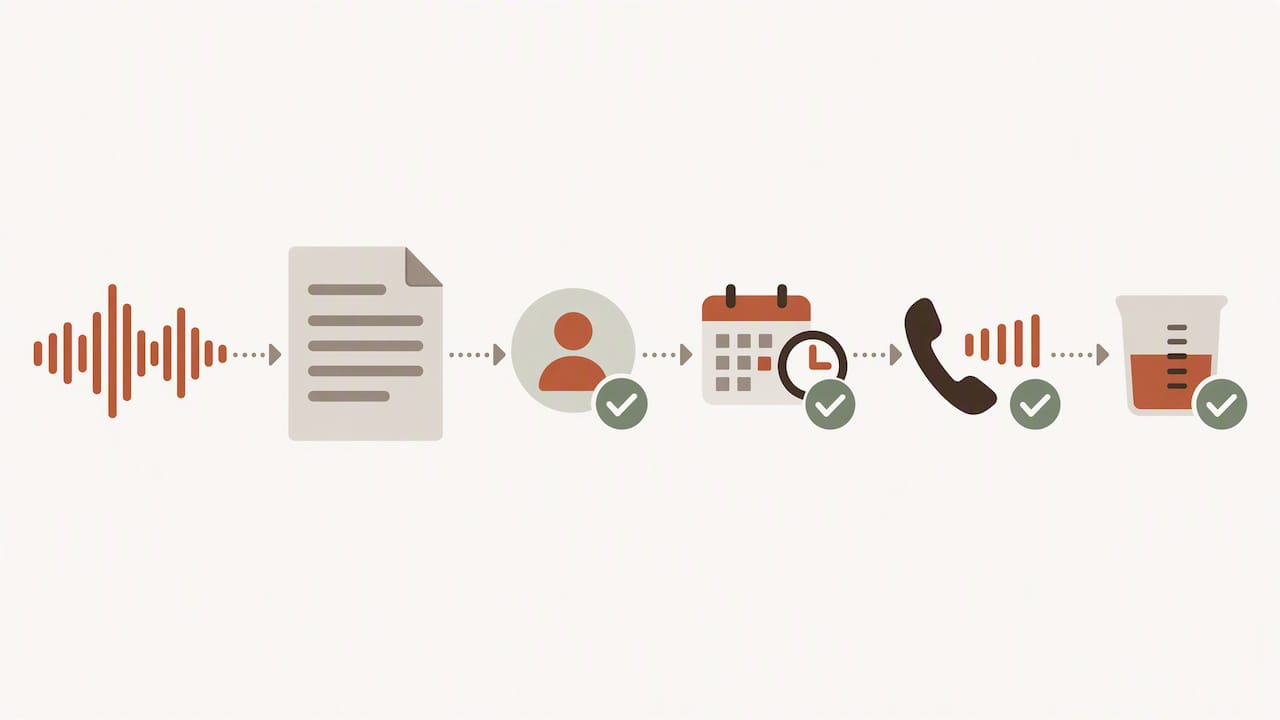
- Save or export the voicemail. On an iPhone, save it directly from the visual voicemail list; on Android or a business line, forward the voicemail to email or export it as an audio file; if neither option exists, play the message aloud and record it with a voice memo app.
- Set the language before you transcribe. Choose Spanish manually rather than relying on auto-detect when your tool supports regional models, since some platforms let you select variants like es-ES or es-MX, a setting the Teams voicemail policy documentation notes affects which model handles the recording.
- Run the transcription. Upload the file or let the on-device feature generate the draft.
- Export in the right format. Plain text works for quick notes, a Word document is better for anything you’ll edit heavily, and SRT is worth using if you need timestamped subtitles for a recorded call.
- Do a focused edit pass. Read through once for sense, then a second time specifically for names, numbers, and dates.
Pro Tip: Read the transcript out loud against the audio once, slowly, before you send it anywhere. Your ear catches misheard numbers faster than your eyes do.
Before you treat any transcript as final, run through a short verification checklist: confirm the caller’s name is spelled correctly, confirm any appointment time or date matches what you’d expect from your schedule, confirm phone numbers by listening to the digits one at a time, and flag any dollar amount or medical dosage for a second listen. These four fields cause the most costly errors when an automated transcript is taken at face value.
How to improve transcription accuracy for Spanish voicemails
Audio quality and accent variation drive most of the errors you’ll see in an automated Spanish transcript, and both are things you can influence before you even hit transcribe.
Start with the recording itself. Trim dead air at the start and end of the file, run a basic noise reduction pass if the voicemail was left from a noisy location, and boost the volume if the caller spoke quietly. Clean audio consistently produces fewer misrecognized words than a raw, unedited file.
- Trim and clean the audio before uploading it to any transcription tool.
- Choose a model built for Spanish variants when the tool offers regional options, since accuracy differs by dialect.
- Add speaker labels and timestamps if your tool supports them, which makes it much faster to verify a specific claim later.
- Build a short list of common misrecognitions for your practice, like a frequently misspelled surname, and do a targeted search-and-replace after each transcription.
Accent and dialect matter more than most people expect. Research on automatic speech recognition of Spanish has found that error rates vary by age group and regional variety, with some accents, including certain teenage speech patterns and specific regional dialects, showing higher error rates than others, according to sociolinguistic research on Spanish ASR accuracy. Research reports that leading open models can reach notably low word error rates on some Spanish datasets, while average commercial accuracy across a broad range of speakers is generally high, with substitution errors, where one word is swapped for another that sounds similar, being the most common failure type.
That gap between best-case and average performance is exactly why a brief manual review matters more for Spanish voicemails than it might for a clean, scripted recording. A caller’s accent, speaking speed, and local vocabulary can all shift where the automated draft goes wrong, so the same checklist (names, dates, numbers) is worth applying every time, not just on messages that sound unclear.
Translating and summarizing Spanish transcripts
Once you have a clean Spanish transcript, you’ll often need it in English or condensed into a quick brief for a colleague. Both steps carry their own risks.
Automated translation is fast and usually good enough for a general sense of the message, but it can mishandle names, legal terms, or medical terminology that don’t translate literally. Summarization tools compress a transcript into a few lines, which is useful for a quick handoff, but a summary can drop a detail that turns out to matter later, like a callback number or a specific date.
- Use automated translation for a quick read, then double-check any proper noun or specialized term against the original Spanish.
- Use AI summarization for internal briefs, but verify that any date, dollar amount, or phone number in the summary matches the full transcript exactly.
- Keep numbers and names in their original form rather than letting a translation tool reformat them, since a reformatted date or phone number is an easy place for an error to hide.
- Route anything legal or high-stakes to a professional human translator, particularly consent forms, contracts, or messages involving a dispute.
For routine scheduling voicemails, an automated translation paired with a quick manual check is usually enough. For anything that could affect a legal outcome or a patient’s care, the extra step of professional translation is worth the delay.
Practical advice for clinics handling Spanish voicemails
Voicemail handling in a clinical or legal setting has a privacy dimension that general transcription advice skips over. The safest approach starts with what you ask callers to say in the first place.
A short bilingual greeting that asks for only a name, date of birth, and callback number, and nothing more, limits what ends up in a transcript that other staff will read later. Guidance on handling protected health information in voicemail specifically recommends keeping sensitive medical details out of recorded messages and reserving them for a live conversation or a secure channel, as outlined in this overview of HIPAA voicemail guidance.
- Keep voicemail prompts minimal: ask for name, date of birth, and phone number, and tell callers you’ll follow up by text or WhatsApp for anything else.
- Use a bilingual greeting so Spanish-speaking callers know exactly what to say and in what order.
- Pair voicemail with a fast follow-up channel, since a WhatsApp or SMS reply closes the loop faster than a callback and keeps sensitive details out of the recording.
- Set a human-review policy for any voicemail transcript tied to an appointment, a prescription, or a payment.
Pro Tip: Record your clinic’s bilingual voicemail greeting once, test it with a real Spanish-speaking caller, and adjust the wording based on what they actually say back; a greeting that’s too long gets ignored.
A simple operational checklist covers most of this: confirm your voicemail system’s language setting is correct, record a bilingual greeting, connect a WhatsApp or SMS follow-up channel, and write down who reviews transcripts before action is taken on them.
Why a fast, accurate Spanish voicemail workflow matters
The most common mistake I see in bilingual practices isn’t a bad transcription tool, it’s no process at all. Staff transcribe messages inconsistently, some by ear and some with whatever app is already open, and nobody double-checks the fields that actually matter.
Pairing an automated draft with a two-minute manual check of the transcript gets you most of the speed of automation without the risk of acting on a misheard number.
What’s worth building is not a better tool but a repeatable habit: same transcription method, same checklist, every time a Spanish voicemail comes in.
— Francisco
Diazluna: a bilingual front desk that handles the calls before they become voicemails
Transcription tools solve the problem after a caller has already hung up without reaching anyone. A bilingual front desk solves it before that happens. We provide a platform that includes a bilingual website, an AI receptionist available 24/7 in Spanish and English, and WhatsApp integration, so Spanish-speaking callers get answered, scheduled, or triaged in real time instead of leaving a message that someone has to transcribe later.
For calls needing follow-up, the AI receptionist captures details and sends a summary to WhatsApp, allowing your team to review a concise note instead of a raw recording. Practices that want ready-to-use scripts can start with our copy-ready Spanish greetings or a Spanish IVR menu built for medical, dental, and legal offices.
- Bilingual website: built and indexed quickly, so Spanish-speaking clients find accurate information without a translated afterthought.
- 24/7 AI receptionist: answers and schedules calls in Spanish and English instead of sending callers to voicemail.
- WhatsApp follow-up: turns call summaries into a channel your staff already checks.
See our plans and pricing to find the setup that fits your practice.
FAQ
How can I transcribe Spanish audio to text?
Upload the audio file to a transcription tool set to Spanish, or use on-device options like Live Voicemail if you’re working directly from an iPhone voicemail. Always review names, dates, and numbers by hand afterward, since accuracy on these fields varies by accent and audio quality, as shown in research on Spanish ASR accuracy.
Can ChatGPT transcribe audio for free?
Some AI chat tools include audio transcription features, but availability and limits depend on the specific service and plan you’re using. For voicemail-specific accuracy, a dedicated ASR tool or your phone’s built-in transcription feature is generally more reliable for Spanish audio.
Can Google Translate do voice to text?
Google Translate supports speech input and can convert spoken Spanish into text or translate it into English in real time. For saved voicemail recordings rather than live speech, a transcription tool designed for audio files usually gives a more complete result.
How do you say voicemail in Spanish?
The most common term is “correo de voz,” though “buzón de voz” and “mensaje de voz” are also widely used depending on the region. Any of these terms will work when setting a phone’s language or searching for a transcription tool’s Spanish-language support.
Does iPhone support Spanish voicemail transcription?
Yes, Live Voicemail on supported iPhones transcribes messages in real time, including Spanish, and keeps the transcript on the device rather than sending it to a server, according to Apple’s Live Voicemail documentation. Availability depends on your region, carrier, and iOS version.
Sources
- Manage voicemail policies - Microsoft Learn
- Automatic speech recognition of Spanish: sociolinguistic factors of accuracy and error typology
- Use Live Voicemail on iPhone - Apple Support