October 20, 2026
WhatsApp Business Setup for Healthcare: A US Practice Guide
Setting up WhatsApp Business for a healthcare practice takes an afternoon. Setting it up so it doesn’t create a HIPAA or FTC problem takes a few decisions you should make first: which account type you use, what staff are allowed to send, and how conversations start. This guide walks through both, with a focus on US practices that serve Spanish-speaking patients.
One point up front. WhatsApp is excellent for logistics: hours, directions, appointment confirmations, “what do I bring?” questions. It is a risky place for clinical detail unless your counsel has signed off on your specific workflow.
TL;DR
- Use WhatsApp as a front desk for routine, non-clinical messages. Keep diagnoses, lab results and treatment details out of the chat.
- No messaging app is “HIPAA compliant” by default. HHS guidance puts the responsibility on your practice to assess risk and use compliant tools and agreements.
- Let patients start the conversation (website button, QR code, reminder link). It keeps you inside the 24-hour service window and avoids template headaches.
- Prepare bilingual replies, an after-hours route and a human handoff before you publish your number.
Table of Contents
- Choose the right WhatsApp account type
- Before you build: what HIPAA and the FTC expect
- Step-by-step setup
- Understand the 24-hour window
- Make it work for Spanish-speaking patients
- What to automate and what to keep human
- Our perspective
- Where Diazluna fits
- Common mistakes to avoid
- FAQ
- Sources
Choose the right WhatsApp account type
There are two business products, and the choice shapes everything else.
| WhatsApp Business app | WhatsApp Business Platform (API) | |
|---|---|---|
| Best for | Solo practices, one or two devices | Multi-provider clinics, automation, CRM links |
| Setup | Download, verify a number, build a profile | Go through a business solution provider or Meta’s onboarding |
| Automation | Greeting, away message, quick replies | Chatbots, AI agents, system integrations |
| Outbound messages | Manual | Pre-approved templates outside the 24-hour window |
| Staff access | Limited linked devices | Shared inbox, routing, audit trails via your software |
The app is fine to test the waters. The moment you want an AI receptionist, a shared inbox or links to your scheduling system, you are on the Platform. Meta describes the onboarding steps in its API onboarding resources.
A dedicated number, not a personal phone
Use a number that belongs to the practice, not a provider’s personal cell. When a front-desk employee leaves, the number and the conversation history should stay with you. Landlines and VoIP numbers can work for verification, so you can keep the number patients already know.
Before you build: what HIPAA and the FTC expect
This is where most healthcare setups go wrong, and it is a policy problem, not a technology problem.
HIPAA is a process, not a badge
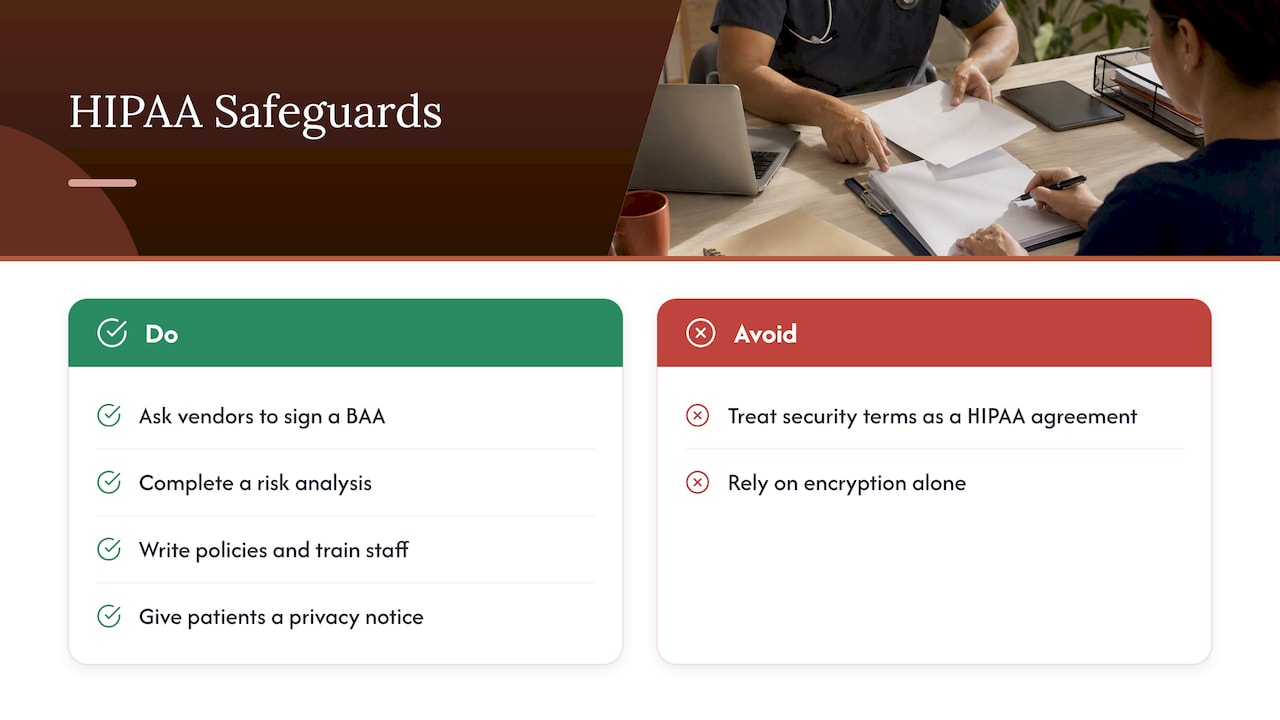
HHS explains that the HIPAA Security Rule applies whenever a covered entity uses electronic media, including mobile messaging apps, to transmit or store electronic protected health information. It encourages providers to use vendors that will sign a Business Associate Agreement. WhatsApp’s standard business terms do not give you that assurance for all use cases, according to the research we reviewed, so you should ask your own attorney how your data flows are treated. WhatsApp does publish business data security terms, but read them as a description of Meta’s security program, not as a HIPAA agreement.
End-to-end encryption helps. It does not replace a risk analysis, written policies and staff training. We go deeper in our post WhatsApp Is Not HIPAA Compliant.
HHS also publishes a plain-language resource for educating patients about the privacy and security risks of remote communication tools. It is a good model for the short notice you give patients before they message you. HHS’s FAQ on “non-public facing” remote communication products is also worth reading to see how the agency thinks about tools that allow only the intended parties to participate.
The FTC cares about what you promise
The FTC’s guidance on consumer health information is blunt about two things that affect a WhatsApp rollout. First, claiming HIPAA compliance without a factual basis can be a deceptive practice, so don’t put “HIPAA-compliant WhatsApp” on your website. Second, health data should not flow to advertising tools without clear, affirmative consent, and the FTC takes a broad view of what counts as health data. If your WhatsApp button sits on a page that also loads ad pixels, audit that.
A practical rule for staff
The weakest point is rarely the software. It is a tired employee pasting a patient’s date of birth and medication into a chat. Write a one-page policy that lists:
- What may be sent: office hours, address, parking, appointment time and date, preparation reminders that contain no diagnosis, links to your patient portal.
- What may not be sent: diagnoses, test results, images of charts or insurance cards, full dates of birth, Social Security numbers.
- What to say instead: “Please log in to the portal or call us so we can discuss this securely.”
Step-by-step setup
- Decide the scope. Write down the five to ten questions your front desk answers most. These become the WhatsApp use cases. Everything else goes to a call or the portal.
- Create the account. Download the Business app on a practice device or begin Platform onboarding with your provider. Verify the dedicated number.
- Build the profile. Add the practice name, logo, address, hours, website and a short description in English and Spanish.
- Configure the greeting and away message. Tell patients what the channel is for, that it is not for emergencies, and when someone will reply.
- Add quick replies. Hours, directions, new-patient forms, insurance accepted, cancellation policy. Keep each under a few sentences.
- Add entry points. Put a click-to-chat button on your contact page and appointment page, a QR code at reception, and a link in confirmation emails and text reminders.
- Set consent language. Ask patients to opt in before you send anything beyond replies. See WhatsApp consent messages.
- Train staff and test. Send yourself ten realistic messages in both languages, including a bad one that contains sensitive details, and practice the redirect.
- Review monthly. Read a sample of conversations, check response times and update replies.
Emergencies
State plainly in the greeting that urgent or emergency situations should go to 911 or your emergency line. If you use automation, make sure it hands urgent keywords to a human, not a canned answer.
Understand the 24-hour window
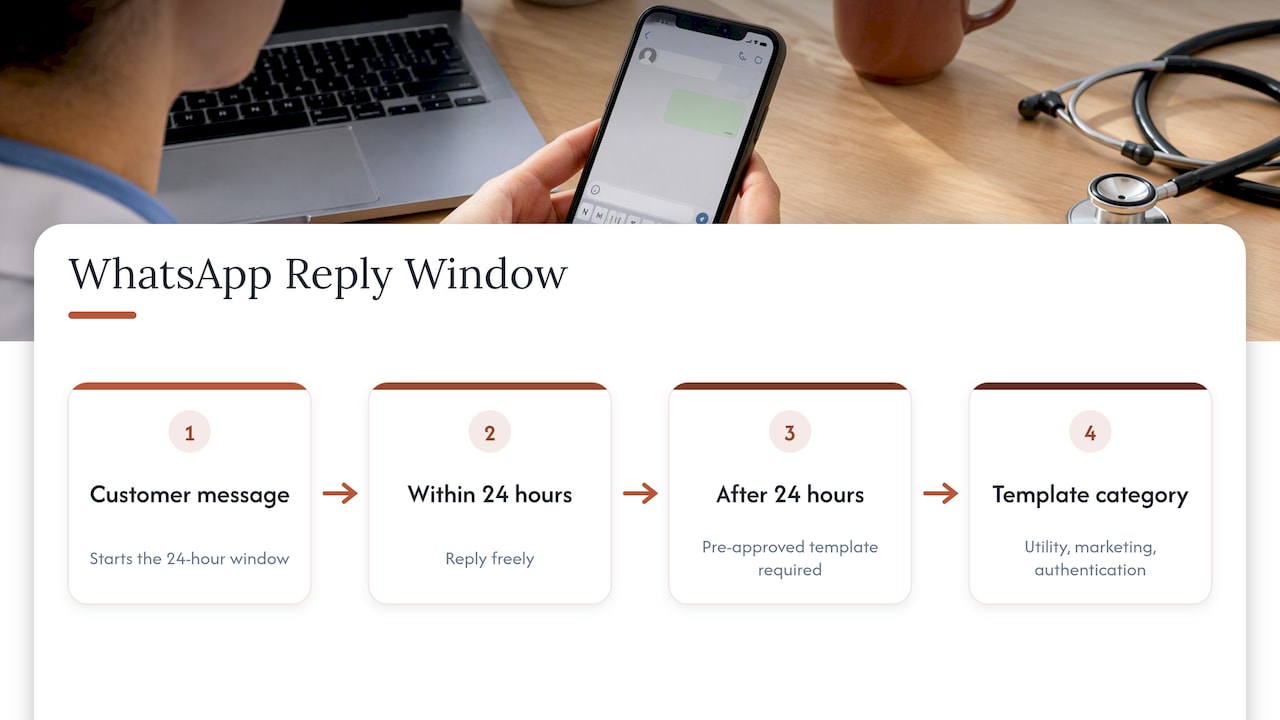
People also ask about the 24-hour rule. Under Meta’s Business Platform policy and onboarding material, a business can message a customer freely for 24 hours after the customer’s last message. After that, you need a pre-approved template, in a category such as utility, marketing or authentication. Templates carry costs that depend on category and location, and Meta has changed its pricing structure before, so check the current rate card before you budget.
For a clinic, the lesson is simple: design for patient-initiated chats. The patient taps your button, asks “Do you take my insurance?”, and you answer inside the window. Reminders that go out after the window closes need templates, and the safest category is utility, such as an appointment time. Meta’s business policy and the FTC both push practices toward messages that directly help the patient, not promotions. Unsolicited marketing is the quickest way to lose trust, and in a medical setting it can also create regulatory trouble.
If your reminders also go out by email, a separate channel can carry the load without touching WhatsApp’s templates. This comparison of email platforms for healthcare providers is a starting point when you weigh that option.
Make it work for Spanish-speaking patients
WhatsApp matters most where your patients already use it. For practices serving Hispanic communities, treating it as a digital front desk, not just another inbox, gives patients one bilingual experience across website, phone and chat. That framing comes up in Meta’s customer stories, which describe a hybrid of live agents for complex needs and automation for routine questions.
Three details separate a good bilingual setup from a translated one:
- Write Spanish, don’t translate it. Machine-translated reminders read as cold or confusing. Have a native speaker review every template. Our post on Spanish WhatsApp auto replies has copy-ready examples.
- Match the tone. One small-business owner in Meta’s Tec Auto-trafo story configured Meta’s automated agent to answer in his own personal style. The same idea applies to a dental or medical office: warm, respectful, plain.
- Let patients switch languages mid-chat. Don’t lock a conversation into one language because the first message was English.
If your front desk loses Spanish-speaking callers at the phone, our guide on training staff for Spanish calls covers the human side.
What to automate and what to keep human
| Automate | Hand to a person |
|---|---|
| Hours, address, parking | Anything clinical or urgent |
| New-patient paperwork links | Billing disputes |
| Appointment booking and rescheduling | Upset or confused patients |
| Appointment confirmations (utility) | Insurance edge cases |
| After-hours acknowledgment | Requests that mention symptoms |
Automation should always have an exit. Define the trigger words and the person who receives the handoff, and tell the patient when a human will respond. For booking specifically, see how a practice can start WhatsApp appointment booking in an hour, and for connecting chats to your records, WhatsApp CRM integration for bilingual practices. Dental offices can look at what patient engagement gains WhatsApp can bring.
Our perspective
We build bilingual front desks for practices serving Hispanic clients, so we see the same pattern often. Practices don’t fail on WhatsApp because the setup is hard. They fail because the channel was switched on before anyone decided what it is for.
Our view is plain. Treat WhatsApp as the place where a patient asks a simple question and gets a fast, human-sounding answer in their own language. Treat your portal, your phone line and your in-person visit as the places where health information is handled. Keep the two roles separate and most of the compliance risk shrinks with them.
We also think the language matters as much as the channel. A Spanish reply that was clearly translated by software tells a patient that the practice didn’t think about them. That is why we insist on human-reviewed Spanish, and why we believe the website, the receptionist and WhatsApp should speak with one voice. And we are not lawyers: before you put any patient data in any messaging flow, ask your own healthcare counsel.
— Francisco
Where Diazluna fits
If you want the website, the 24/7 AI receptionist and WhatsApp working together without hiring an agency for each piece, that is what we do. Plans are published on our site: Solo Sitio is $99 per month, Sitio + María is $199 per month, and Sitio + María Pro is $349 per month, with annual billing also available. There is a one-time activation fee of $399. See the details at Diazluna and decide which tier matches your call volume.
Common mistakes to avoid
- Publishing the number before the policy exists. Staff improvise, and improvisation is where PHI leaks.
- Treating WhatsApp like email. Without the 24-hour window in mind, you will hit template walls and unexpected costs.
- Starting with marketing blasts. Lead with utility messages and let patients opt in.
- Claiming compliance on your site. The FTC treats unsupported claims as deceptive.
- Forgetting the after-hours path. A message sent at 9 p.m. needs an acknowledgment and a clear next step.
- No owner. Assign one person to review conversations and update replies each month.
FAQ
Is a WhatsApp Business account HIPAA compliant?
No account type is compliant by default. HHS says compliance depends on how a covered entity uses a tool, including risk analysis, safeguards and agreements with vendors. Based on the research we reviewed, WhatsApp’s standard terms do not give you the Business Associate Agreement coverage that dedicated telehealth tools offer, so keep patient health details out and ask your attorney about your specific setup.
Can we use WhatsApp for appointment reminders?
Yes, many practices do, ideally with only the date, time and location and no diagnosis or treatment details. Outside the 24-hour window you need an approved utility template. Get the patient’s opt-in first and keep the wording minimal.
What is the 24-hour rule for WhatsApp Business?
When a patient messages you, you can reply freely for the next 24 hours. After that, you can only reach them with a pre-approved template. Encouraging patients to start chats from your website or a QR code keeps most conversations inside the window.
Do we need the API, or is the Business app enough?
A solo practice with light volume can start with the Business app. If you want AI automation, several staff sharing an inbox, or integration with scheduling and records, you will need the Business Platform through an approved provider.
Sources
- HIPAA Rules for telehealth technology, Telehealth.HHS.gov
- Collecting, Using, or Sharing Consumer Health Information? FTC
- WhatsApp Business Platform API onboarding resources
- WhatsApp Business policy
- WhatsApp Business Data Security Terms
- HHS: educating patients about privacy and security risks
- HHS: what is a non-public facing remote communication product
- Tec Auto-trafo success story, WhatsApp for Business
- CUPRA success story, WhatsApp for Business