September 15, 2026
WhatsApp for US Clinics: 3 Limits That Keep Messages Out
WhatsApp healthcare communication works well for reminders, logistics, and non-clinical patient contact, but it should never carry protected health information or replace your medical record. The single biggest mistake practices make is treating a convenience channel like a compliance-ready one. Use the guardrails below to keep the access benefits without the exposure.
TL;DR:
- WhatsApp is effective for administrative tasks like appointment reminders, directions, and logistical updates, reducing missed visits and phone calls.
- It is not HIPAA compliant by default and cannot automatically transfer clinical information into electronic medical records without policy and technical safeguards.
- Having clear consent procedures at appointment booking and using templates for messages helps maintain documentation and auditability.
- Any clinical or diagnostic information shared via WhatsApp must be moved into the EMR immediately to ensure proper record-keeping and legal compliance.
- A layered messaging approach with a secure platform for protected health information and strict governance prevents data leaks and regulatory risks.
Table of Contents
- What Is WhatsApp Healthcare Communication Actually Good For?
- Is WhatsApp HIPAA Compliant for Patient Messaging?
- How Should Clinics Build a WhatsApp Workflow That Holds Up?
- What Does the Research Say About WhatsApp Record-Keeping?
- What Should the Rest of Your Messaging Stack Look Like?
- Access First, Governance Close Behind
- How Diazluna Puts This Playbook Into Practice
- Sources
- FAQ
What Is WhatsApp Healthcare Communication Actually Good For?
WhatsApp earns its place in a clinical workflow when the message is administrative, not diagnostic. Appointment reminders are the clearest win: a templated message that confirms a date, offers a reschedule link, and asks for a one-word reply cuts down on missed visits without anyone touching a patient’s chart. Practices that automate this through WhatsApp appointment reminders report fewer no-show calls to the front desk, simply because patients respond faster to a text thread than a voicemail.
Two-way logistics fall into the same safe zone. Sending directions to a clinic, pre-visit prep instructions (fasting times, what to bring), or a same-day “running 15 minutes late” note doesn’t touch clinical data and saves staff a phone call. Non-diagnostic triage acknowledgments work too. A message like “we got your note, the doctor will call you back by 3 PM” reassures a patient without anyone rendering a medical opinion over text.
Team coordination is where WhatsApp genuinely shines behind the scenes. A resident-led internal medicine program that introduced WhatsApp Communities for its residency saw measurable gains in how quickly staff coordinated consults and flagged urgent cases, using role-based groups instead of scattered pages and calls.
That said, three limits matter:
- WhatsApp is not a clinical record. Anything said there needs to land in the EMR if it affects care.
- A photo sent for a “quick look” is not diagnostic quality, as compression and lighting distort exactly the details a clinician needs.
- There’s no ePrescribe integration. Prescriptions still have to route through your pharmacy system.
Pro Tip: Keep a running list of the three or four message types your front desk sends most often (reminders, reschedules, directions) and template every one of them. Templated messages are easier to audit later than freeform chat.
Is WhatsApp HIPAA Compliant for Patient Messaging?
No, not by default, and understanding why matters more than the label itself. Meta does not sign a Business Associate Agreement for WhatsApp, which means the platform sits outside the HIPAA-covered channel framework the moment protected health information enters the conversation. End-to-end encryption protects the message content in transit, but metadata, cloud backups, and device-level storage are not automatically covered the way a BAA would require.
The deeper problem isn’t encryption. It’s record-keeping. A scoping review of clinician WhatsApp use covering studies through December 2020 found adoption rates as high as 97% in some regional cohorts, alongside a consistent gap: most clinicians had no mechanism to transfer that communication into the official medical record. The conversation happened, the decision got made, and then it lived on a personal phone instead of in the chart.
Here’s how to close that gap in practice:
- Capture consent before the first message. A checkbox at registration or a “Reply YES to receive appointment texts” template creates a timestamped record of opt-in.
- Minimize what you send. Names, appointment times, and general instructions are fine. Diagnoses, lab results, and treatment plans are not.
- Password-protect anything sensitive. If a document must go through WhatsApp, send it as an encrypted PDF rather than plain text or a photo.
- Set device policy. Require passcodes, enable remote wipe, and restrict cloud backup of chat history on any device used for patient contact.
- Know your escalation trigger. The moment a conversation turns clinical, move it to a HIPAA-covered channel or a phone call.
For a full breakdown of where the compliance line sits, Diazluna’s guide on WhatsApp and HIPAA walks through the specific failure points most practices miss. On the technical side, a HIPAA IT requirements guide covers the device and network controls that reduce risk regardless of which messaging app your staff uses.
How Should Clinics Build a WhatsApp Workflow That Holds Up?
Setup starts with consent, not with the message itself. A QR-code appointment flow posted at the front desk or texted after a booking gives patients a one-tap way to opt in, and the click itself creates a timestamp you can point to later if anyone asks how consent was obtained.
Once a patient opts in, template discipline matters more than message volume. WhatsApp Business utility templates are built for exactly this: appointment confirmations, reschedule prompts, and pickup reminders that don’t read as marketing and don’t require case-by-case approval. Nine approval-ready templates built for bilingual practices cover most of what a front desk sends in a given week. Avoid free-text clinical follow-ups inside these templates. If a patient asks a clinical question in response, that’s the cue to move the conversation, not template it.
Handoff to the EMR is where most clinics fall short, and it’s the fix that closes the gap the scoping review flagged. The rule should be simple: any message that informs a clinical decision gets copied, screenshotted, or exported into the patient’s chart the same day. Encrypted PDF attachments should follow the same rule, filed and logged rather than left in the chat thread. A WhatsApp CRM integration can automate part of this by routing conversation metadata into your practice management system without requiring manual copy-paste.
Staffing needs its own guardrails:
- Assign WhatsApp access by role, not by whoever’s phone is closest.
- Set an away message with expected response windows so patients aren’t waiting on a “read” receipt.
- Write emergency redirection language into every away message: “If this is urgent, call 911 or go to the nearest emergency room.”
- Audit the account monthly for who has access and whether consent records are current.
Pro Tip: Put the emergency redirection line in both English and Spanish if you serve bilingual patients. A patient in crisis shouldn’t have to hunt for the version they understand.
What Does the Research Say About WhatsApp Record-Keeping?
The scoping review’s finding is blunt: clinicians adopted WhatsApp faster than institutions built policy to govern it. Usage climbed to nearly universal in some settings, while the same review found that most published studies described no consistent method for pulling that communication into a legal medical record. That’s not a technology failure. It’s a governance failure that happened because nobody assigned ownership of the problem.
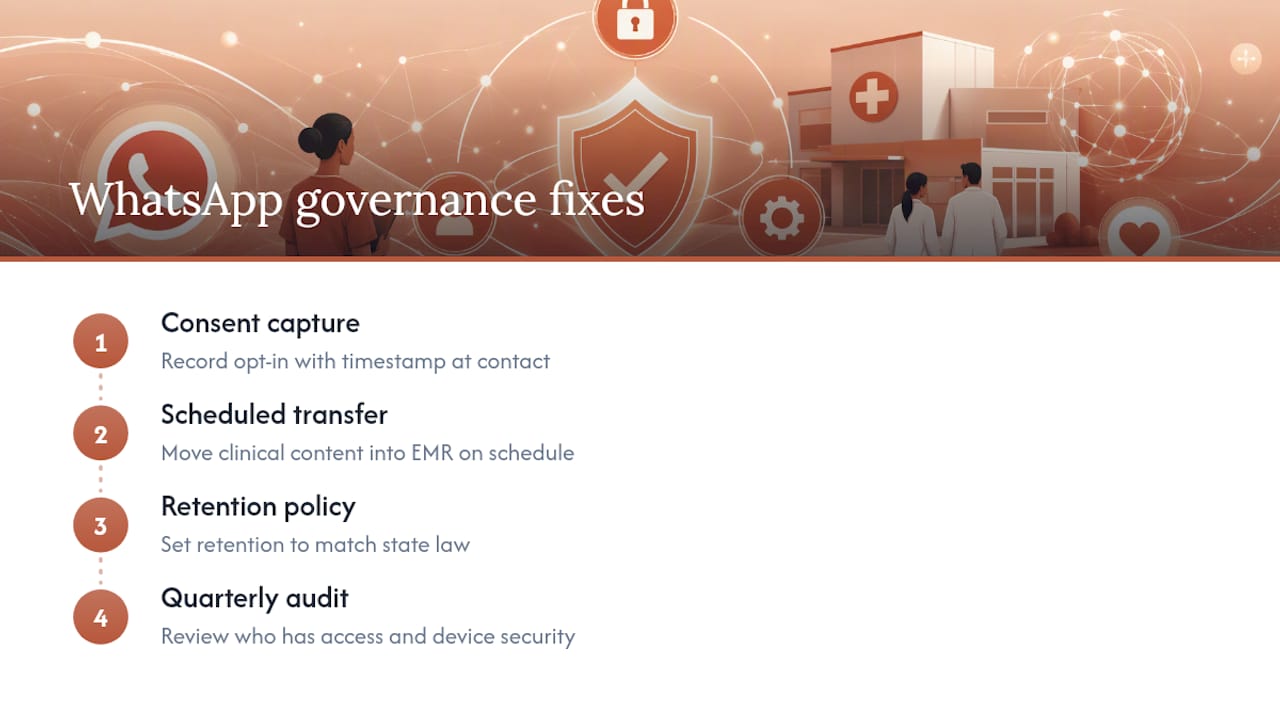
The fix that keeps surfacing across implementation studies isn’t complicated. Transfer clinically relevant content into the EMR on a fixed schedule, not “when someone remembers.” Set a retention policy that matches your state’s medical records requirements. Run a quarterly audit of who has WhatsApp access and whether their device meets your security policy.
The literature consistently supports one conclusion: WhatsApp works as a patient-facing convenience layer, but it cannot function as the authoritative clinical record. The practices that get this right don’t fight the tool’s popularity. They build a thirty-second habit around it, moving anything clinical into the chart before the shift ends.
Diazluna’s own deployments follow this same pattern in bilingual practices. Consent capture happens at the point of contact, whether that’s a QR code at check-in or a click-to-chat link on a bilingual site, and every opt-in carries a timestamp that satisfies the documentation gap the review describes. Reminder templates preserve that consent metadata automatically, so a front-desk audit takes minutes instead of a records search.
What Should the Rest of Your Messaging Stack Look Like?
WhatsApp should sit at the top of a layered stack, not carry the whole weight of patient communication on its own. Picture three layers: WhatsApp as the patient-facing convenience surface, your EMR as the single authoritative record, and a dedicated secure messaging platform for anything that qualifies as ePHI in transit.
When you’re evaluating a secure clinical messaging tool to fill that middle layer, look for:
- A signed BAA, without exception.
- Audit logs that show who read what and when.
- Remote device management, including the ability to wipe a lost phone.
- Native EMR integration, so messages attach to the chart automatically rather than needing manual entry.
The migration trigger is straightforward: the moment a conversation includes a diagnosis, a lab result, a medication change, or anything a plaintiff’s attorney would call a clinical record, move it off WhatsApp. Some practices handle this by requiring patient portal use for lab results and reserving WhatsApp strictly for logistics. Others license a secure clinical messenger for provider-to-provider consults and keep WhatsApp for patient-facing reminders only. Either pattern works, as long as the line is written down and staff know exactly where it sits.
Access First, Governance Close Behind
The instinct to lock everything down until it’s “safe” usually backfires. Patients who don’t get a text in their own language, or who have to call a number that puts them on hold, disengage entirely. Bilingual access through a channel patients already use daily is worth protecting, not avoiding.
What actually reduces risk isn’t a more complicated tool. It’s a short, written policy that every staff member can recite: what gets sent, what gets copied to the chart, and what triggers a phone call instead of a text. Diazluna builds this into bilingual templates and consent timestamps by default, because the practices that stick with a workflow are the ones where the rules fit on one page.
— Francisco
How Diazluna Puts This Playbook Into Practice
Building this workflow from scratch means stitching together a bilingual website, a way to capture consent, and a WhatsApp setup that doesn’t leak protected data. A comprehensive approach packages all three into one subscription instead of three separate vendor bills. The bilingual site can capture patient intent in Spanish or English, an AI receptionist can handle calls and scheduling around the clock, and WhatsApp integration can log consent metadata automatically to help the front desk track opt-in records.
In practice, that means QR-code appointment booking at check-in, bilingual reminder templates that follow the utility-template rules described above, and consented message flows that escalate to a human staff member the moment a conversation turns clinical instead of administrative. For a dental, legal, or medical practice serving Hispanic patients, that’s the difference between losing a client to a language barrier and keeping them booked. Visit the Diazluna dentists page to see the workflow in action, or request an implementation checklist to map it onto your own front desk.
This article is general information, not a substitute for advice from a qualified doctor. Consult a qualified healthcare professional about your own circumstances before acting on anything here.
FAQ
Is WhatsApp a HIPAA Violation?
Using WhatsApp itself isn’t automatically a violation, but sending protected health information through it without a Business Associate Agreement in place puts you at risk, since Meta does not offer a BAA for WhatsApp.
What Is the 24 Hour Rule on WhatsApp?
WhatsApp Business API restricts free-form messaging to within a short window after a patient’s last message; outside that window, businesses must use pre-approved template messages, which is why utility templates matter for reminders and follow-ups.
Is WhatsApp HIPAA Compliant in 2026?
No. WhatsApp still does not offer a signed BAA for US healthcare organizations, so it remains unsuitable as a standalone channel for transmitting protected health information, regardless of the year.
Do Hospitals Use WhatsApp?
Yes, widely, mostly for team coordination and patient-facing logistics rather than clinical documentation. The scoping review found clinician adoption reaching as high as 97% in some studies, paired with a consistent lack of record-transfer practices that hospitals now have to address through policy.
Can WhatsApp Replace a Patient Portal or EMR Messaging?
No. WhatsApp works well as a convenience layer for reminders and logistics, but your EMR needs to remain the authoritative clinical record, with any clinically relevant WhatsApp content copied into the chart the same day.