September 12, 2026
Cut No Shows 40–60% with WhatsApp Booking
Appointment booking, confirmations, and reminders can all run inside WhatsApp today, no separate app required. The fastest path is a verified WhatsApp Business number, two-way calendar sync with Google or Outlook, and an in-chat flow (a slot picker or a simple chatbot) paired with at least one automated reminder before every visit. That combination alone covers most of what a clinic, salon, or law office needs to stop losing appointments to phone tag.
TL;DR:
- A verified WhatsApp Business number with calendar sync and an in-chat booking flow can cover most appointment needs, reducing missed bookings.
- Using native list messages for slot selection and automatic calendar updates minimizes double bookings and manual errors.
- Two-way calendar, CRM, and payment integrations significantly cut manual work, improve data consistency, and lower no-show rates.
- Confirmations and reminders should be personalized, concise, and include clear CTA buttons, with templates prepared in multiple languages upfront.
- Implementing instant confirmation and at least one reminder within 24 hours reduces no-shows by up to 60 percent, especially when combined with deposits for high-cancellation slots.
Table of Contents
- How Does WhatsApp Appointment Scheduling Actually Work?
- What Do You Need to Set Up WhatsApp Appointment Scheduling?
- Which Integrations Actually Matter for WhatsApp Booking?
- What Should Your Confirmation and Reminder Messages Say?
- What Actually Reduces No-Shows on WhatsApp?
- How Long Does WhatsApp Booking Setup Take, and What Does It Cost?
- What Bilingual Practices Get Wrong About WhatsApp Booking
- Want a Bilingual Front Desk You Don’t Have to Build Yourself?
- Sources
- FAQ
How Does WhatsApp Appointment Scheduling Actually Work?
The customer’s journey usually starts outside the chat and ends inside it. Someone scans a QR code on your front door, taps a click-to-WhatsApp link on Instagram, or clicks a “Book Now” button on your website. That single tap opens a pre-filled WhatsApp conversation with your business number already loaded.
From there, the flow depends on how you built it:
- Interactive list messages. WhatsApp’s native list or button format shows available time slots directly in the chat, no external app needed. The customer taps a slot, and the system locks it against your calendar in real time.
- Link to a booking widget. Some setups send a link to a lightweight scheduling page instead of using native buttons. It works, but it adds a step, and every added step loses a percentage of bookers.
- Chatbot-guided intake. A bot asks two or three questions (service type, preferred day, new or returning client) before offering slots, which matters more for law offices and clinics where the service determines who handles the appointment.
Once a slot is picked, the system fires a confirmation message and writes the event to your calendar simultaneously. If the request is unusual (an emergency dental case, a legal matter needing immediate attorney review), rules-based handover routes the conversation to a live staff member instead of closing it out automatically.
Reminders follow their own clock. A message typically goes out 24 hours before the appointment and again an hour or two before, each with one-tap buttons to confirm, reschedule, or cancel. There’s a catch worth knowing early: WhatsApp only allows free-form messages within a 24-hour window after the customer last replied. Send a reminder outside that window and it has to use a pre-approved template instead of a regular message, which is why template setup happens before launch, not after.
What Do You Need to Set Up WhatsApp Appointment Scheduling?
Getting live takes a specific sequence, and skipping steps is the most common reason bookings break later.
Choose your account type first. The WhatsApp Business App works fine for a solo provider handling a handful of bookings a day manually from one phone. The moment you need multiple staff answering from shared inboxes, automated flows, or a chatbot, you need the WhatsApp Business Platform, commonly called the API. Most multi-provider clinics and firms outgrow the app within the first month.
- Register your business number through Meta’s Embedded Signup or a registered partner, since number verification can take a few days if your business documentation isn’t ready.
- Draft and submit message templates for confirmations, reminders, and reschedule fallbacks. Meta reviews these before approval, so submit them before your launch date, not the week of.
- Connect Google Calendar or Outlook with two-way sync, then define staff resources, buffer times between appointments, and working hours for each provider.
- Run test bookings end to end: a fresh booking, a reschedule, a cancellation, a reminder that lands inside the 24-hour window, and one that doesn’t. Confirm agent handover actually reaches a real phone.
- Check that a QR code and a click-to-WhatsApp link both route to the correct flow before you print anything or update your website.
Pro Tip: Submit your template drafts in both Spanish and English on day one, even if you think you’ll only need one language at launch. Meta’s review adds delay, and bilingual practices that wait to request Spanish templates later lose weeks they didn’t need to lose.
Which Integrations Actually Matter for WhatsApp Booking?
Calendar sync isn’t optional. Without real-time, two-way sync to Google Calendar or Outlook, your WhatsApp bot will happily offer a slot a staff member already filled by phone five minutes earlier. That’s how double bookings happen, and it’s the single most common complaint about half-built WhatsApp scheduling setups.
Beyond the calendar, a few other connections change how much manual work your staff does:
- CRM syncing pulls client history and appointment notes into the same record the front desk already uses, so a returning patient doesn’t have to repeat their story.
- Payments and deposits inside chat can cut no-shows for high-value or easily-cancelled slots, but check card-data handling rules before routing payment links through a messaging channel.
- Webhooks and confirmation receipts let your calendar, CRM, and WhatsApp system acknowledge the same booking event, so a slot that fails to save on one side doesn’t silently show as booked on the other.
A practice running a CRM alongside WhatsApp generally sees fewer duplicate entries and fewer “who is this client again” moments at the front desk.
What Should Your Confirmation and Reminder Messages Say?
Template messages and session messages do different jobs. A session message is free-form and only works within that 24-hour reply window. A template message is pre-approved by Meta and required for anything sent outside it, including most day-before reminders.
Vendor data converges on a pattern worth copying directly: send an instant confirmation the moment a slot is booked, then a reminder at the 24-hour mark, then a shorter one an hour or two before the visit. Happilee’s booking flows use exactly this multi-touch cadence with one-tap confirm, reschedule, and cancel buttons on each message, which keeps the customer from ever having to type a reply.
- Keep templates short. A long template buries the one thing that matters: the CTA that triggers a real session message once the customer taps it.
- Use personalization tokens (name, service, time, provider) so the reminder reads as specific, not generic.
- Include prep instructions when relevant. “Bring your insurance card” or “arrive 10 minutes early for intake paperwork” reduces the awkward on-site delays that eat into a provider’s schedule.
- For bilingual audiences, detect language from the first message where possible, and fail over to a dual-language template (Spanish first line, English second) when the customer’s preferred language isn’t yet known.
Pro Tip: A pre-approved bilingual template that includes both languages in one message, rather than two separate templates, avoids the confusion of accidentally sending the wrong-language version to a client.
What Actually Reduces No-Shows on WhatsApp?
Instant confirmation paired with at least one reminder inside the 24-hour window before the visit is the mechanism that does most of the work. Vendors report meaningful results from this combination specifically, not from reminders alone: Infobip cites up to a 40% reduction in no-shows from automated confirmation-plus-reminder flows, and Reepli reports a 40 to 60% range tied to the same instant-confirmation-plus-reminder pattern.
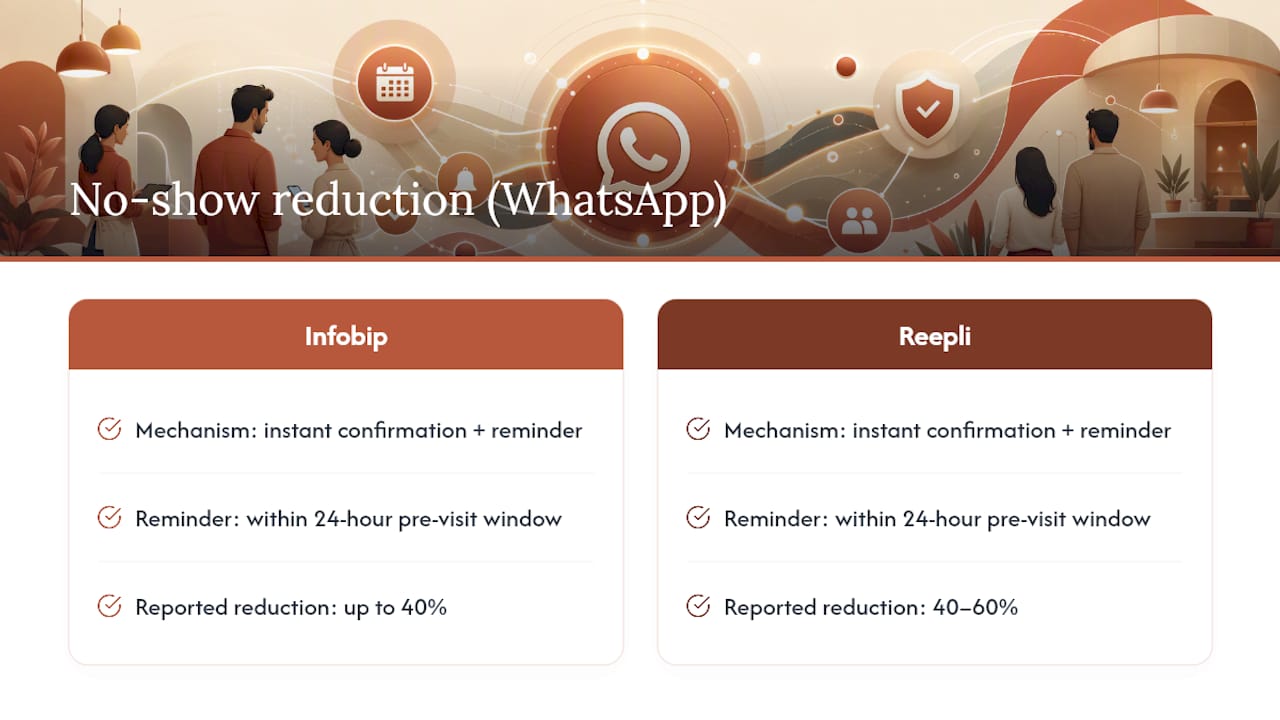
A few habits push that further. Write reminders that are specific rather than generic, and always give a one-tap reschedule or cancel option, since a client who wants to reschedule but has no easy way to do it often just doesn’t show up instead. For appointment types with high cancellation risk (first-time consultations, cosmetic procedures, expensive legal filings), a small deposit collected at booking filters out casual no-shows without adding real friction for serious clients.
None of this works without tracking. Watch your confirmation rate, your reminder response rate, and the actual change in no-show rate by service line after each adjustment, because a cadence that works for dental cleanings won’t necessarily work for legal consultations booked weeks out.
How Long Does WhatsApp Booking Setup Take, and What Does It Cost?
A plug-and-play booking flow using an existing template can go live in under an hour for a business with simple needs. A full API integration tied to a CRM and multi-provider calendar sync usually runs days to a few weeks, mostly waiting on Meta’s template approval and calendar permission setup rather than actual build time.
Pricing tends to fall into a few shapes:
- Monthly SaaS fees for the booking platform itself, often scaled by message volume or number of staff seats.
- Per-conversation or per-template messaging fees charged by the platform partner handling your API access.
- One-time setup fees for calendar connectors, CRM integration, or premium template-approval support.
Before signing anything, ask a vendor about message volume limits, response time guarantees, support hours, and whether bilingual support is included or billed separately. That last question matters more than it sounds. Plenty of platforms handle English templates cleanly and treat Spanish as an afterthought.
What Bilingual Practices Get Wrong About WhatsApp Booking
Most guides treat WhatsApp scheduling as a technical problem. It’s really a language problem wearing a technical costume. A booking flow that only works in English quietly loses every Spanish-dominant client who hesitates for half a second at the first message, then closes the chat.
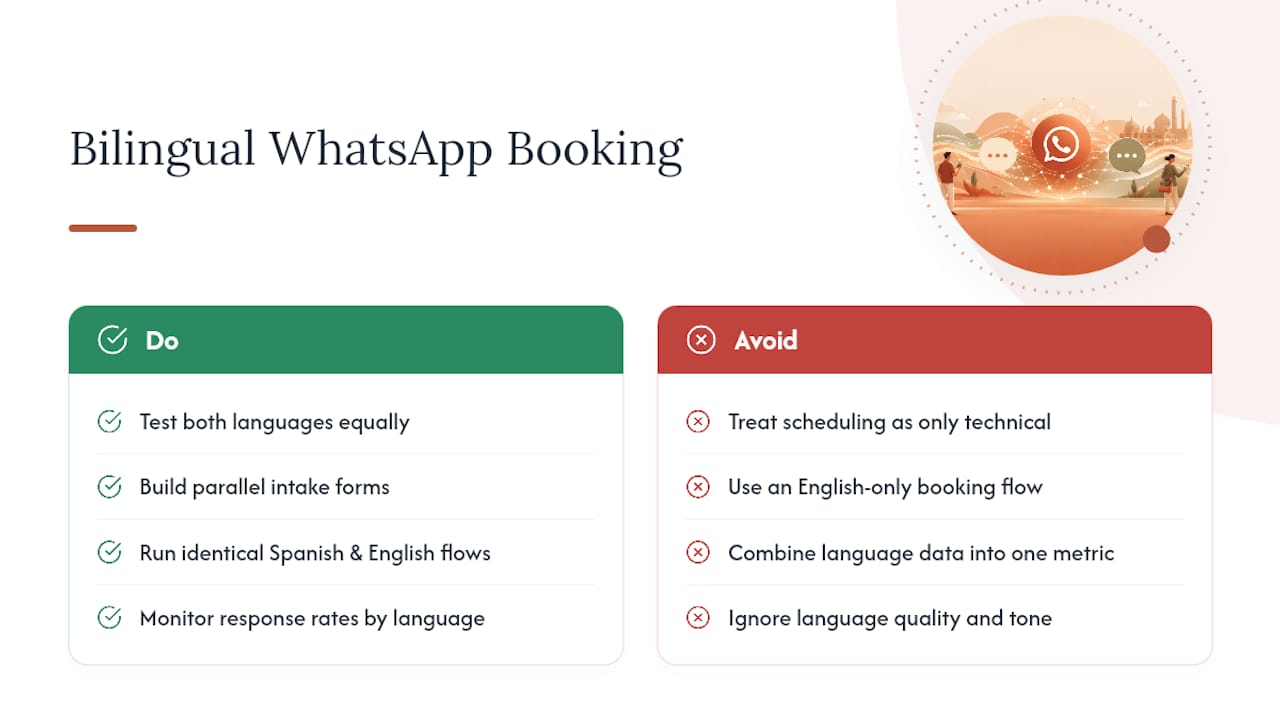
The practices that get this right test both languages the same way: they build parallel intake forms, run identical booking flows in Spanish and English, and monitor response rates by language separately, not combined. A drop in Spanish-language confirmation rates almost never shows up if you’re only watching one aggregate number. Diazluna’s work with dental and legal practices serving Hispanic clients keeps surfacing the same pattern: the technical setup (calendar sync, templates, reminders) is rarely where bookings fail. Language quality and tone are.
…
— Francisco
Want a Bilingual Front Desk You Don’t Have to Build Yourself?
Everything above is doable in-house, but building a verified number, approved templates, calendar sync, and a genuinely fluent Spanish-language flow from scratch usually takes a developer, a translator, and a few weeks you don’t have, which is why many businesses decide to hire an agency to build your appointment booking website. A bilingual digital front desk combines a Spanish and English website, a 24/7 AI receptionist handling calls and messages in both languages, and WhatsApp booking wired directly into your calendar, all running as a single subscription instead of three separate vendor bills.
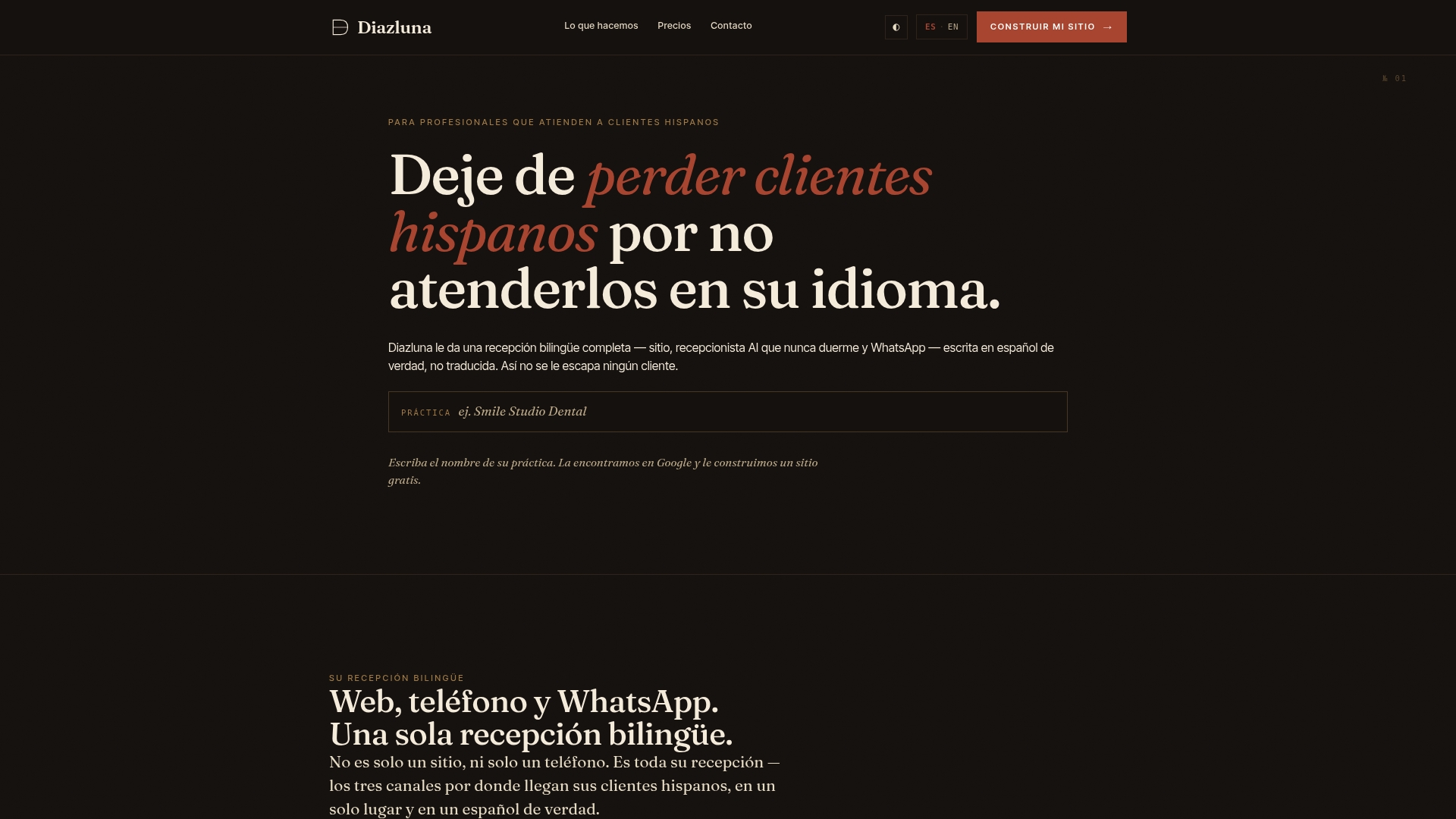
A managed setup like this makes sense the moment language quality matters as much as automation does, which is exactly the case for most dental, legal, and medical practices serving Hispanic clients. You skip the template-approval back-and-forth and the guesswork of translating your own reminders. Visit Diazluna to start a discovery conversation about your current booking setup, and see what a bilingual WhatsApp front desk would look like for your practice.
Sources
The WhatsApp Help Center covers official rules on templates, the 24-hour messaging window, and business account verification. Vendor documentation from Infobip, Happilee, and Reepli provides working examples of booking flows, reminder cadences, and reported no-show reduction figures referenced throughout this guide.
- WhatsApp Help Center
- WhatsApp Business Appointment Bookings — Infobip
- WhatsApp Appointment Booking — Happilee
- WhatsApp Online Appointment Booking + AI Reminders — Reepli
FAQ
How Do You Use WhatsApp for Appointment Scheduling?
Connect a verified WhatsApp Business number to a calendar system, then set up an in-chat slot picker or chatbot that offers open times, confirms the booking, and syncs the event to Google Calendar or Outlook automatically.
Can You Schedule Meetings Directly Inside WhatsApp?
Yes. Interactive list messages let a contact pick a time slot without leaving the chat, and the booking writes straight to your calendar; more complex scheduling (multiple attendees, recurring meetings) typically needs a linked booking tool.
How Does WhatsApp Booking Work Without a Separate App?
A customer taps a QR code or click-to-WhatsApp link, sees available slots through native list messages, picks one, and receives an instant confirmation, all inside the same WhatsApp conversation with no app switch required.
Does WhatsApp Have a Built-In Calendar Feature?
No, WhatsApp doesn’t include a native calendar. Booking systems connect WhatsApp to an external calendar like Google Calendar or Outlook through a two-way sync so slots update in real time on both sides.
What Happens if a Reminder Is Sent Outside the 24-Hour Window?
WhatsApp requires a pre-approved message template for anything sent more than 24 hours after the customer’s last reply, so reminders scheduled a day or more in advance need a template ready ahead of time.