November 10, 2026
ADA Website Compliance for Healthcare: A Practice Guide

Yes, the ADA applies to your practice’s website. Doctors’ offices and private hospitals are covered by Title III of the ADA, which requires equal access to services, effective communication and reasonable modifications. The Department of Justice (DOJ) points to WCAG as the practical benchmark for web content. If your practice takes federal funding, a separate HHS rule sets WCAG 2.1 Level AA as the standard, with a compliance date of May 11, 2027 for larger recipients.
This guide covers who is covered, which standard to build to, what regulators have found wrong on real clinic sites, and a step-by-step plan a practice manager can run without a developer on staff. It also explains how accessibility for people with disabilities differs from Spanish-language access, because many practices mix the two up.
TL;DR
- Private medical practices are covered by ADA Title III, and that includes the website, patient forms and online scheduling.
- WCAG 2.1 Level AA is the benchmark to aim for. HHS requires it for covered recipients of federal funds with 15 or more employees from May 11, 2027.
- The DOJ can investigate and sue. In a 2024 clinic settlement it found barriers such as unlabeled form fields, poor color contrast and no keyboard access.
- Accessibility is ongoing work. New forms, PDFs, videos and plugins can break a site that was fine last quarter.
- Spanish-language access and disability access are separate obligations. A bilingual site does not make a site accessible, and the reverse is also true.
Table of Contents
- Does the ADA apply to a healthcare website?
- Which rules apply to which practice
- What WCAG 2.1 Level AA means in plain words
- What regulators actually found wrong
- Can a practice be sued or penalized?
- A seven-step plan for your practice website
- Treat accessibility as ongoing work
- Disability access is not the same as Spanish-language access
- Perspective
- Questions to ask any website or front desk vendor
- Where Diazluna fits
- FAQ
- Sources
Does the ADA apply to a healthcare website?
The ADA covers health care organizations that serve the public. Under Title III, businesses open to the public, including nonprofits, doctors’ offices and private hospitals, must give people with disabilities an equal opportunity to use their goods and services, communicate effectively, and make reasonable modifications to policies and procedures.
The DOJ’s web accessibility guidance applies that principle online. It says existing technical standards, including WCAG and the Section 508 Standards the federal government uses for its own sites, give helpful direction on making a website accessible. In practice, a patient who is blind, deaf, has low vision, or cannot use a mouse must be able to book, read and ask for records on your site as independently as anyone else.
The ADA’s “effective communication” duty also reaches digital tools. Guidance for providers from ADA Pacific lists digital accessibility as part of effective communication. It names websites, medical kiosks, electronic health records and telephonic appointments as examples. So the scope is wider than your homepage. It includes your patient portal login page, your online intake forms and any scheduling widget you embed.
Which rules apply to which practice
Three sets of rules overlap, and which ones reach you depends on how your practice is funded and organized.
| Rule | Who it covers | Standard | Date to know |
|---|---|---|---|
| ADA Title III | Private practices, clinics, private hospitals open to the public | No single technical regulation for private sites. WCAG is the common benchmark | In force now |
| HHS Section 504 web rule | Recipients of HHS funding, including many practices that accept Medicaid or Medicare payments, with 15 or more employees | WCAG 2.1 Level A and AA | May 11, 2027 |
| ADA Title II web rule | State and local government entities, such as public hospitals and county clinics | WCAG 2.1 Level A and AA | April 26, 2027 for populations of 50,000 or more; April 26, 2028 for smaller ones |
The HHS requirement sits in 45 CFR § 84.84: beginning May 11, 2027, recipients with 15 or more employees must make web content and mobile apps meet WCAG 2.1 Level A and Level AA, subject to limited exceptions. The 2024 final rule adopts WCAG 2.1 as the technical standard.
For public entities, 28 CFR § 35.200 sets the same WCAG 2.1 A and AA requirement. The DOJ’s first-steps page states that its deadlines were extended to April 26, 2027 and April 26, 2028, depending on population. Rules and dates in this area have moved before, so check the official pages for the current status before you plan a budget around a date.
If you are unsure whether your practice counts as a recipient of federal financial assistance, ask your healthcare attorney or compliance officer. The answer decides whether the May 2027 date is yours.
What WCAG 2.1 Level AA means in plain words
WCAG, the Web Content Accessibility Guidelines, is organized around four ideas: content must be perceivable, operable, understandable and robust. Level AA is the middle tier and the one regulators name. For a clinic site, it translates into a short list of checks:
- Text alternatives. Every meaningful image has descriptive alt text. Decorative images are marked so screen readers skip them.
- Color contrast. Text stands out from its background enough to be readable by people with low vision.
- Keyboard access. Every menu, button, form and pop-up works without a mouse, and the cursor focus is visible.
- Labeled forms. Every field has a real label, and error messages say what went wrong and how to fix it.
- Captions and transcripts. Videos have captions. Audio has a transcript.
- Clear structure. Headings follow a logical order so screen-reader users can jump through a page.
The American Dental Association’s Digital Accessibility Guide covers exactly these techniques: color contrast, alt text, video captions, and accessible forms with labels, keyboard access and clear error handling. It is written for dental practices, but the techniques apply to any clinic.
What regulators actually found wrong
The clearest picture of what goes wrong comes from the DOJ’s 2024 Springfield Clinic settlement agreement. The agreement identifies barriers including unlabeled data fields, visually hidden content, insufficient color contrast, and limited keyboard or screen-reader accessibility. It states that these barriers made it very difficult, and in some cases likely impossible, for people with disabilities to independently access services or complete records requests. The DOJ found violations of the ADA.
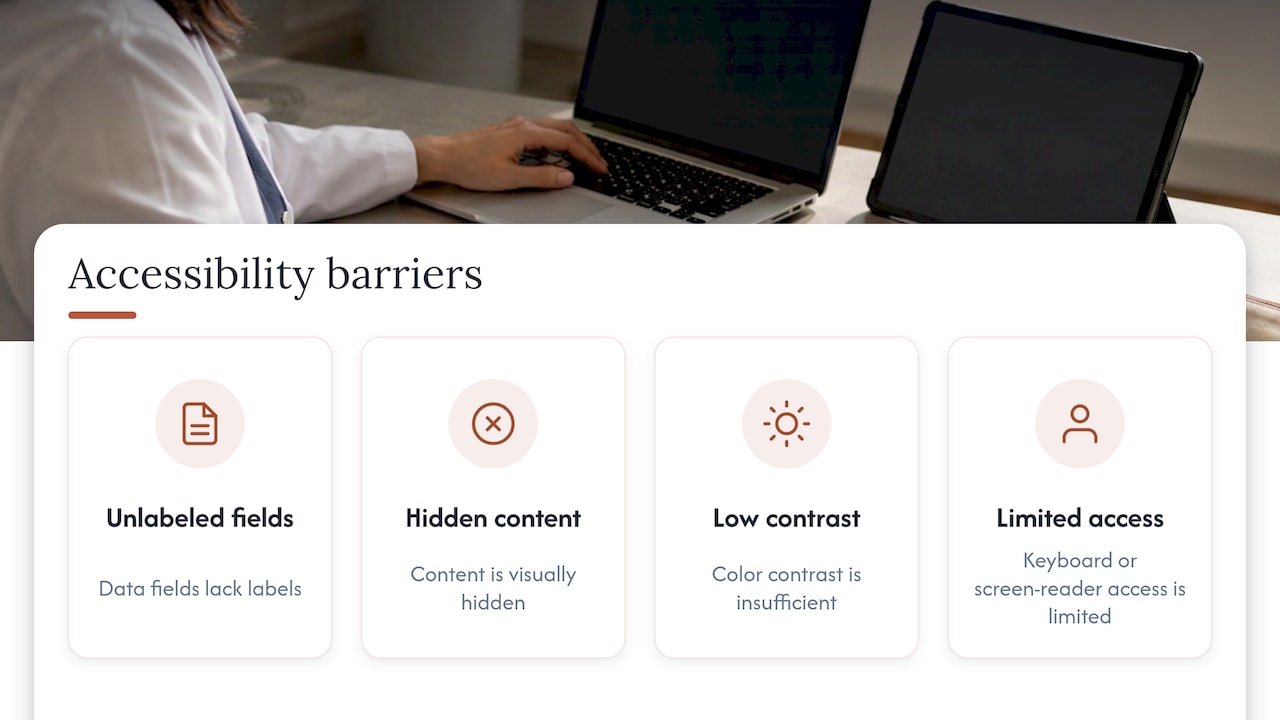
None of these are exotic. They are the ordinary result of a template, a form plugin or a PDF that nobody tested with a keyboard. That is good news: most of them are fixable with a prioritized checklist rather than a rebuild.
Can a practice be sued or penalized?
Yes. The same settlement notes that the DOJ may investigate alleged Title III violations and, if informal resolution is not reached, bring a civil action seeking injunctive relief and monetary damages.
For practices that receive federal funds, there is a second channel. Law firm Holland & Knight notes that the HHS Office for Civil Rights investigates complaints and can run compliance reviews. If it finds a violation, it can impose corrective action plans and penalties, may suspend federal funding, and may refer matters to the DOJ.
The practical takeaway is to document what you do. A dated audit, a remediation list with owners, and a way for patients to report a problem show a good-faith program, and they make the work easier to manage.
A seven-step plan for your practice website
Holland & Knight’s guidance, linked above, recommends assigning responsibility, building a prioritized remediation plan, adopting policies and training staff, assessing digital content and documents, incorporating feedback from people with disabilities, coordinating with vendors, and auditing on an ongoing basis. Here is how a small practice can turn that into action.
- Name an owner. One person, often the practice manager, is accountable for accessibility. Give them time and authority to ask vendors for fixes.
- Inventory everything patients touch. List the website, intake and contact forms, scheduling widget, patient portal link, PDFs, videos, and any chat or messaging tool.
- Run an audit. Use an automated scanner for the first pass, then check by hand: tab through every page with the keyboard only, zoom to 200%, and try a screen reader on your booking flow. Automated tools catch only part of the issues.
- Prioritize by patient impact. Fix the booking path, forms, and records requests first. Then address contrast, headings and alt text across the rest of the site.
- Fix documents. Scanned PDFs of consent forms are a common trap. Replace image-only PDFs with tagged, readable versions or accessible web forms.
- Coordinate with vendors. Ask your website platform, scheduling software and form providers in writing how they meet WCAG 2.1 AA, and set a date for fixes. Accessibility fixes that also help SEO are an easy case to make internally, since clear structure and text alternatives serve search engines as well as screen readers.
- Invite feedback and publish a contact. Add an accessibility statement with a phone number and email where patients can report a problem, and respond quickly.
If your clinic serves Spanish-speaking patients, our guide to copy-ready bilingual contact forms with WCAG shows how labels, error messages and field order work in both languages.
Treat accessibility as ongoing work
There is no certificate that makes a site compliant forever. AAP guidance describes compliance as a continuing process, because site updates, third-party integrations and embedded content such as forms, videos and PDFs can affect accessibility over time. It also stresses fixing barriers in existing content while making new content accessible from the start.
Build that into routine:
- Check accessibility before publishing any new page, form, video or PDF.
- Re-test the booking and contact paths after every redesign, plugin update or vendor change.
- Re-audit on a set schedule, such as twice a year.
- Train whoever edits the site on alt text, headings and captions.
Disability access is not the same as Spanish-language access
Practices serving Hispanic communities often ask whether a Spanish version of the site settles their ADA duty. It does not, and the reverse holds too. They are two different obligations that meet at the same website.
- ADA accessibility is about disability. It asks whether a person who is blind, deaf, or has limited mobility can use the site.
- Language access is about limited English proficiency. It asks whether a patient who prefers Spanish can understand and use your services. For many healthcare organizations this comes from rules such as Section 1557, which we cover in our language access policy deadline guide.
A patient can fall under both. A Spanish-speaking patient who uses a screen reader needs Spanish pages with proper language tags, labeled fields and readable structure. If the Spanish pages are missing alt text or the forms have no labels, the Spanish site is still a barrier. For the combined picture, see our walkthrough on multilingual ADA steps to avoid DOJ trouble and the broader language access plan for healthcare.
The overlap is practical, too. Tagging each page’s language correctly helps screen readers pronounce Spanish text properly, and it helps search engines serve the right page. Our piece on bilingual website navigation with the lang attribute explains the setup. Plain, readable wording also serves both groups, which is why a Spanish readability audit belongs next to your accessibility audit.
Perspective
We talk to practice owners every week who are juggling a web agency, a phone service, a translator and a messaging app. Each one touches the patient’s first contact with the clinic, and nobody owns the whole path.
Our view is that the front desk online should be one connected system. When the bilingual website, the AI receptionist and WhatsApp are designed together, you have one place to review, one place to update, and one patient journey to check for barriers. That is how we built Diazluna, and it is why we argue for an integrated approach over a stack of separate vendors.
Authentic Spanish matters just as much as the structure. Our Spanish is human-reviewed, not machine-translated, because a patient who reads clumsy Spanish on a medical site loses trust fast. The same care applies to accessibility: whoever builds your front desk should treat clear labels, readable forms and a tested booking path as part of the product, not an afterthought.
Francisco
Questions to ask any website or front desk vendor
Whether you rebuild or just update, put these questions to every vendor in writing:
- Which WCAG version and level does the platform target, and how often is it re-checked?
- Are forms labeled, keyboard-operable and clear about errors, in every language you offer?
- Can you edit alt text, headings and captions yourself without a developer?
- How are embedded tools, such as chat, scheduling and messaging, kept in step with your site’s standards?
- Who do you call when a patient reports a barrier, and how fast is the fix?
Keep the answers on file. They support your remediation record and give you a clean basis for comparison.
Where Diazluna fits
If your practice serves Hispanic patients, we built Diazluna as a bilingual front desk: a Spanish and English website that you can edit yourself, María, our 24/7 AI receptionist for calls, messages and appointment scheduling, and WhatsApp integration with real-time summaries and transfer of urgent cases. Setup of the site is free, and there is a one-time activation fee of $399.
Plans are monthly or annual:
- Solo Sitio: $99 per month or $990 per year.
- Sitio + María: $199 per month or $1990 per year.
- Sitio + María Pro: $349 per month or $3490 per year, a full-service managed package with site updates and expanded call capacity.
See the plans on our pricing page, or read how a bilingual medical website can work for your clinic. For a deeper look at the patient side, our article on bilingual healthcare website advantages covers why Spanish-speaking patients stay when the first contact is in their language.
FAQ
Does ADA compliance apply to my small medical practice website?
Yes. Title III covers doctors’ offices and private hospitals that serve the public, and the DOJ’s web guidance treats WCAG as the practical benchmark. Practice size does not remove the duty, though the HHS web rule has a 15-employee threshold for funding recipients.
What standard should my healthcare website meet?
Aim for WCAG 2.1 Level AA. It is the standard in the HHS Section 504 rule and the DOJ’s Title II rule, and it is the benchmark most often used for private practices. Ask your attorney whether the HHS rule’s May 11, 2027 date applies to you.
Can I be sued if my website is not accessible?
Yes. The DOJ can investigate Title III complaints and bring a civil action seeking injunctive relief and damages. For federally funded practices, the HHS Office for Civil Rights can also require corrective action plans and may suspend funding.
Does an accessibility overlay or plugin make my site compliant?
A scanner or plugin can help you find issues, but compliance depends on how your pages, forms and documents actually work for patients. Test the booking and records-request paths yourself with a keyboard and a screen reader, and repeat after every update.
Does a Spanish version of my site satisfy the ADA?
No. Spanish-language access serves patients with limited English proficiency, while ADA accessibility serves patients with disabilities. Your Spanish pages need to meet the same accessibility checks as your English ones.
Sources
- Businesses That Are Open to the Public, ADA.gov
- Guidance on Web Accessibility and the ADA, ADA.gov
- Section 504 Final Rule, HHS (2024)
- State and Local Governments: First Steps Toward Complying, ADA.gov
- 45 CFR § 84.84, Cornell LII
- 28 CFR § 35.200, Cornell LII
- Springfield Clinic Settlement Agreement, DOJ
- Healthcare provider responsibilities under the ADA, ADA Pacific
- Are Your Digital Front Door and Virtual Health Services Accessible, Holland & Knight
- Digital Accessibility Guide, American Dental Association
- Complying with 2024 ADA/HHS Requirements for Web and Mobile Content Accessibility, AAP
- Web Accessibility: Boosting Inclusion and SEO Impact