September 24, 2026
U.S. Practices: Multilingual ADA Steps to Avoid DOJ

Any language your organization publishes on the web has to be as accessible as the English version. That is the practical bar the Department of Justice sets, and WCAG 2.1 Level AA is the technical yardstick behind it. If you serve Spanish-speaking clients, the immediate move is to audit your language tagging and fix your highest-traffic, transaction-facing pages first, before anything else.
TL;DR:
- Ensure all multilingual pages have programmatically determinable language tags to enable correct pronunciation by assistive technology, especially for Spanish content.
- Prioritize fixing transactional pages like forms, appointment scheduling, and billing portals first, as they are most likely to trigger complaints and cause real harm.
- Test translated pages with a screen reader set to the target language and verify that all headings, labels, and error messages are structurally and linguistically consistent.
- Confirm that all content, including third-party tools and embedded widgets, supports proper language tagging and accessibility before publishing.
- Maintain ongoing compliance by assigning responsibility for verifying new content language tags, updating accessibility documentation, and conducting regular audits across all languages.
Table of Contents
- What US Laws Govern Multilingual ADA Compliance
- WCAG Rules That Actually Govern Multilingual Content
- A Practical Checklist for Accessible Multilingual Websites
- How To Test Multilingual Accessibility Before It Becomes a Complaint
- DOJ Compliance Dates and the Exceptions That Actually Apply
- Keeping Translation and Accessibility Aligned as You Update Content
- Publishing an Accessibility Notice and Handling Requests in Any Language
- The Legal Risk of Ignoring Multilingual Accessibility
- Language Markup Beyond the Basics
- Managing Accessibility for Third-Party Multilingual Content
- Keeping Multilingual Compliance Current as Content Changes
- What Working With Bilingual Front Desks Actually Teaches You
- A Bilingual Front Desk That Handles the Access Gap Too
- Where To Verify This Information Directly
- Sources
- FAQ
What US Laws Govern Multilingual ADA Compliance
The ADA splits obligations by who you are. Title II covers state and local government entities. Title III covers private businesses open to the public, including law firms, dental practices, and medical clinics. Both titles reach digital content, and both now point to the same technical target.
The DOJ’s 2024 rule formally adopted WCAG 2.1 Level AA as the standard for web content and mobile apps operated by state and local governments. That is a Title II rule specifically, but it has become the de facto benchmark that courts and plaintiffs’ attorneys point to when evaluating Title III sites too, since no separate technical standard exists for private businesses. Compliance dates for public entities are staggered by population size and resources, which the exceptions section below covers in detail.
Title III businesses operate under a broader, older standard: effective communication. This means that whatever information or service you offer in English, you generally need to offer with equivalent access in the other languages you publish. The DOJ’s guidance on effective communication is explicit that once you choose to communicate in a language, the accessibility bar for that content does not drop just because it is not English. A Spanish-language appointment form that a screen reader cannot parse is not equivalent communication, even if the English version works fine.
The DOJ’s final rule also carves out five narrow exceptions from full conformance:
- Archived web content that is no longer needed for current services
- Preexisting conventional electronic documents (unless someone requests an accessible version)
- Content posted by a third party, absent the entity’s control
- Password-protected content intended for a specific individual
- Preexisting social media posts published before the compliance date
None of these exceptions cover your live, public-facing Spanish or English pages. If your organization prioritizes only one round of remediation, spend it on transactional pages: appointment scheduling, intake forms, billing portals, and anything tied to actually getting service. Those are the pages most likely to trigger a complaint and the ones where inaccessibility does the most real damage to a patient or client trying to get help.
WCAG Rules That Actually Govern Multilingual Content
Success Criterion 3.1.2, Language of Parts, is the WCAG rule that speaks directly to multilingual pages. It requires that the language of each passage or phrase be programmatically determinable, so screen readers and other assistive technology can switch pronunciation and synthesis engines automatically. This W3C standard explains that without it, a screen reader set to English will try to read Spanish text using English phonetic rules, producing garbled, sometimes unintelligible output for Success Criterion 3.1.2.
That single technical requirement carries more practical weight for multilingual sites than almost any other WCAG item, because it determines whether assistive technology can even attempt correct pronunciation. A few other criteria matter just as much once 3.1.2 is handled:
- Captions and transcripts need to exist in each language your video or audio content uses, not just English.
- Semantic headings, labels, and landmark structure need to survive translation intact. A translated page that drops its
<h2>tags breaks navigation for screen reader patients even if the words are perfect. - Character encoding must support the diacritics and special characters your language uses (UTF-8 handles Spanish cleanly; older encodings sometimes do not).
- Text alternatives for images need translated alt text, not the English string left in place.
Pro Tip: Test your Spanish pages with a screen reader set to a Spanish voice profile, not just your default English one. Most teams test only in English and never catch that the synthesized voice is mangling their own translated content.
Structural parity is the piece that gets missed most often. If your English error message says “Please enter a valid phone number” and links to a help page, your Spanish version needs the same structure, the same link, and the same level of clarity. A shorter or vaguer translation is not equivalent, even if it is grammatically correct.
A Practical Checklist for Accessible Multilingual Websites
Fixing multilingual accessibility issues works best when technical, content, UX, and process work happen in that order. Skipping the technical layer means every content fix has to be redone later.
- Set the lang attribute correctly. Tag the
<html>element with the page’s primary language, and wrap any embedded phrases in a different language with their ownlangattribute per Success Criterion 3.1.2. - Confirm UTF-8 encoding site-wide so accented characters and special punctuation render and get read correctly.
- Preserve ARIA roles and semantic markup through translation. Translation vendors sometimes flatten HTML structure when they move content through translation memory tools. Have developers verify the markup survives.
- Localize alt text, not just body copy. Every image description needs its own translation, matched to the language of the surrounding page.
- Localize form labels and error messages fully, including validation text that only appears when a patient makes a mistake.
- Provide captions and transcripts for every language your audio or video content uses.
- Offer accessible alternatives to scanned or image-based PDFs, since a scanned Spanish intake form is unreadable to a screen reader regardless of language.
- Check focus order and keyboard navigation on the translated version separately. Layout shifts from longer or shorter translated strings sometimes break tab order even when the English version works fine.
- Keep navigation and language-switch controls visible and consistent across every page, not just the homepage.
- Put accessibility requirements in vendor contracts and require documentation before publishing.
Pro Tip: Add a QA gate to your release process that blocks any translated page from going live until someone verifies the lang attribute and tests it with a screen reader. Catching this before publication is far cheaper than fixing it after a complaint.
How To Test Multilingual Accessibility Before It Becomes a Complaint
Automated scanners catch a lot: missing alt text, contrast failures, missing form labels. They miss almost everything language-specific. A scanner will not tell you that your Spanish screen reader output is unintelligible, or that a translated error message lost its semantic connection to the form field it describes. Government guidance is direct about this limit, recommending that automated checks pair with manual audits and user testing rather than standing alone.
Manual checks for multilingual pages should include:
- Confirming every
langattribute matches the actual content language, element by element - Listening to a screen reader switch languages mid-page to hear whether pronunciation changes correctly
- Reviewing translated UI labels and error announcements for completeness, not just accuracy
- Checking that translated PDFs and any third-party embedded tools (scheduling widgets, chat plugins) are included in the audit scope
User testing closes the gap that manual audits cannot. Recruit native speakers with disabilities for each language and script your site supports, and have them attempt real tasks: booking an appointment, filling out an intake form, finding your phone number. Some organizations have faced enforcement actions requiring remediation of third-party tools and linked content, which is a reminder that embedded widgets and vendor portals count as part of your site, not someone else’s problem.
Set a cadence: weekly checks on any newly released or translated page, and a full quarterly audit across every language version. Multilingual sites drift out of compliance faster than single-language ones simply because there are more pages to keep in sync.
DOJ Compliance Dates and the Exceptions That Actually Apply
The DOJ’s final rule became effective June 24, 2024, with staggered compliance dates. Larger public entities (those serving populations of 50,000 or more) must comply by April 24, 2026. Smaller public entities and special district governments get more time. Private Title III businesses are not directly covered by this specific rule, but the same WCAG 2.1 AA standard is now the reference point regulators and courts expect.
The five exceptions worth remembering:
- Archived content no longer used for current services
- Preexisting documents, unless a specific request comes in for an accessible version
- Third-party content the entity does not control
- Password-protected content meant for one individual
- Social media posts published before the compliance date
If your organization believes full conformance creates an undue burden or a fundamental alteration to your services, document the specific reasoning, the cost analysis, and any interim accommodation you offered instead. That written record is what protects you if the decision is ever challenged.
Keeping Translation and Accessibility Aligned as You Update Content
The safest workflow treats accessibility as a gate inside your localization pipeline, not a separate cleanup pass afterward.
- Run source-language accessibility checks before translation starts. An inaccessible English page produces an inaccessible Spanish page, just with extra work.
- Give translators explicit instructions to preserve HTML structure, ARIA labels, and alt text placeholders rather than rewriting markup.
- Require developer QA on every translated page before it publishes, checking lang attributes and semantic structure, not just visual layout.
- Demand accessible file formats from vendors. A remediated, tagged PDF or an HTML alternative should be the contractual default, not an afterthought.
- Build a localized accessibility QA checklist with a named owner responsible for sign-off before any language version goes live.
Diazluna’s own cultural nuance and communication checklist walks through translated text, navigation, and assistive-technology testing in more detail if you want a template to adapt.
Publishing an Accessibility Notice and Handling Requests in Any Language
An accessibility notice, published in every language you offer, tells patients and clients exactly how to get help if something on your site does not work for them. At minimum, it should include a contact email and phone number, video relay or video remote interpreting options where relevant, a stated response window, and a clear description of how to submit a request.
- Honor the individual’s stated preference for how they want to communicate whenever possible.
- Treat the requester’s preferred method as the primary consideration, not just the easiest option for your staff.
- Offer a documented fallback only when the preferred method creates a genuine undue burden, and explain why.
Pro Tip: Log every accessibility request and how it was resolved, even the simple ones. That log becomes your best evidence of good-faith effort if a complaint ever escalates.
The Legal Risk of Ignoring Multilingual Accessibility
Non-compliance in a second language carries the same legal exposure as English-language failures, and sometimes more, because the gap is easier to prove. A plaintiff’s attorney does not need a complex argument to show that a Spanish-language page lacks lang attributes or that a translated form has no accessible labels; the failure is visible with basic testing tools.
Title III businesses face private lawsuits and DOJ enforcement action for effective-communication failures. Title II public entities face the same exposure plus the specific WCAG 2.1 AA standard now written into federal rule, with clear compliance dates attached. Courts have increasingly treated a language offering as a commitment: once you publish in Spanish, you have taken on the obligation to make that Spanish content accessible, not a lighter version of the English obligation.
The reputational cost tends to compound the legal one. A dental practice or law firm that markets itself to Hispanic clients, then delivers a Spanish website that a blind or low-vision Spanish-speaking patient cannot use, undermines the exact trust that bilingual outreach was supposed to build. That damage does not show up in a settlement number, but it shows up in client retention.
Multilingual sites also multiply your surface area for risk. Every additional language is another full set of pages that can drift out of compliance, another translation vendor whose output needs QA, and another version of every form and error message that has to stay in sync with the English original. Treating each language as a fully separate accessibility obligation, rather than a translation layer on top of one compliant site, is the mindset that actually holds up under scrutiny.
Language Markup Beyond the Basics
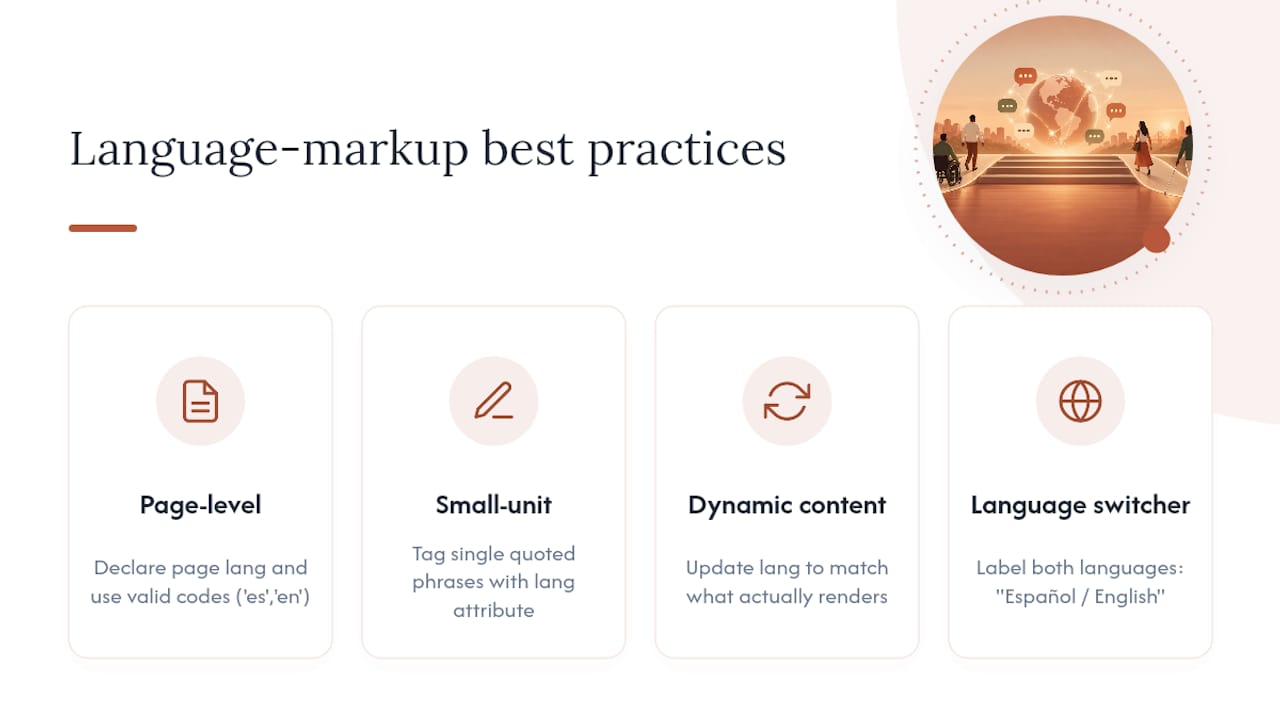
Success Criterion 3.1.2 covers the core requirement, but a few practical habits go further than the letter of the rule. Tag language changes at the smallest reasonable unit: a single quoted phrase in Spanish inside an English paragraph needs its own lang attribute, not just a page-level tag.
Watch for language switches inside dynamic content: chatbot responses, search results, and user-generated comments often mix languages without any markup at all. If your site auto-detects a patient’s browser language and serves content accordingly, make sure the lang attribute updates to match what actually renders, not what the server assumed.
Avoid relying on visual cues alone, like a flag icon or a country name, to signal language. Screen reader patients need the language encoded in the markup itself, not implied by a graphic they cannot see. And when you use a language switcher, label it in both languages simultaneously, such as “Español / English,” so a patient using assistive technology in either language can find and understand the control.
One overlooked detail: lang attributes need valid language codes (“es” for Spanish, “en” for English), not shorthand or regional variants unless you genuinely need to distinguish, say, Mexican Spanish from Castilian Spanish for pronunciation purposes. Getting the code wrong breaks the exact synthesis behavior 3.1.2 exists to enable.
Managing Accessibility for Third-Party Multilingual Content
Scheduling widgets, chat plugins, payment processors, and embedded review platforms are usually built by someone else, but the DOJ and courts have made clear they still fall inside your accessibility obligations when they sit on your site. The exception for third-party content is narrower than most teams assume. It applies to content genuinely outside your control, not to a vendor tool you chose, embedded, and profit from.
Before adopting any third-party widget for a bilingual site, ask the vendor directly whether their tool supports proper language tagging and whether it has been tested with screen readers in both languages. Get the answer in writing, and put accessibility requirements into the contract itself rather than treating it as a verbal assurance.
Where a vendor cannot confirm multilingual accessibility, build in a fallback: a phone number, an email, or a simple accessible form that accomplishes the same task without depending on the third-party tool. That fallback protects patients and clients while you push the vendor for a fix, or decide to switch vendors entirely.
Audit third-party tools on the same cadence as your own content, since vendors update their software independently of your release schedule, and an update on their end can silently break the accessibility behavior you tested six months ago. Diazluna’s approach to bilingual digital marketing touches on vetting third-party integrations for practices juggling multiple vendor tools across two languages.
Keeping Multilingual Compliance Current as Content Changes
Compliance is not a one-time project. Every new blog post, updated form, or added service page in a second language is a fresh opportunity to reintroduce the same errors you already fixed once. Organizations that treat multilingual accessibility as a permanent workflow, rather than a completed audit, are the ones that stay compliant.
Assign clear ownership. Someone on your team, or at your agency, needs to be responsible for verifying that new Spanish content gets the same accessibility review as new English content, every time, without exception. Build that review into your content calendar rather than hoping someone remembers.
Watch for scope creep in your language coverage. Adding a third language, or expanding from a marketing page to a full transactional experience, resets your risk profile. Treat each meaningful expansion as its own mini-audit rather than assuming your existing checklist automatically covers the new surface area.
Finally, keep your documentation current. If you have already logged undue-burden decisions, accessibility notice text, and past user-testing results, update those records whenever your site structure changes meaningfully. Stale documentation defeats the purpose of having it in the first place. Diazluna’s write-up on what a bilingual business website means for growth covers why treating language access as ongoing operational infrastructure, not a launch checklist, tends to produce better outcomes for practices serving Hispanic clients long-term.
What Working With Bilingual Front Desks Actually Teaches You
The most common failure isn’t bad translation. It’s incomplete language tagging, PDFs nobody remembered to remediate, and Spanish form labels that don’t match their English counterparts anymore after six months of edits. Those gaps accumulate quietly until a patient or client hits one and can’t get through.
What actually reduces client loss is pairing accessibility remediation with the operational side: a bilingual website that stays accurate, a receptionist function that answers in the right language at the right hour, and a WhatsApp channel that doesn’t force anyone to switch tools mid-conversation. Fix the code, but also fix the workflow around it. For step-by-step templates, the law firm Spanish website guide breaks down what that looks like in practice for a professional services site.
— Francisco
A Bilingual Front Desk That Handles the Access Gap Too
Accessibility remediation fixes your website’s code and is key to boosting inclusion and SEO impact. It doesn’t answer the phone at 9 p.m. in Spanish, or catch the WhatsApp message from a patient who couldn’t fill out your online form. Diazluna is built for that gap: a fully optimized bilingual website paired with a 24/7 AI receptionist fluent in Spanish and English, plus WhatsApp integration, so no client is lost simply because the language or the channel wasn’t there when they needed it.
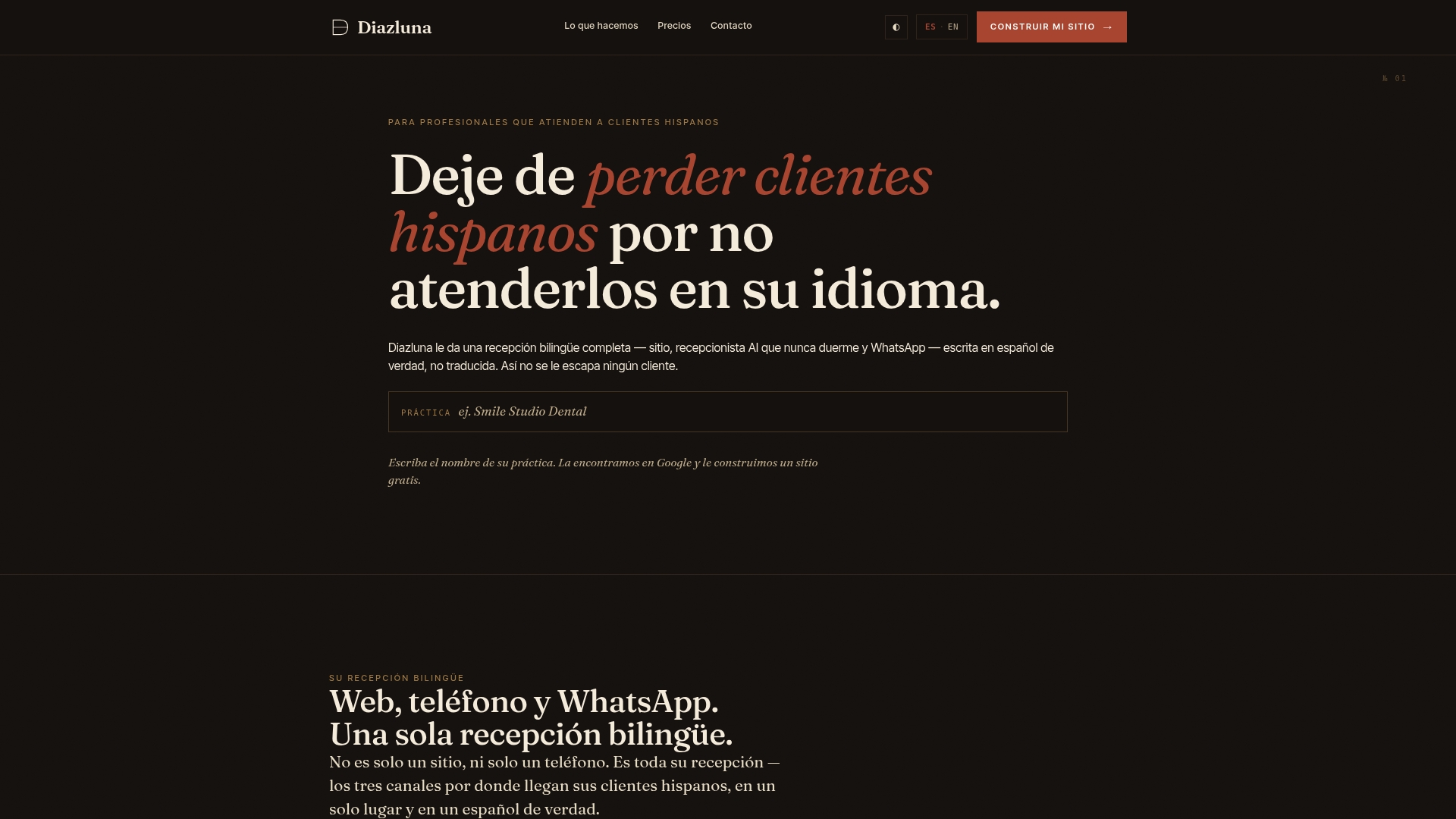
This isn’t a claim that Diazluna makes your site legally compliant on its own, that work still runs through the checklist above. What it does is make sure the human side of language access, the calls, the messages, the after-hours questions, gets handled in both languages without your practice juggling three separate vendors to do it. Plans start with Solo Sitio, a basic bilingual website package suitable for small businesses, and the full Sitio + María package, which adds the AI receptionist, is available as a higher-tier option. If you want a focused look at where your bilingual front desk has gaps, check the current packages at Diazluna and request a walkthrough of what fits your practice.
Where To Verify This Information Directly
For the primary legal and technical sources behind this guide, go straight to the government publications rather than secondary summaries. The DOJ’s Small Entity Compliance Guide covers WCAG 2.1 AA adoption and timelines in plain language. The effective communication guidance and general web accessibility guidance from ADA.gov cover obligations and testing recommendations. The W3C’s page on Language of Parts explains the technical standard behind Success Criterion 3.1.2. For the full regulatory text and compliance dates, see the Federal Register final rule and the DOJ web-rule PDF.
Sources
FAQ
What Are the ADA Web Accessibility Requirements for 2026?
Public entities covered by Title II must meet WCAG 2.1 Level AA for web content and mobile apps, with larger entities required to comply by April 24, 2026 under the DOJ’s final rule. Private businesses under Title III don’t have that specific rule, but effective communication obligations still apply, and WCAG 2.1 AA is the standard regulators and courts reference.
What Places Are Exempt From ADA Compliance?
The DOJ’s rule carves out five narrow exceptions: archived content, preexisting conventional documents (unless requested), third-party content outside the entity’s control, password-protected individualized content, and preexisting social media posts. Live, public, transactional pages like appointment forms and intake portals are not exempt.
Does ADA Apply Outside the United States?
No. The ADA is US federal law and applies only to entities and content operating in the United States; other countries have their own accessibility laws, such as the EU’s accessibility directives. If your practice serves patients internationally, check the accessibility requirements specific to that country separately.
Is WCAG 2.2 a Legal Requirement?
Not currently. The DOJ’s final rule specifically adopted WCAG 2.1 Level AA as the Title II technical standard. Following newer standards where practical is good practice, but 2.1 AA remains the version referenced in the current federal rule.
How Much Does Diazluna Cost for a Bilingual Website?
Diazluna offers a subscription model starting with a basic bilingual website plan and additional packages that include bilingual AI receptionist services. For the most current pricing details, visit Diazluna’s official website. Full current pricing and the Sitio + María Pro tier are listed on Diazluna’s site.