November 1, 2026
AI Phone Triage in Healthcare
AI phone triage uses a voice or chat system to answer a patient’s call, ask structured questions about why they are calling, and route them to the right next step: an emergency instruction, a nurse, a same-day slot or a routine appointment. Used well, it speeds up the first minute of every call and puts the right person on the line sooner. It supports your clinical staff and does not replace them. This guide covers how it works, what the research shows, which safeguards to require, and how to handle Spanish-speaking callers.
TL;DR
- AI phone triage screens callers, collects symptoms and details, and routes the call by urgency. Licensed staff keep the final clinical decision.
- Evidence is promising but uneven: one health system’s digital triage tool matched physician triage 88% to 96% of the time, yet teletriage safety research overall is still thin.
- Require human review, fast escalation to a person, privacy protections and a way to switch to a qualified interpreter.
- For Spanish-speaking patients, federal rules expect meaningful language access, so the AI must speak natural Spanish and hand off cleanly.
- Our receptionist, María, answers 24/7 in Spanish and English and passes urgent cases to your team. It does not diagnose.
Table of Contents
- What AI phone triage means in a medical practice
- How AI phone triage works, step by step
- What the evidence shows so far
- Safety risks and the guardrails that address them
- Serving Spanish-speaking callers
- How to roll out AI phone triage in your practice
- Our perspective
- Where Diazluna fits
- Questions to ask any vendor before you sign
- FAQ
- Sources
What AI phone triage means in a medical practice
Triage is sorting by urgency. The U.S. Department of Health and Human Services describes tele-triage as using technology to screen patients remotely, work out their condition and identify the care they need. A classic example is a patient at home deciding whether to go to an emergency department.
AI phone triage puts software at the front of that process. Instead of a caller waiting on hold for a nurse or a front desk worker, an AI agent picks up, listens, asks questions and records the answers. Depending on the setup, it can sit in one of three roles:
- Intake and routing. It collects the caller’s name, date of birth, reason for calling and callback number, then sends the call to the right queue.
- Structured symptom screening. It follows a clinical question set and recommends a level of urgency for a nurse to confirm.
- Scheduled outreach. It places calls such as pre-procedure instructions and reports back to staff.
The first role is the safest and most common for small and mid-size practices. The second needs clinical validation and governance. The third is where large health systems are experimenting now.
How AI phone triage works, step by step
Peer-reviewed descriptions of AI triage engines follow a similar workflow. According to a published decision-support study, the patient gives initial symptoms, the system generates focused follow-up questions, it assesses risk using the patient’s history and clinical guidelines, and it recommends a point of care and a timeframe. Critical cases go straight to immediate teleconsultation with a clinician.
On a phone line, that looks like this:
- Answer and identify. The AI picks up on the first ring, in the caller’s language, and states that it is an automated assistant.
- Listen for red flags. Phrases such as chest pain, trouble breathing or heavy bleeding trigger a fixed emergency script and a live handoff.
- Ask targeted questions. Some engines use Bayesian probabilities to choose the next relevant question and estimate care acuity. The same research notes that this is not diagnosis.
- Recommend a path. The call is classified: emergency, same-day, next available, routine or administrative.
- Summarize for a human. Staff receive a transcript or summary so the patient does not have to repeat themselves.
- Confirm or override. A nurse or clinician reviews and has the last word.
Steps 5 and 6 matter most. A system that collects information but never reaches a person is a voicemail with better grammar.
What the evidence shows so far
The research is encouraging, but be careful about what each study measured.
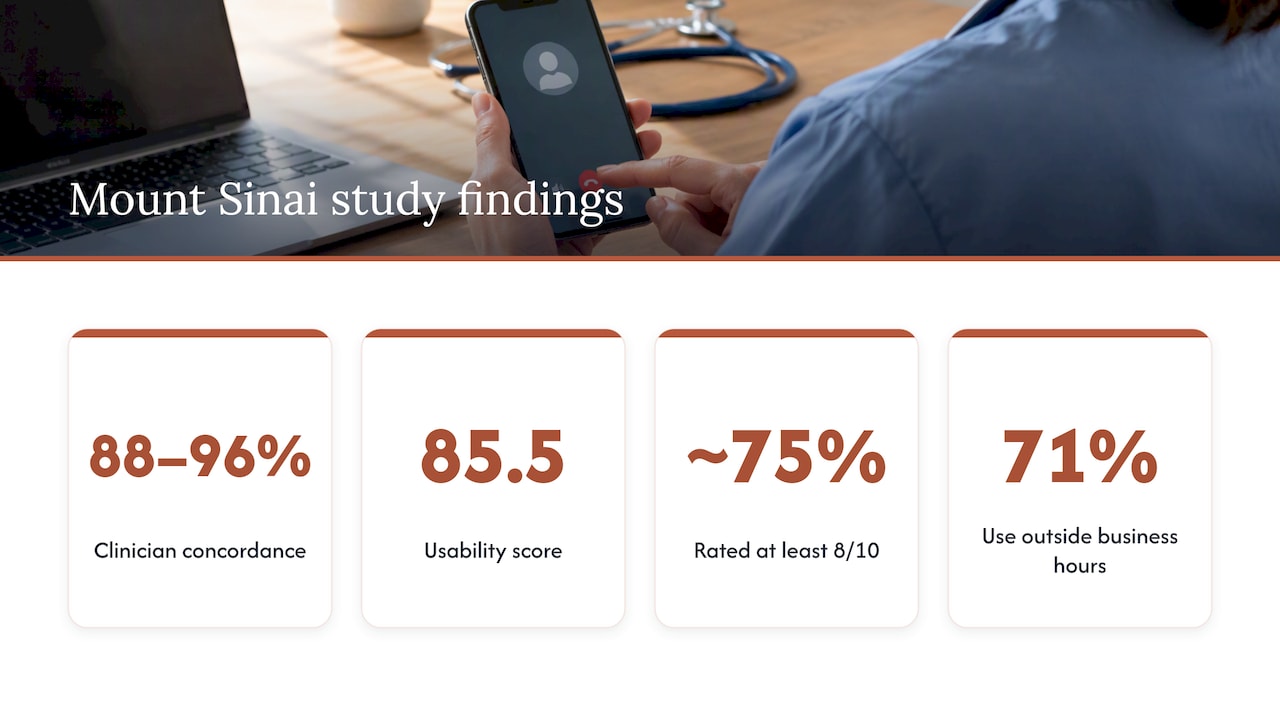
Accuracy against clinicians. A peer-reviewed evaluation of Mount Sinai’s AI triage tool reported 88% to 96% concordance with physician triage and a system usability score of 85.5. Roughly 75% of users rated it at least 8 out of 10.
After-hours demand. In the same study, about 22,000 patients completed digital triage sessions out of more than 60,000 visits, and 71% of use happened outside business hours. For a practice, that is the gap an AI phone line is built to fill: patients call when your office is closed.
Pre-procedure calls. At Mount Sinai, a voice AI program for cardiac prep calls handled 1,606 calls with completion rates above 86% over six months. It automated repetitive instructions and data collection, and nurses reviewed every encounter, called back when needed and verified reports before anything entered the electronic health record.
System-level benefits. HHS lists potential tele-triage benefits including less emergency department crowding, shorter waits, faster help for low-risk patients and fewer patients leaving without treatment.
Integration is still immature. A scoping review of 19 decision support systems for emergency telephone triage found 11 in real-world use and only 3 connected to electronic health records.
Taken together: AI can sort and document calls quickly and at all hours, and the best results come where nurses stay in the loop.
Safety risks and the guardrails that address them
The honest picture is that the field is young. A 2024 narrative review of teletriage safety found the research sparse and of variable quality, with a high potential for error and technology that may move faster than professional standards. That is a reason to adopt carefully, not a reason to avoid structure. Here are the guardrails to ask any vendor about.
Keep a human in charge
The Agency for Healthcare Research and Quality calls human review of AI output a key promising practice, because AI may not capture all the context a clinician knows. A 2026 framework for patient-facing AI in emergency settings says the same thing in practical terms: the tool can capture the patient’s story, but licensed staff keep final authority over triage levels.
Make escalation fast and simple
Mount Sinai’s cath lab agent, Sofiya, has a very low threshold for transferring a call to a nurse. Its voice program also relied on curated knowledge, escalation rules and restricted instructions to limit inaccurate answers. Copy that logic:
- A fixed list of emergency phrases that always triggers a live handoff or a 911 instruction.
- A “talk to a person” request that works on the first try, at any point in the call.
- Rules that stop the AI from improvising medical advice.
Plan for privacy and downtime
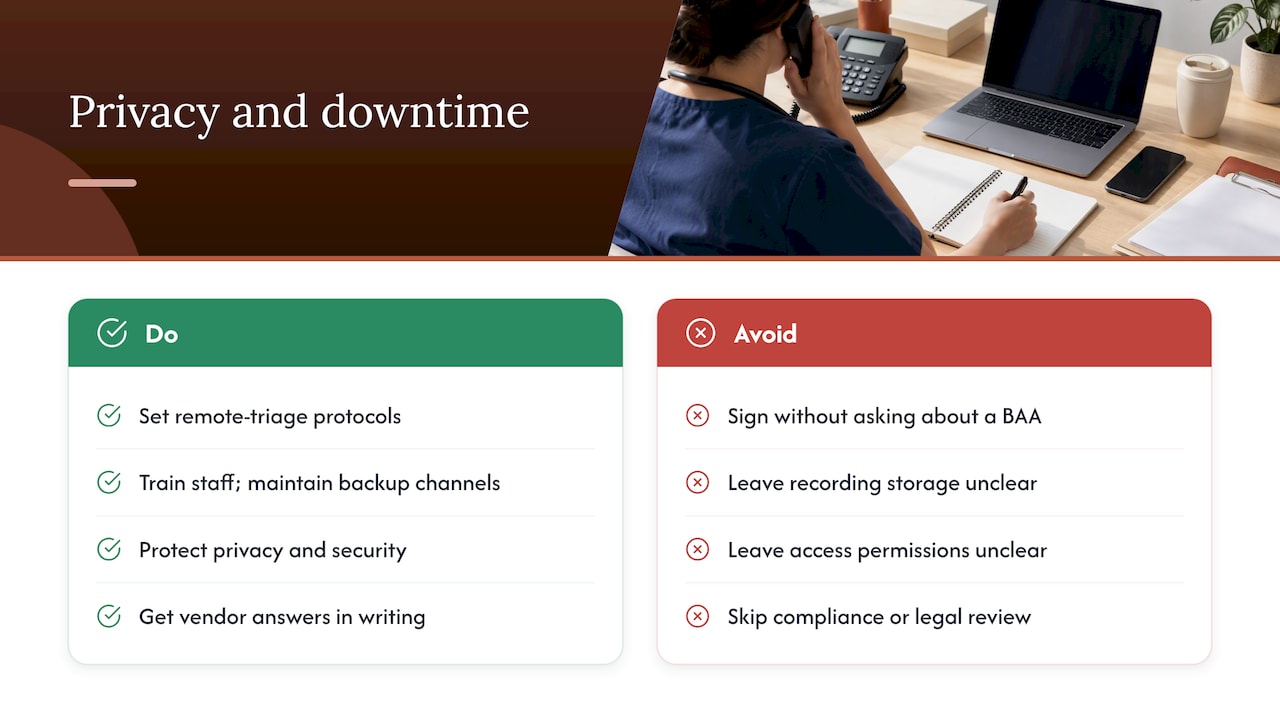
HHS emergency-preparedness guidance says organizations using telehealth should have remote-triage protocols, staff training, backup communication channels and privacy and security measures. Before you sign with any vendor, ask whether it will sign a business associate agreement, how call recordings and transcripts are stored, and who can access them. Ask for the answers in writing, and have your compliance lead or healthcare counsel review them.
Monitor quality over time
A triage tool is not a set-and-forget purchase. Review a sample of calls every week at first: Were urgent calls escalated? Did the summary match the recording? Did any caller get stuck? Treating this as a standing quality loop, the same way you would approach quality management in healthcare, keeps small errors from becoming patterns.
Serving Spanish-speaking callers
If your patients include Spanish speakers, triage quality depends on language quality. A caller who cannot describe symptoms clearly may be sorted into the wrong urgency tier.
Federal rules set the baseline. HHS’s Office for Civil Rights explains that Title VI and Section 1557 require covered recipients to take reasonable steps to provide meaningful access for people with limited English proficiency, including free language assistance when necessary. Whether those rules apply to your practice depends on whether you receive federal financial assistance, so confirm with your compliance advisor.
Good practice for phone and virtual interpretation, according to the National Center for Farmworker Health, is to use qualified interpreters or trained bilingual staff, speak in plain language, use teach-back, and avoid relying on family members to interpret on the fly.
For AI specifically, the National Council on Interpreting in Health Care recommends that patients and providers be able to accept or decline AI interpreting each time, choose a qualified human interpreter, and have a protocol for switching to a human mid-session.
Translated:
| Situation | What the AI should do |
|---|---|
| Caller prefers Spanish | Answer in natural Spanish from the first sentence, with no “press 2” maze |
| Routine request (appointment, hours, directions) | Handle it end to end and confirm by text or WhatsApp |
| Any clinical symptom beyond a simple question | Collect the basics, flag the call and route it to staff |
| Possible emergency | Give the fixed emergency instruction and transfer immediately |
| Caller asks for a person or sounds confused | Hand off right away, with a summary so they do not repeat themselves |
| Detailed clinical discussion | Qualified interpreter or bilingual clinician takes over |
We go deeper on this in our guide to an AI receptionist for Spanish-speaking medical patients and on urgent call routing for clinics with Spanish.
How to roll out AI phone triage in your practice
A phased rollout keeps risk low and lets your team trust the system before it carries more.
- Map your call types. Pull a week of calls and tally them: scheduling, billing, refills, symptom questions, urgent. Most practices find that administrative calls are the large majority.
- Start with intake and routing. Let the AI answer, collect details and route. Do not ask it to assess symptoms yet.
- Write your escalation rules with your clinicians. Decide which words, situations and ages trigger a live transfer. Put them in writing.
- Set up the handoff. Decide who receives urgent summaries, by which channel, and how quickly they must respond. Our piece on call triage automation for bilingual practices shows one way to structure it.
- Train staff. Everyone should know what the AI says, what it never says and how to take over a call. See how to train staff for Spanish calls.
- Test with real scenarios. Call it yourself in English and Spanish, at night, with an accent, with background noise, and with a fake emergency.
- Review weekly, then monthly. Check a sample of calls against the summaries and adjust the rules.
- Expand carefully. Add more tasks only after the first ones run cleanly.
For a broader view of how the front-desk side works, read how an AI medical receptionist works for clinics and what an AI medical intake assistant is.
Our perspective
Most of the calls a practice loses are not clinical puzzles. They are a patient who called after hours, reached voicemail, and called the next office instead. For Spanish-speaking patients it is worse: if the greeting is in English only, many never leave a message at all.
That is why we built María to be a front desk first. She answers around the clock in Spanish and English, handles scheduling, takes messages, and sends your team a real-time summary. When a call sounds urgent, she transfers it to your people. We designed her to do the work that does not need a nurse so your nurses can spend their time on the calls that do.
We also believe the Spanish has to sound like your practice wrote it. Our content is human-reviewed rather than machine-translated, because trust starts with the first sentence a patient hears. The same care applies on the website and on WhatsApp, where many Hispanic patients already prefer to message.
Our advice to any practice: do not buy a promise of automated diagnosis. Buy a reliable first response, a clear escalation path and a summary your staff can act on. That is the version of AI phone triage that holds up in a real clinic.
Francisco
Where Diazluna fits
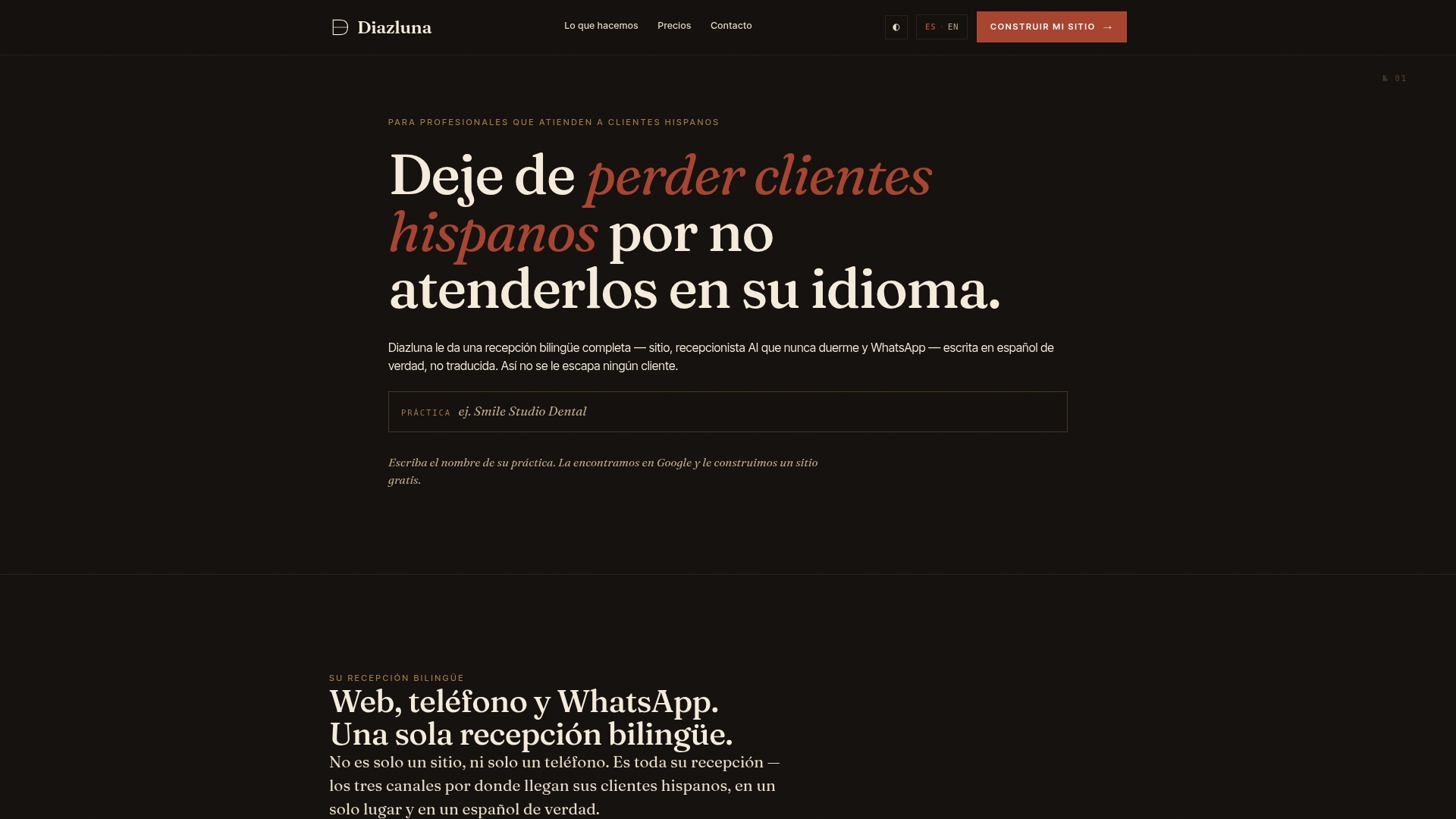
Diazluna is a bilingual digital front desk for practices serving Hispanic patients: a fully optimized Spanish and English website, a 24/7 AI receptionist, and WhatsApp integration in one subscription. The receptionist manages calls, messages and appointment scheduling, sends real-time summaries and transfers urgent cases to your team.
Plans, as published on our site:
| Plan | Monthly | Yearly |
|---|---|---|
| Solo Sitio (website only) | $99 per month | $990 per year |
| Sitio + María (website plus AI receptionist) | $199 per month | $1,990 per year |
| Sitio + María Pro (managed package with site updates and expanded call capacity) | $349 per month | $3,490 per year |
There is a one-off activation fee of $399. You can see the plans and start setup or go straight to the build flow. Dental practices can start from our page for Hispanic-serving dentists.
Questions to ask any vendor before you sign
Use this checklist in demos:
- What happens when a caller says a red-flag phrase? Ask to hear it.
- How quickly can a caller reach a human, and what does the staff member see on screen?
- Is the Spanish natural and regionally flexible, or translated word for word?
- Will you sign a business associate agreement, and where are recordings and transcripts stored?
- Can the system be switched off or bypassed instantly during an incident?
- What reports will I get on missed escalations and call outcomes?
- Who edits the scripts when our policies change, and how fast?
A vendor who answers these concretely is a better bet than one who leads with accuracy percentages.
FAQ
Is AI phone triage the same as an AI receptionist?
Not exactly. An AI receptionist answers calls, schedules appointments and routes callers by request type. Clinical triage goes further and assesses symptom urgency using a validated protocol. Many practices begin with receptionist-style routing and add clinical screening only with nurse oversight and clear governance.
Can AI phone triage replace nurses?
Current guidance says no. AHRQ describes AI as safest as decision support, with clinicians reviewing outputs for relevance and missing context. In Mount Sinai’s voice AI program, nurses checked every encounter before reports entered the record.
Is AI phone triage safe for emergencies?
Only with a fixed escalation path. Emergency phrases should trigger an immediate human transfer or an instruction to call 911, independent of any free-form AI response. Test that path yourself before launch, and review it regularly.
Does it work for Spanish-speaking patients?
It can, if the Spanish is natural and the system hands off to a person or qualified interpreter when needed. Patients should also be able to decline the AI and ask for a human. Check your compliance obligations for language access with your advisor.
How much does an AI receptionist cost for a small practice?
Our Sitio + María plan, which includes the website and the 24/7 AI receptionist, is $199 per month or $1,990 per year, plus a one-off $399 activation fee. Other vendors price differently, so compare what each includes.
Sources
- Tele-triage, Telehealth.HHS.gov
- Artificial Intelligence Decision Support for Medical Triage
- The potential of virtual triage AI to improve early care
- Mount Sinai’s AI triage tool study
- Voice AI Supports Pre-Procedural Cardiac Calls
- Clinical decision support system in emergency telephone triage, scoping review
- Safety in Teletriage by Nurses and Physicians
- AHRQ: Exploring How AI Can Enhance Clinical Decision Support
- AI agent calling cath lab patients
- Developing an emergency preparedness strategy, Telehealth.HHS.gov
- An Evidence-Based Framework for Patient-Facing AI in the Emergency Department
- HHS Continues to Improve Access for LEP Individuals
- NCFH: Best Practices for Phone and Virtual Interpretation
- NCIHC: Guidance on AI-generated Interpreting
- The Importance of Quality in Healthcare