October 24, 2026
Call Triage Automation for Bilingual Practices
Call triage automation means software answers an incoming call, works out who is calling and what they need, and sends the call down the right path: book it, answer it, route it to a person, or escalate it now. For a dental, medical or law practice with Spanish-speaking callers, the part that decides whether it works is language. A triage system that sorts calls well in English and badly in Spanish does not reduce your workload. It hides your lost callers.
This guide explains how automated triage works, what to hand to software and what to keep with people, how to build the escalation rules, and which legal points deserve attention before you switch anything on.
TL;DR
- Call triage automation identifies the caller, classifies the request and routes it. The best use is the routine majority of calls: appointments, hours, directions, intake, simple questions.
- Urgent, clinical and legal-judgment calls must transfer to a person quickly, with a summary, so the caller never repeats the story.
- In Spanish, the system must understand real speech and be written by people, not machine-translated. Language access is also a legal matter for many healthcare providers.
- AI does not exempt you from phone and text consent rules. Log every automated touchpoint.
- Start with a short list of call types, test them in both languages, and review transcripts weekly.
Table of Contents
- What call triage automation actually does
- Why clinical triage models matter, even for non-clinical front desks
- What to automate and what to keep human
- The language problem most triage guides skip
- Building escalation rules that hold up
- Legal points to settle before launch
- Perspective: what we have learned about triage in Spanish
- Keeping human follow-up timely
- How to choose a triage setup for a small practice
- Where Diazluna fits
- A 30-day rollout plan
- FAQ
- Sources
What call triage automation actually does
Triage comes from medicine: sort people by urgency so the most serious cases are seen first. Phone triage borrows the idea. Every call gets assessed for urgency and type, then directed to the appropriate response path.
An automated system usually does four things in order:
- Answers immediately, at any hour, without a hold queue.
- Identifies the caller: new or existing, name, callback number, preferred language.
- Classifies the request: scheduling, billing, prescription refill, new-case inquiry, urgent symptom, existing-matter question.
- Routes or resolves: books the appointment, answers the question, sends a message to the right person, or transfers the call live.
The top search results for this topic cover very different settings: 911 non-emergency lines, hospital call centers, IT ticket queues. The logic is the same, but the stakes and the rules are not. A small practice is closer to the healthcare call center than to the 911 center, and the questions to ask are practical ones. What happens at 7 p.m. on a Friday? What happens when the caller speaks only Spanish and says something that sounds urgent?
Why clinical triage models matter, even for non-clinical front desks
Clinical triage systems are structured on purpose. NHS Pathways, the telephone triage system used in England, is built as a linked series of algorithms that connect clinical questions to care advice and end at defined endpoints. Non-clinical advisors follow the questions; the system does not rely on improvisation.
The lesson for a practice owner is not to copy a national health service. It is that good triage has fixed order: rule out the dangerous cases first, then narrow the request, then choose the endpoint. In a dental office that might mean:
- First check: severe swelling, trouble breathing or swallowing, uncontrolled bleeding, facial trauma. Transfer immediately and tell the caller to call 911 when the situation calls for it.
- Second check: pain, a broken tooth, a lost crown. Offer the earliest urgent slot or the on-call line.
- Third check: cleanings, consultations, insurance and billing questions. Book or answer.
The order is what makes automation safe. Sort by risk before convenience.
What to automate and what to keep human
Research on telephone triage and advice services found that patient satisfaction is generally high and these services can reduce clinical workload. The same body of evidence stresses that triage is an interactional process: quality depends on how the technology fits the wider service model and whether it improves fair access to care. In plain terms, a system that answers fast but leaves callers stranded after the handoff has not solved anything.
A workable split for most small practices looks like this:
| Call type | Automate fully | Automate then hand off | Keep with a person |
|---|---|---|---|
| Hours, location, parking, accepted insurance | Yes | ||
| New appointment, reschedule, cancellation | Yes | ||
| New patient or new client intake | Yes, with summary | ||
| Prescription refill request or billing dispute | Yes | ||
| Symptoms that may be urgent | Immediate transfer | Yes | |
| Legal emergencies (arrest, detention, deadline today) | Immediate transfer | Yes | |
| Anything the caller asks a human for | Yes |
Two rules keep this table honest. First, a caller who asks for a person gets a person. Second, the system never gives clinical or legal advice. It collects, schedules, informs and escalates.
For a deeper look at how this works inside a clinic, our guide to how an AI medical receptionist works walks through the call flow, and what an AI medical intake assistant is covers the intake step in detail.
The language problem most triage guides skip
Almost every article ranking for this keyword treats language as a settings menu. For practices serving Hispanic clients, it is the main risk.
The HHS Language Access Plan notes that roughly 68 million people in the U.S. speak a language other than English at home, and that 8.2% have limited English proficiency. It also describes meaningful language access as a legal obligation under Title VI of the Civil Rights Act and Section 1557 of the Affordable Care Act for entities receiving federal financial assistance. If your practice takes Medicaid or Medicare, ask your compliance advisor or attorney whether that applies to you. It often does.
The same document warns that integrated voice prompt systems have made it harder for people with limited English proficiency, because they must navigate phone trees to reach an interpreter. An automated triage system that opens with “For English, press 1” and then expects a Spanish speaker to continue in menus repeats that problem. A better design recognizes Spanish from the first sentence and continues in Spanish.
Translation is not the same as authentic communication
HHS materials separate translation from communication that works: the patient has to understand how serious the situation is, and the provider has to understand what the patient actually needs. A word-for-word machine script can miss register, regional vocabulary and the polite indirectness many callers use. A caller who says their child “no se siente bien” may mean a mild cold or a real emergency. The system needs questions that draw out the difference.
That is why we insist on Spanish written and reviewed by people, not pasted through a translator. The wording of each triage question matters as much as the routing logic behind it.
Do not lean on family members or bilingual staff alone
Many small practices cope by asking a bilingual receptionist or a relative to interpret. It is common: a national study of ambulatory care found that only 29.5% of outpatient physicians regularly use professional interpreters, and 39.9% say they never do. The practice is common, but that does not make it safe. Automation should support your language access protocol, not replace it. Use it to answer and sort calls in Spanish, and keep a path to qualified interpretation for clinical conversations.
Building escalation rules that hold up
The escalation rules are the most important thing you will configure. Write them on paper before you touch any software.
Step 1: List your call types
Pull a month of call logs or voicemail. Group the calls. Most practices find that four or five types make up the large majority.
Step 2: Define urgent for your practice
A dentist, a family clinic and an immigration law firm define urgent differently. Write the specific phrases and facts that trigger a transfer, in both English and Spanish. Have a licensed professional in your practice approve the list. For medical and dental practices, that means a clinician signs off on the symptom triggers.
Step 3: Set the handoff
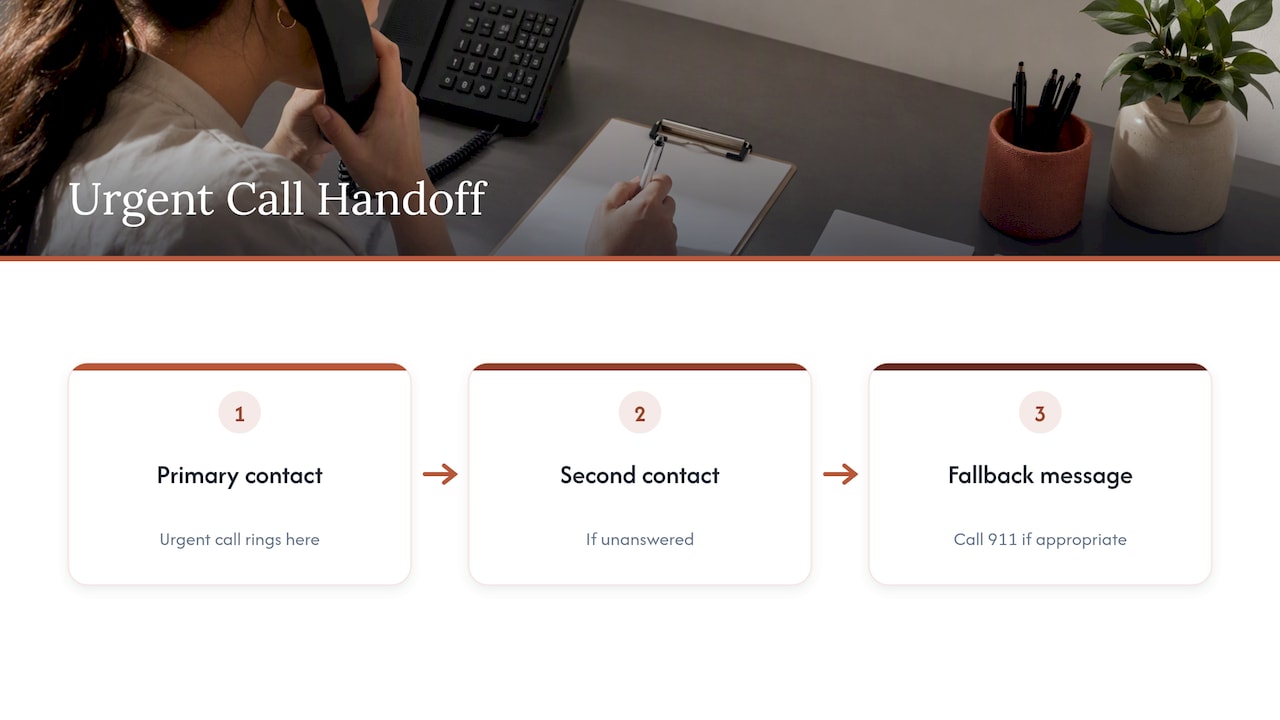
Decide who receives urgent transfers, what number they ring, and what happens if nobody answers. A transfer that rings out to voicemail is a failed triage. Add a second contact and a fallback message that tells the caller what to do, including calling 911 when appropriate.
Step 4: Require a summary
Every transferred call should arrive with a short written summary: who called, language, what they said, why it was flagged. The person picking up should not start from zero, and the caller should not repeat the story. Our write-up on urgent call routing for U.S. clinics with Spanish shows how to phase this in.
Step 5: Test with real scenarios
Run at least 20 test calls in each language before launch. Include accents, background noise, a caller who interrupts, a caller who switches between English and Spanish mid-sentence, and a caller who says something ambiguous. Fix what fails, then test again.
Step 6: Review transcripts weekly
For the first two months, read a sample of transcripts every week. Look for calls that were routed wrong, questions the system could not answer, and callers who hung up. Each one is a rule to improve.
Legal points to settle before launch
This is not legal advice. Talk to your attorney or compliance officer about your own situation. These are the points we see practices overlook.
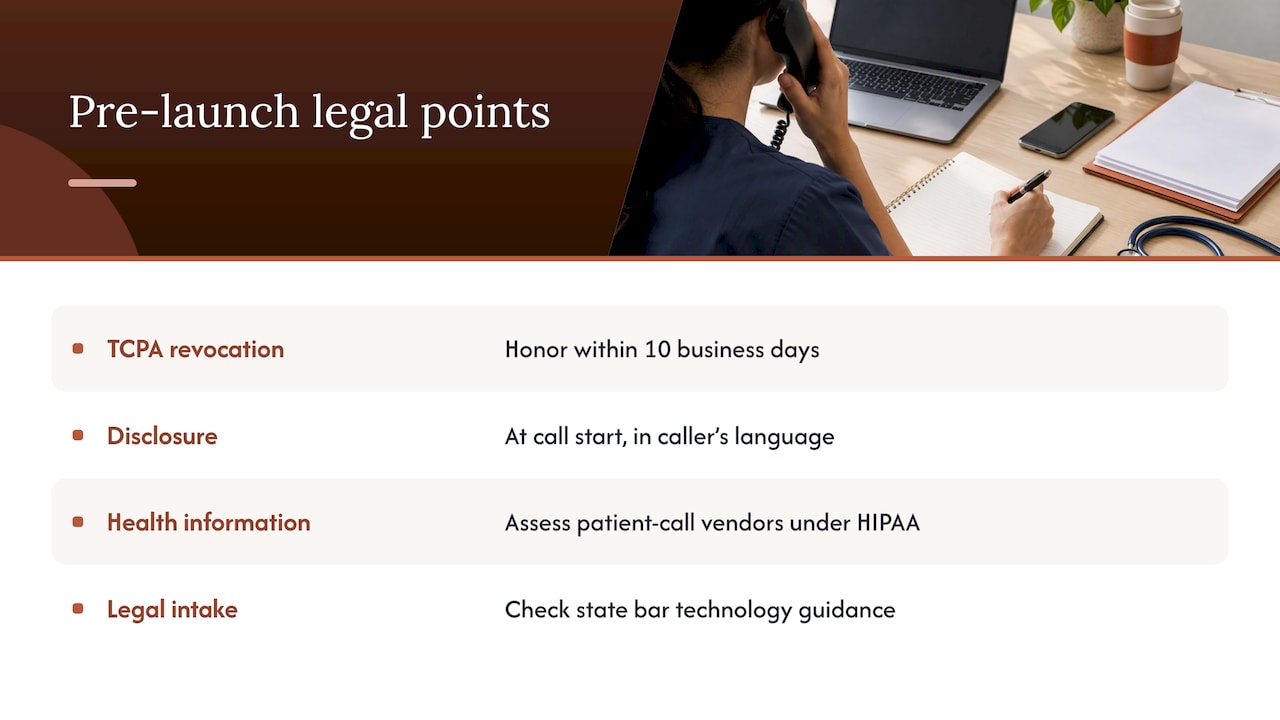
Consent and outreach. The Telephone Consumer Protection Act restricts marketing calls and texts. In 2024 the FCC ruled that calls made with AI-generated voices count as artificial under the TCPA. If your system calls or texts clients back, for reminders or follow-ups, consent matters. Consumer Action’s small business guide to the TCPA explains what you can and cannot do, and it notes that newer rules require businesses to honor consent revocations made in any reasonable manner, such as replying STOP, within 10 business days. Keep a record of consent and log each automated touchpoint.
Disclosure. Tell callers they are speaking with an automated assistant at the start of the call, in the language they are using. Honest disclosure also builds trust with clients who may already be wary of calling a professional’s office.
Health information. If you are a covered healthcare provider, any vendor handling calls that contain patient information needs to be assessed under HIPAA. Ask the vendor directly what they sign and what they store, and get it in writing.
Legal practices. Intake calls can contain privileged or sensitive facts. Check your state bar’s guidance on technology and client confidentiality before you configure what the system records.
Perspective: what we have learned about triage in Spanish
We built Diazluna around one observation: practices lose Spanish-speaking callers at the front door, long before anyone evaluates their care or their legal skill. A caller who reaches voicemail, or a menu in a language they do not use comfortably, rarely calls back. They call the next office.
So we do not think of triage as a cost-cutting trick. We think of it as the first minute of service. That first minute should happen in the caller’s language, sound natural, and end in a clear next step. When it cannot end in a clear next step, because the situation is urgent or complicated, the right move is a fast, warm transfer to a human with the facts already written down.
We also think owners should be able to edit their own front desk. Your hours change, your services change, your urgent criteria change. If every edit needs a technician, the system drifts out of date. That is why the website, the AI receptionist and WhatsApp work as one service, and why the owner can update them without technical skills.
Automation is a way to give every caller a fast first answer so your people spend their time on the calls that need them.
— Francisco
Keeping human follow-up timely
Automation changes the shape of your team’s day. Fewer interruptions, but more summaries to act on. The risk is that a flagged call sits in an inbox. Assign one person per shift to own the queue, set a response-time target (for example, return every non-urgent flagged call the same business day), and measure it. For a wider view of how AI lifts team output without removing the human step, see these measured productivity gains from AI.
WhatsApp deserves a mention here. Many Spanish-speaking clients prefer to message rather than call. Triage rules should apply to messages too: same categories, same escalation, same summaries. Our overview of types of bilingual support services compares the options.
How to choose a triage setup for a small practice
Use these criteria when you compare options, whether a human answering service, a generic AI phone tool or a bilingual platform:
- Spanish quality. Call it yourself in Spanish, with a regional accent if you can. Ask about a scenario with an ambiguous symptom or legal problem.
- Escalation. Can it transfer a live call with a summary? Can it text or message your on-call person?
- Coverage of channels. Phone only, or phone, web and WhatsApp?
- Editing. Can you change hours and rules yourself?
- Records. Do you get transcripts, logs and consent records?
- Total cost. Add up the website, receptionist and messaging you would otherwise buy separately.
Our comparison of AI customer service tools for small business applies these criteria in more detail. If you run a dental office, start with the AI receptionist guide for dental practices. Medical practices can read the guide for Spanish-speaking patients, and law firms can see how our service works for attorneys.
Where Diazluna fits
Diazluna is a bilingual digital front desk for practices serving Hispanic clients: a fully optimized Spanish and English website, a 24/7 AI receptionist that handles calls, messages and scheduling, and WhatsApp integration, with real-time summaries and transfer of urgent cases. Plans on our pricing page are:
| Plan | Monthly | Yearly |
|---|---|---|
| Solo Sitio (website) | $99 | $990 |
| Sitio + María (website plus AI receptionist) | $199 | $1,990 |
| Sitio + María Pro (managed, with site updates and expanded call capacity) | $349 | $3,490 |
There is a one-off activation fee of $399. If triage is your goal, the receptionist plans are the relevant ones. You can see the full details and start on the Diazluna site.
A 30-day rollout plan
Week 1. Audit calls. List call types, urgent triggers and the people who receive transfers. Get clinical or legal sign-off on the urgent list.
Week 2. Configure the greeting, disclosure, questions and routing in both languages. Load your hours, services and insurance or fee information.
Week 3. Test with staff and a few trusted Spanish-speaking clients. Fix wording that sounds stiff or confusing.
Week 4. Go live during business hours first, then after hours. Read every transcript for the first week, then sample.
Track three numbers from the start: calls answered, calls transferred, and calls that ended without a next step. The third number tells you where the system is failing.
FAQ
What is a call triage?
Call triage is sorting incoming calls by urgency and type so each one reaches the right person or process. In healthcare, it decides how quickly a caller needs care. In a business office, it decides whether a call can be handled automatically or needs staff.
What does automated triage mean?
It means software performs the sorting: it answers, asks questions, classifies the request and routes the call. Good systems resolve routine requests and pass urgent or complex ones to a person with a summary. The software should never replace professional judgment on clinical or legal matters.
Is there a free automated call service available?
Some basic voicemail and auto-attendant features come free with business phone plans. They usually cannot understand Spanish speech, classify urgency or book appointments. For a practice that serves Hispanic clients, the cost of missed calls usually outweighs the savings.
Can AI triage work for callers who only speak Spanish?
Yes, if it was built to understand and speak Spanish natively, not translate from English. Test it yourself with realistic Spanish calls, including urgent ones, before relying on it. Keep a route to a qualified interpreter for clinical conversations.
Sources
- HHS Language Access Plan
- National Estimates of Professional Interpreter Use in the Ambulatory Setting
- The quality, safety and governance of telephone triage and advice services
- NHS Pathways: how it works
- A Small Business’s Guide to the TCPA, Consumer Action
- FCC Makes AI-Generated Voices in Robocalls Illegal