October 19, 2026
Spanish Appointment Confirmation Text: Templates That Work
A good Spanish appointment confirmation text is short, names your practice, gives the date and time, and asks for a reply the patient can type without thinking. The simplest version is: “Clínica Sonrisa: su cita es el martes 21 a las 10:00 a. m. Confirmar: responda S. Cambiar: responda C.” Below you will find ready-to-use templates for dental, medical and legal offices, the wording choices that matter, and the US rules (TCPA, HIPAA, Section 1557) that decide what your text can and cannot say.
TL;DR
- Write the text in Spanish from the start, using reviewed templates, not machine translation. Localize the reply command too: “Confirmar: responda S”, not “Reply Y”.
- Keep it to the essentials: practice name, date, time, one action. Leave diagnoses, treatments and balances out of the message.
- Healthcare providers can send appointment confirmations to cell phones under a TCPA exemption, but only if the message is concise, free of marketing and honors opt-outs at once.
- Ask each patient which language they prefer instead of guessing from a surname, and record the answer so every message goes out in the right language.
- A text is one touchpoint. If the patient calls back or messages on WhatsApp and no one answers in Spanish, the confirmation did its job for nothing.
Table of Contents
- What a Spanish confirmation text has to do
- Copy-ready templates
- Wording choices that make Spanish texts land
- Timing and cadence
- The rules behind the text
- What happens after the patient replies
- Our perspective
- Where Diazluna fits
- Mistakes to avoid
- FAQ
- Sources
What a Spanish confirmation text has to do
The text has three jobs. It tells the patient who is writing, it states when and where the appointment is, and it makes the next step obvious. Everything else is a risk: more words mean more chances for a split message, a privacy slip or a confusing reply.
A workable skeleton, in order:
- Who: the practice name, so the message is not mistaken for spam.
- What and when: “su cita”, date, day of the week, time.
- Action: one reply to confirm, one to reschedule.
- Opt-out: a short line such as “Responda STOP para no recibir mensajes”.
The 1-800 Notify bilingual reminder scripts follow the same logic: standard, professionally reviewed Spanish, kept brief, with the reply command localized so a Spanish speaker finds it natural (for example, S for sí).
Copy-ready templates
Adapt names, dates and phone numbers. Each one is written in neutral Spanish that reads naturally across Mexican, Central American, Caribbean and South American communities, and uses usted, which is the safe register for a first contact with a patient or client.
Dental office
Confirmation request (48 hours before)
Clínica Dental Sonrisa: su cita es el martes 21 de octubre a las 10:00 a. m. Confirmar: responda S. Cambiar: responda C. STOP para cancelar mensajes.
Same-day reminder
Clínica Dental Sonrisa: le esperamos hoy a las 10:00 a. m. Dirección: 123 Main St. ¿Necesita ayuda? Llame al (555) 555-0100.
Missed-appointment follow-up
Clínica Dental Sonrisa: lo extrañamos hoy. Responda REPROGRAMAR o llame al (555) 555-0100 para elegir otro horario.
Medical practice
Confirmation request
Centro Médico Esperanza: recordatorio de su cita el jueves 23 de octubre a las 2:30 p. m. Confirmar: responda S. Cambiar: responda C.
Pre-visit instruction (non-sensitive)
Centro Médico Esperanza: para su cita de mañana, traiga su identificación y su tarjeta del seguro. Llegue 15 minutos antes.
Notice what is missing: no mention of the reason for the visit, the specialist’s field, or a lab. More on that in the privacy section.
Law office
Consultation confirmation
Bufete Ramírez: su consulta es el lunes 27 de octubre a las 11:00 a. m. Confirmar: responda S. Para cambiarla, llame al (555) 555-0100.
Document reminder
Bufete Ramírez: para su consulta, traiga los documentos que le indicamos. Si tiene dudas, llámenos al (555) 555-0100.
Law firms are not covered by the healthcare exemption, so keep your consent practices in order and ask a licensed attorney about your state’s rules before you automate messages to clients.
Short English-plus-Spanish version
If you do not yet know a patient’s preferred language, a two-line text can bridge the gap, but only for a short time:
Clínica Sonrisa: Your appointment is Tue 10/21, 10:00 AM. / Su cita es el mar. 21/10, 10:00 a. m. Reply S/Y to confirm.
The date format is where bilingual texts go wrong. Americans write month first (10/21), most Spanish-speaking countries write day first (21/10). The safest fix is to spell the month out in the Spanish line: “martes 21 de octubre”.
Wording choices that make Spanish texts land
Localize the command, not just the sentence
A reply code in English inside a Spanish sentence creates friction. The 1-800 Notify scripts localize “Confirm: Reply Y” as “Confirmar: Responda S”, and the same goes for your other keywords. Decide on the set once (S to confirm, C to change) and use it everywhere. If your platform only recognizes English keywords, check that before you send; a patient who replies “Sí” and gets silence will assume the appointment is not set.
Use usted, plain verbs and a real practice name
Usted signals respect, which matters in medical and legal settings. Use common verbs (“confirmar”, “cambiar”, “llamar”) rather than literal translations of English phrases. “Cita” is the right word for an appointment with a professional; appointment translated word for word as “apuntamiento” is a classic error.
Do not translate by machine and hope
Automated translation can mistranslate clinical terms and miss cultural nuance, which is why reviewed standard templates are the better path. Our own Spanish readability checklist for clinics walks through how to review patient-facing Spanish before it goes live, and the same review applies to a 160-character text.
Do not guess the language
It is a common mistake to assume a patient’s language from their surname or appearance. The recommended practice, per the Family Voices provider info sheet, is to ask every new patient the same neutral question about the language in which they prefer to communicate about their care. Put the question on your intake form and in your scheduling script, then store the answer in the patient record. Your texting system should read that field, not a hunch.
Timing and cadence
There is no federal rule that sets the ideal send time, so treat these as working defaults to test in your own practice:
| Message | Typical timing | Purpose |
|---|---|---|
| Booking confirmation | Right after scheduling | Patient has the details in writing |
| Confirmation request | 2 days before | Time to reschedule and refill the slot |
| Same-day reminder | Morning of the visit | Reduces last-minute no-shows |
| Missed-visit follow-up | Same day, after the slot | Keeps the patient in your care |
Remember the cap in the healthcare exemption: no more than three messages per week to a patient, as summarized by Mintz. A booking confirmation, a two-day request and a same-day reminder fit inside that limit, but add a follow-up in the same week and you are at the ceiling.
The rules behind the text
This section covers US healthcare practices. It is general information, not legal advice. For your specific setup, talk to a healthcare attorney or your compliance officer.
TCPA: the healthcare message exemption
The Telephone Consumer Protection Act normally requires prior express consent for automated texts to cell phones. The FCC carved out an exemption for certain healthcare messages, and appointment and exam confirmations and reminders are on the exempt list. The conditions are tight: messages must be concise, generally under one minute for calls or 160 characters for texts, contain no marketing, advertising or billing content, honor opt-out requests immediately, and stay within three per week.
The HIPAA Journal’s summary of the FCC order adds that a patient who gives a covered entity a phone number has provided consent for such calls and texts. Because the legal reading of these rules has been moving, check current guidance with counsel rather than relying on a 2015 article alone. Foley’s overview of texting and the TCPA is a useful second read on the exception.
In practice, this means:
- Do not tack on a promotion. “Also, 20% off whitening” turns a confirmation into marketing and can void the exemption.
- Do not include billing language in the same message.
- Include an opt-out line and honor it right away, in either language. Recognize “STOP” and common Spanish equivalents such as “BAJA” or “CANCELAR” if your platform supports them.
HIPAA: say less in the message
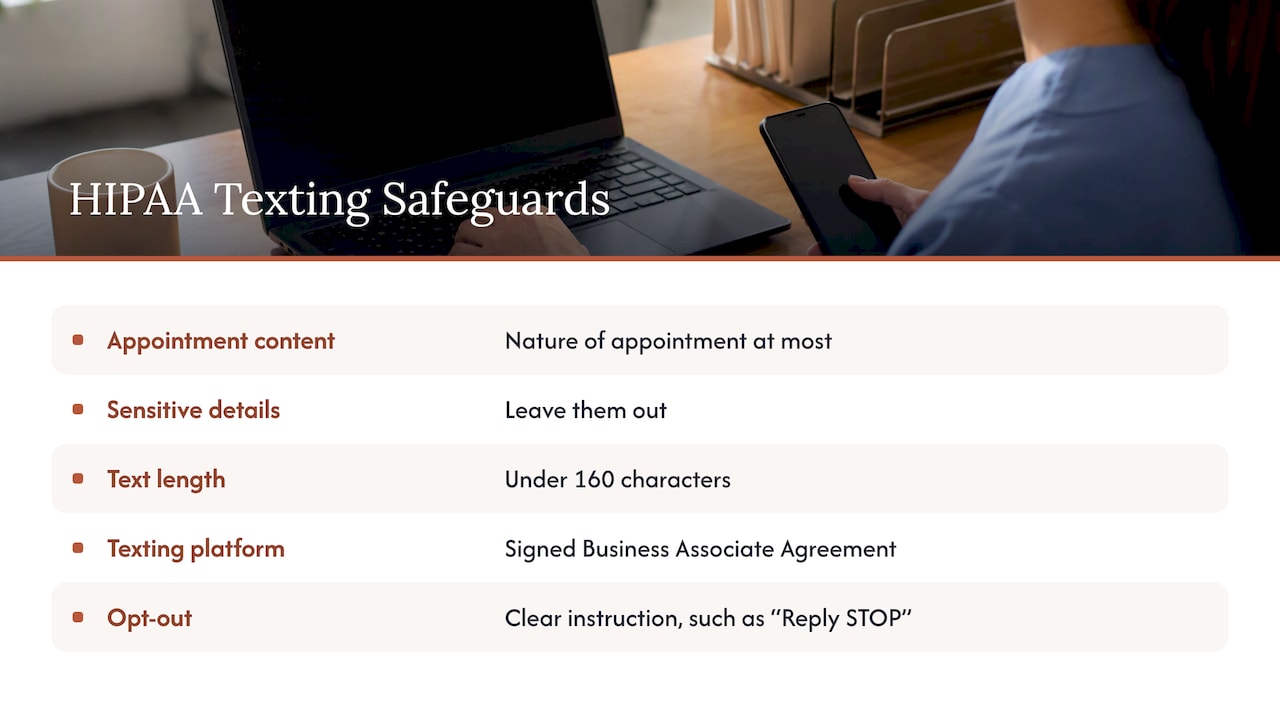
The American Dental Association notes that the TCPA exemption does not override HIPAA. Keep texts to the nature of the appointment at most, leave out sensitive details, and make sure any third-party texting platform you use has a signed Business Associate Agreement. Its guidance also recommends keeping messages under 160 characters so they do not split into pieces that could be partially seen by someone else, and including a clear opt-out such as “Reply STOP”.
A useful test: if a family member glanced at the lock screen, would the text reveal anything the patient has not chosen to share? “Su cita es el martes a las 10” passes. “Su cita de seguimiento por diabetes” does not. If you want a deeper walk through the BAA question for scheduling tools, see our piece on what to settle before going live with bilingual online scheduling.
Section 1557: language access is part of the job
If your practice receives federal funds such as Medicare or Medicaid, Section 1557 of the Affordable Care Act requires meaningful access for people with limited English proficiency, which can include free interpretation and written translation. The ADA’s Section 1557 page explains how this applies to dental practices. A Spanish confirmation text is a small but visible piece of that obligation, because it is often the first written thing a patient receives from you.
The CMS guide to developing a language access plan lists the points of contact where patients need language services, from the call center to the front desk to paperwork. Map your own: booking, confirmation, check-in, forms, billing, follow-up. Then ask where Spanish stops. We cover the deadline side in our Section 1557 language access post.
What happens after the patient replies
Most patients will answer “S”. A meaningful share will not. They will call, send a WhatsApp message or write back with a question: “¿Puedo cambiarla para el miércoles?” or “¿Tengo que pagar algo ese día?” That is where a confirmation system succeeds or fails.
Three things to prepare:
- A Spanish-speaking answer path. If a patient replies in Spanish and the response comes back in English, you have lost the benefit of writing in Spanish. Our guide to Spanish phone calls and staff training covers what front-desk teams can do.
- A rescheduling route that does not need a phone call. Offer a link or a reply keyword. See practical bilingual scheduling for dental, legal and medical offices.
- A consistent greeting. When the patient calls the number in your text, the first words should match the tone of the message. We collected copy-ready Spanish greetings for that.
Being reachable also starts before the text. If a Spanish-speaking patient searches online and finds only an English page, the first contact may never happen. Making your practice findable online through healthcare-focused SEO is one way to support access and continuity of care, and a Spanish version of your site helps the same patient understand what to expect once the appointment is booked.
Our perspective
We build bilingual front desks for dentists, lawyers and medical practices, and the same pattern shows up again and again. The confirmation text is rarely the problem. Practices will often have a decent Spanish template. The problem is everything around it: the English-only website the patient checked before booking, the voicemail that nobody returns in Spanish, the reply that lands in an inbox no one reads.
So we do not think of the text as a standalone task. It is one touchpoint in a chain, and the patient judges the chain by its weakest link. That is why our platform combines a bilingual website, a 24/7 receptionist that speaks Spanish and English, and WhatsApp in one service. The Spanish is human-reviewed rather than machine-translated, because the patient notices when it sounds like a translation.
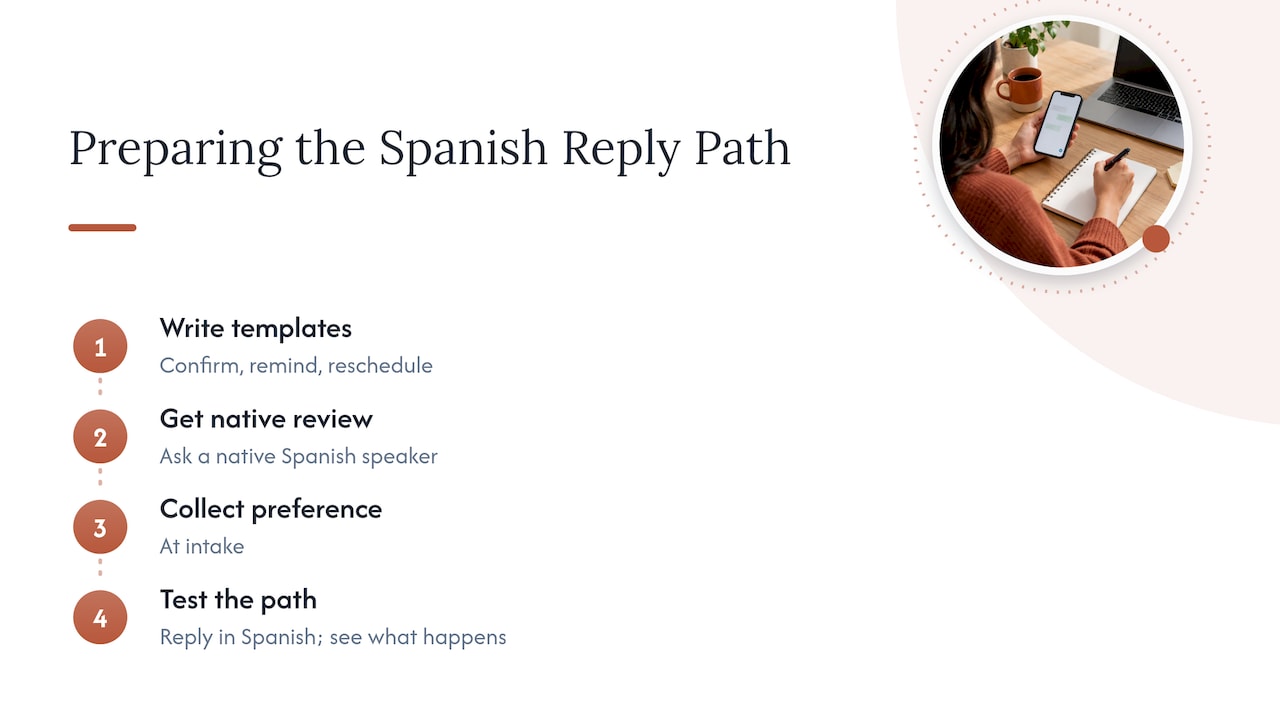
Our advice if you are starting from zero: write three templates (confirm, remind, reschedule), have a native Spanish speaker review them, collect the language preference at intake, and test the whole path yourself by replying in Spanish and seeing what happens.
— Francisco
Where Diazluna fits
If you would rather not stitch this together from separate tools, Diazluna gives you the pieces in one subscription. Plans are published on our site:
- Solo Sitio: $99 per month or $990 per year. A bilingual, optimized website in Spanish and English.
- Sitio + María: $199 per month or $1990 per year. The website plus María, our bilingual AI receptionist for calls, messages and scheduling.
- Sitio + María Pro: $349 per month or $3490 per year. A full-service managed package with site updates and expanded call capacity.
- Activación: $399 one-off.
If your problem is that Spanish-speaking patients reply, call or message and nobody answers well, Sitio + María is the plan built for that.
Mistakes to avoid
- Pasting English into a translator. Reviewed templates beat on-the-fly translation, especially for health terms.
- Mixing a promotion into the confirmation. It risks the exemption and annoys patients.
- Putting the reason for the visit in the text. Keep it to date, time and place.
- Ignoring a Spanish reply. If the patient answers in Spanish, answer in Spanish.
- Assuming language from a surname. Ask, record, and use the field.
- Sending in English by default to everyone. The CLAS standards ask organizations to provide language assistance through trained, qualified people, and not to rely on minors or untrained staff, as laid out in the National CLAS Standards.
FAQ
How do you politely confirm an appointment in Spanish?
Use usted and a direct, courteous line, such as “Le escribimos para confirmar su cita del martes 21 a las 10:00 a. m. ¿Puede confirmar respondiendo S?” Name your practice at the start and give a way to change the appointment. Short and polite works better than long and formal.
Can I send a text message in Spanish to my patients?
Yes. Nothing in the TCPA healthcare exemption limits the language of the message. The same conditions apply as in English: concise, no marketing, honored opt-outs, and no more than three messages per week. Keep HIPAA in mind and avoid sensitive details.
Should the text be bilingual or only in Spanish?
Send in the patient’s preferred language, which you should ask for and record at intake. A bilingual text is a stopgap for patients whose preference you do not yet know. For patients who prefer Spanish, a Spanish-only message is cleaner and stays within the 160-character guideline more easily.
What reply keyword should I use for confirmation?
S, for sí, is the standard localization of “Reply Y”, as in the 1-800 Notify scripts. Also accept “Sí” and “SI” in your system, since many patients will type the full word. Confirm that your platform handles accented characters.
Sources
- FCC Ruling Addresses Robocalls by Health Care Providers, Mintz
- Follow the Rules When Phoning Patients, American Dental Association
- FCC Confirms Rules Regarding HIPAA and Patient Telephone Calls, HIPAA Journal
- Telemedicine and Texting: Telephone Consumer Protection Act, Foley
- Appointment Reminder Scripts, Bilingual English-Spanish, 1-800 Notify
- Provider Language Access Info Sheets, Family Voices
- Section 1557 and Limited English Proficiency, HHS.gov
- Section 1557 Individuals with LEP, American Dental Association
- Guide to Developing a Language Access Plan, CMS
- Enhanced National CLAS Standards, HHS