October 21, 2026
Spanish Meta Descriptions: How to Write Ones That Get Clicks

A Spanish meta description is the one- or two-sentence summary that sits under your page title in Google results, written in natural Spanish for the person searching in Spanish. Write it as its own piece of copy for each Spanish page, not as a translation of the English one. Pair it with a separate Spanish URL and hreflang tags so Google can find and serve the right version. This guide shows how, with examples for dental, legal and medical practices in the U.S.
TL;DR
- Write each Spanish meta description from scratch, as a short pitch for that page. Don’t run the English one through a translator.
- Google uses meta descriptions as a snippet, not as a ranking signal. Their job is to earn the click, and Google may rewrite them.
- Forget fixed character counts. Lead with the useful part, because truncation depends on device width.
- Give every Spanish page its own URL and connect it to the English page with hreflang, or the description may never be shown to the right audience.
- Include what a worried patient or client needs to know: the service, the city, and that someone answers in Spanish.
Table of Contents
- What a Spanish meta description does (and what it doesn’t)
- Why translating your English description fails
- How long should it be?
- A formula for practices
- Examples by profession
- Don’t forget the title tag
- Make sure Google can show the Spanish version
- A simple workflow for a small practice
- Our perspective
- Where Diazluna fits
- Frequently asked questions
- Sources
What a Spanish meta description does (and what it doesn’t)
The meta description is an HTML tag in the head of a page. Its text can appear under your blue title link in search results. Google’s documentation says snippets are generated mostly from the content on the page itself, and that your meta tag is one input it may use when it describes the page better than the on-page text does.
Two misconceptions cause most of the wasted effort here.
It is not a ranking lever. Google describes the tag as a way to offer a summary to users. Its value is indirect: a clearer, more persuasive snippet gets more people to click, and more of the right people.
You don’t control the final text. Snippets are built to match the query, so the same page can show different descriptions to different searchers. A person typing “dentista que habla español cerca de mí” may see a different line from the person typing “emergencia dental”, even for the same page. Treat your description as your best offer, not a guarantee.
If you want a broader look at what happens when snippets are generated at scale, this rollout guide to automatic meta descriptions explains how Google may substitute its own text. That is a good reason to make sure the visible page copy supports your description.
For a practice, the stakes are practical. Pew Research found that about 75% of U.S. Latinos can carry on a conversation in Spanish pretty well, and 85% say it is at least somewhat important for future generations to speak Spanish. People searching in Spanish are a large, real audience, and the snippet is often the first thing of yours they read.
Why translating your English description fails
A word-for-word translation usually produces Spanish that is correct but cold. In medicine and law, tone is part of trust. A searcher comparing three results will pick the one that sounds like it was written by someone who actually speaks the language with patients and clients.
Common problems with translated descriptions:
- Wrong register. English marketing copy often sounds brisk and promotional. Spanish for a legal or health decision usually sounds more courteous. Use usted forms or neutral phrasing, and avoid slangy shortcuts.
- Wrong vocabulary. Searchers may type abogado de inmigración, consulta gratis or dentista de emergencia. Your description should echo the words people actually use, not a literal rendering of your English phrasing.
- Length surprises. Spanish often runs longer than English for the same idea. A translated line can lose its call to action after truncation.
- Missing local anchors. “Serving the greater Phoenix area” becomes weak if the Spanish reads like a brochure. Name the city, the neighborhood, or the language promise.
The approach we recommend is to write the idea in Spanish first, as someone speaking to a neighbor would say it, then check it against the keyword your Spanish page targets. Our guide on Spanish SEO for lawyers calls this “transcreating”: rebuilding the message for the new audience instead of converting it.
How long should it be?
People love to ask for an exact number. Google’s own guidance says there is no technical length limit; descriptions are shortened to fit the width of the device. Width is measured in pixels, not characters, so a line heavy in wide letters gets cut earlier than one with narrow letters.
A practical rule that works without a counter:
- Put the reason to click in the first 100 characters or so.
- Keep the total to one or two short sentences.
- End with an action only if there is room. If it gets cut, you have lost nothing important.
Don’t stuff the line with keywords. Repeating “dentista en español, dentista bilingüe, dentista latino” reads as spam to people and adds nothing for Google.
A formula for practices
A description that works for a professional practice usually answers four questions in a few words:
| Element | What it tells the reader | Example fragment |
|---|---|---|
| Service | What you do | ”Limpiezas y coronas” |
| Place | Where you do it | ”en Houston” |
| Language promise | They will be understood | ”atención en español” |
| Next step | What happens if they click | ”Pida su cita hoy” |
Then add one specific that sets the page apart: same-day appointments, payment options, a free first consultation, or evening hours. Only state what is true for your practice. If you don’t offer free consultations, don’t promise them.
Examples by profession
These are templates. Swap in your own city, services and facts before using them.
Dental
Page: Spanish page for emergency dental care
Dolor de muelas o un diente roto? Atendemos emergencias dentales en Houston, con personal que habla español. Llame o escriba por WhatsApp.
Why it works: it opens on the pain the searcher feels, names the city, promises Spanish, and gives two ways to reach you. Note the Spanish question mark: use both the opening and closing marks in your real copy (¿ and ?).
For a fuller plan to build those Spanish pages in the first place, see Spanish dental SEO: publish three Spanish pages and fix the basics.
Legal
Page: Spanish page for a car accident practice
¿Tuvo un accidente de carro? Hable con un abogado en Miami y reciba orientación en español sobre sus opciones. Consulte con nosotros hoy.
Why it works: it uses the everyday word carro, which many U.S. Spanish speakers use, and it avoids promising an outcome. Legal marketing rules vary by state, so check your bar’s advertising rules before you promise results, fees or “free” anything.
More on the full page, not just the snippet: how a law firm Spanish website converts and our notes on a bilingual law firm website.
Medical
Page: Spanish page for primary care
Médico de familia en Dallas con atención en español. Chequeos, vacunas y control de la diabetes para toda la familia. Pida su cita.
Why it works: it lists the services people look for in plain words and says who it’s for. Avoid claims about outcomes or cures, and don’t imply a diagnosis from a search snippet.
To pick the words behind these lines, start from what your community searches. Our piece on Spanish keyword research for U.S. clinics walks through it, and Spanish clinic website content covers the page copy that should sit behind the snippet.
Don’t forget the title tag
The title is what people read first, and Google leans on it heavily for the link text. A good description under a weak title still loses. Keep the title short, put the service and city near the front, and let the description add detail instead of repeating it.
Example pair:
- Title: Dentista en Houston con atención en español
- Description: Limpiezas, ortodoncia y emergencias. Agende por teléfono o WhatsApp y le contestamos en español.
The two lines don’t repeat each other. The title says who and where; the description says what and how to start.
Make sure Google can show the Spanish version
A great Spanish description does nothing if Google doesn’t index the Spanish page or shows it to the wrong audience. Google’s guidance on localized versions of pages is clear on the setup:
- Use a separate URL for each language. For example,
/es/for Spanish. Don’t rely on browser-based or IP-based switching on a single address. - Add hreflang annotations linking each page to its other-language version, and make them reciprocal: each page points to itself and to every variant. Without that, Google may ignore them.
- Use valid codes.
esfor Spanish works, andes-USif you want to specify the region. Google doesn’t support unofficial codes such ases-419.
The automatic-redirect trap is worth a second look. Google says that crawlers often arrive from the U.S. without a language preference, so a site that auto-redirects by locale can hide its Spanish pages from search. The fix is a distinct Spanish URL, plus a visible language switcher.
We lay out the exact tags in hreflang setup for English and Spanish.
A simple workflow for a small practice
You don’t need a content team. This takes an afternoon for a five-page site.
- List your Spanish pages. Home, each main service, contact, and any urgent-care or consultation page.
- Write one query per page. Phrase it as a patient would say it, in Spanish. Check it by typing it into Google yourself.
- Draft the description in Spanish. Service, place, language promise, next step. One or two sentences.
- Have a native speaker review it. Ideally someone who speaks with your patients or clients, not just a bilingual staff member who has never written marketing copy.
- Publish and wait. Give Google some time to recrawl, then look in Search Console for impressions and click-through rate on the Spanish pages.
- Revise the weak ones. If a page gets plenty of impressions but few clicks, rewrite the title and description, not the page.
Also check that the page’s visible copy backs up the promise. If your description says “atención en español” but the page is half English, the searcher bounces, and Google may pick text from the page over your tag.
Our perspective
We build bilingual digital front desks for dentists, lawyers and clinics, and the same mistake shows up again and again: practices treat the Spanish site as a copy of the English one, then wonder why the phones stay quiet. The snippet is the first handshake. If it sounds machine-made, the person never gets to the page.
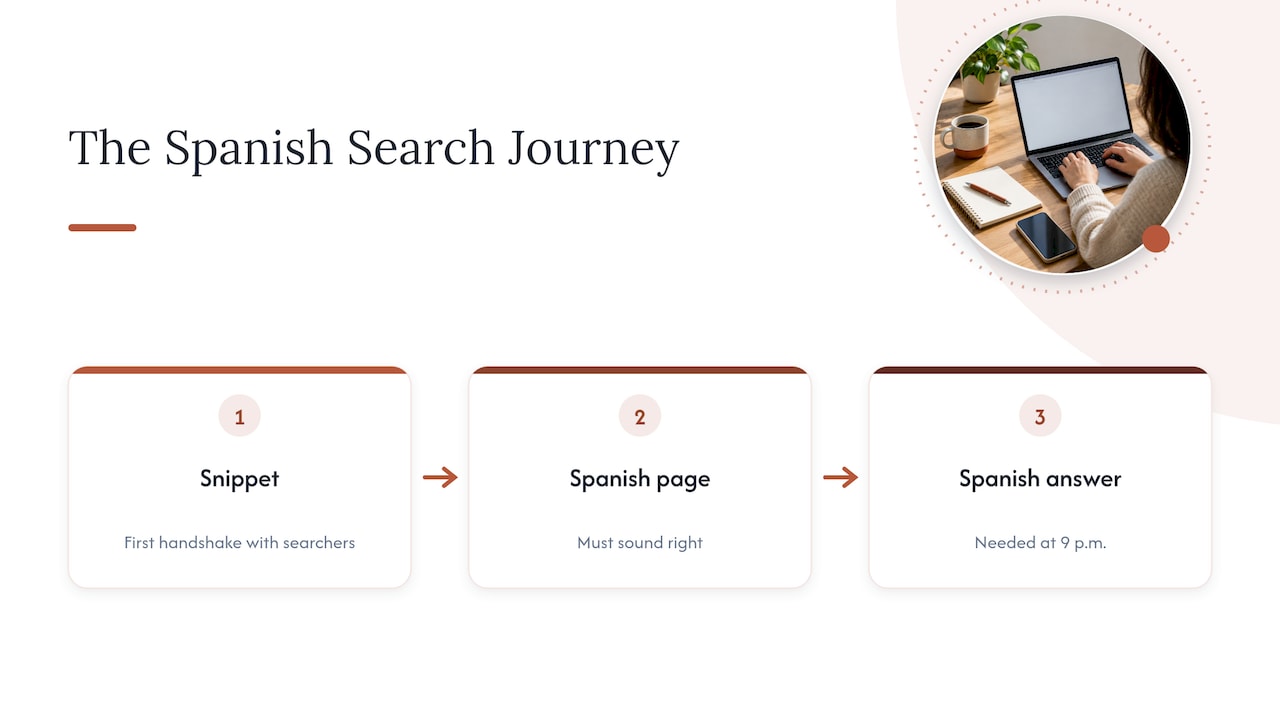
What we have learned is that the description is only one link in a chain. The searcher clicks, reads a page that sounds right, then needs someone to answer in Spanish at 9 p.m. when the pain starts or the accident just happened. A perfect snippet that leads to a voicemail in English is a leak, not a funnel. That is why we put the website, a 24/7 AI receptionist and WhatsApp in one package, with Spanish content that is reviewed by people instead of simply translated, and why we think the snippet should be written with the whole journey in mind.
If you do only one thing after reading this, rewrite the descriptions on your three most important Spanish pages, in your patients’ words.
— Francisco
Where Diazluna fits
If your Spanish pages don’t exist yet, or exist but aren’t set up right, we can handle the site, the receptionist and WhatsApp together. Plans are published on our site:
| Plan | Price |
|---|---|
| Solo Sitio | $99 per month, or $990 per year |
| Sitio + María | $199 per month, or $1990 per year |
| Sitio + María Pro | $349 per month, or $3490 per year |
There is a one-off activation fee of $399. See the Diazluna plans for what each tier includes, or read about our bilingual digital marketing strategies for practices first.
Frequently asked questions
Do Spanish meta descriptions still matter?
Yes, but for clicks rather than rankings. Google says the description is a summary offered to searchers, and a clearer one can raise the share of people who choose your result. Since Spanish searchers compare results quickly, the wording counts.
Should the meta description be in Spanish if the page is in Spanish?
Always. The title, description and page copy should all be in the same language, matching the language of your URL and hreflang tag. Mixing English in the snippet confuses searchers and weakens the signal to Google.
How many characters should a Spanish meta description have?
There is no fixed limit. Google cuts snippets to fit the device width, so put the most useful words first and keep it to one or two sentences. Spanish tends to run longer than English, so check how it looks in a real search result.
Why does Google show a different description than the one I wrote?
Google builds snippets to match the query, and may use text from the page when it fits the search better. This is normal. Improve your page copy and keep the tag accurate and specific, and your text will be used more often.
Can I use the same description for English and Spanish pages?
No. Each page needs its own text in its own language. Identical or duplicated descriptions across pages also waste the chance to speak to each searcher directly.
Sources
- Google Search Central: control your snippets in search results
- Google Search Central: localized versions of your pages
- Pew Research Center: Latinos and Spanish, views and experience